HAMWORTHY HEATING LTD
28
FLEET V series
500001213/G
7494z34/0902
7494z26/1202
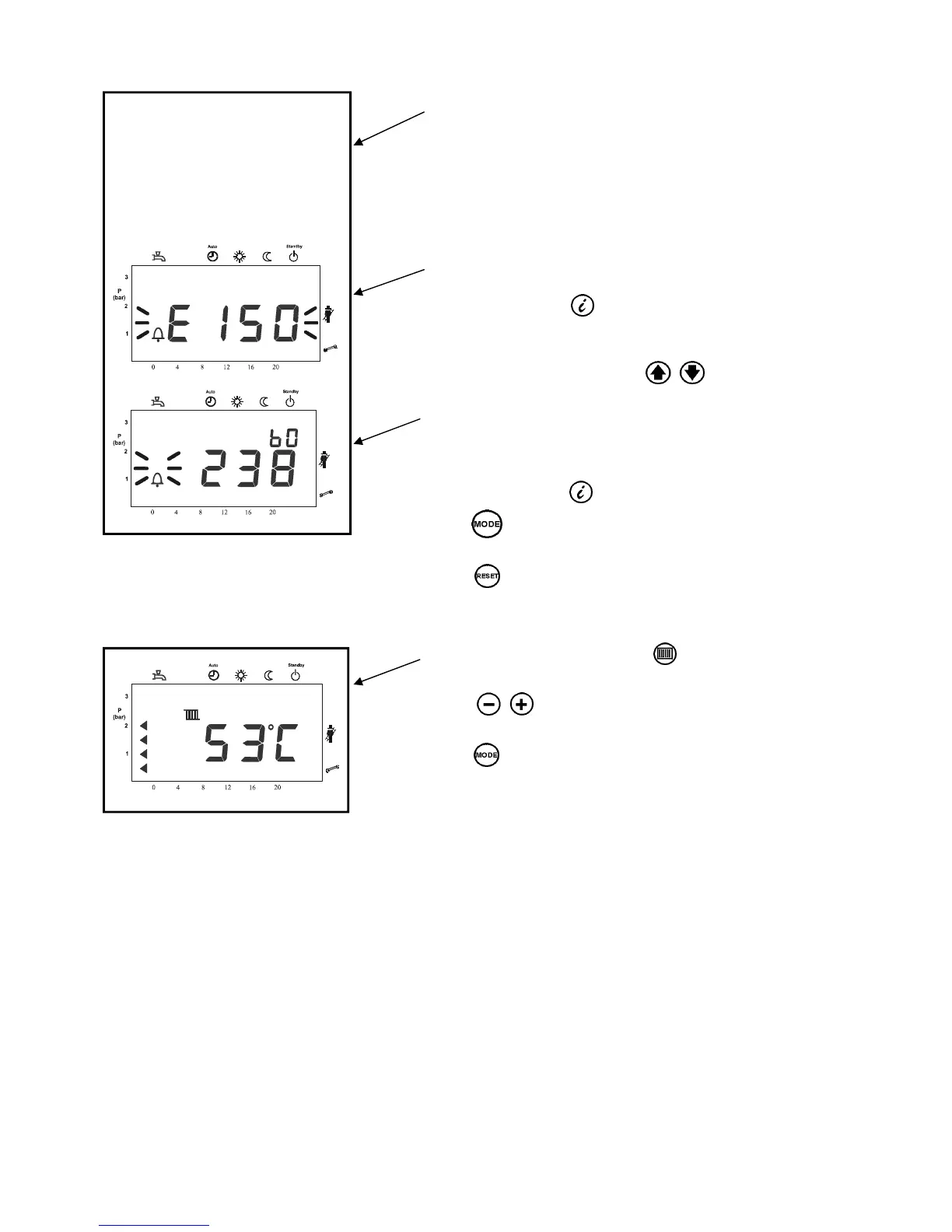
In the case of a lockout code, the error code display flashes
together with an ‘Alarm symbol’;
The LMU will go to lockout
Example: “E150”
Press the Info button to switch to the error code
Press both line selection buttons simultaneously
for 3 seconds. The internal error code will be displayed
Example “238”
Press the Info button to switch to the Info display
Press to return to the default display
Note:
After rectification of the fault, press the reset
button (>0.6 seconds) to reset the LMU.
Figure 8.2.4 - Display of lockout code
304
7494z35/0202
8.2.5 - Adjusting the heating circuit setpoint temperature
Press the flow temperature button to adjust the heating
circuit setpoint
Press to adjust the required setpoint
Press to return to the default value
Changes will be stored.
Figure 8.2.5 - Heating circuit setpoint temperature
The room temperature setpoint or boiler temperature setpoint will be changed depending on the plant’s
configuration ( with or without outside sensor).
If no button is pressed for about 8 minutes, the screen will automatically return to the default display. Changes
will be stored.
(1)
(2)
(1)
8.2.4 - Lockout Display
8.2.6 - Parameter settings for the Enduser
The boiler is supplied with default settings. These must be modified to suit individual Enduser needs.



 To Next Page