11
WIRING
WARNING:Toreducetheriskofre,electricalshockorpersonalinjury,wireconnectors
provided with this fan are designed to accept only one 12-gauge house wire and two lead wires from
the fan. If your house wire is larger than 12-gauge and there is more than one house wire to connect
to the two fan lead wires, consult an electrician for the proper size wire connectors to use.
CAUTION: Be sure the outlet box is properly grounded or that a ground (green or bare) wire is present.
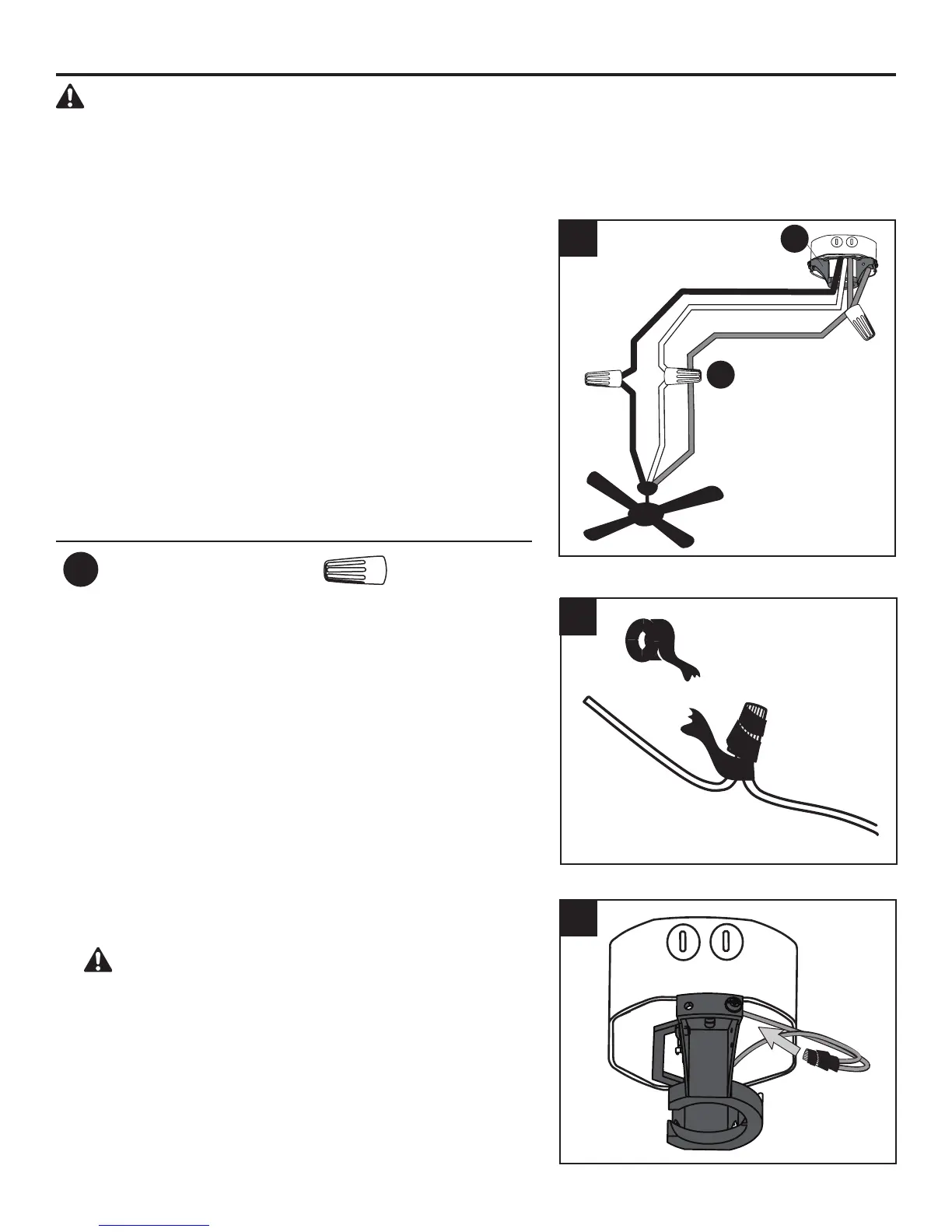
1. Secure all wiring connections with wire connectors (AA)
according to the diagram and these steps:
•ConnecttheBare/Green(ground)supplytoGreenwires
from the fan and the mounting bracket.
•ConnecttheBlack(hot)supplywiretotheBlackfanwire.
•ConnecttheWhite(neutral)supplywiretotheWhitefan
wire.
Note: The Black wire is hot power for the fan. The
White wire is common for the fan and light kit. The Blue
wire is hot power for light. The Green wire is the ground
wire.Ifhouseholdsupplywiresaredierentcolorsthan
referred to above, it is recommended a professional
electrician determines the proper wiring.
Hardware Used
AA
Wire Connector x 3
Black (Hot)
White (Neutral)
Bare/Green (Ground)
Black
White
Green
2. Wrap electrical tape (not included) around each
individual wire connector (AA) down to the wire.
3. Turn the spliced/taped wires upward and gently push the
wires and wire connectors into the outlet box.
WARNING: Ensure no bare wire or wire strands
are visible after making connections. Place the Green
and White wire connections on the opposite side of the
outlet box from the Black wire connections.
1
3
AA
D
2



 To Next Page