The REFPRV415 is a forward-thinking marine, side-by-side, golf car, and hot tub stereo system from Infinity by Harman, distributed exclusively by Prospec Electronics. This unit is designed to provide high-quality audio in outdoor environments and is built to withstand various conditions.
Function Description:
The REFPRV415 serves as a comprehensive audio receiver, offering multiple source options and control features. It allows users to listen to AM/FM/WB/RBDS radio, stream audio via Bluetooth, play music from USB devices (including iPod/iPhone compatibility), and connect auxiliary input devices. The system also integrates with SiriusXM® satellite radio (requiring a separate connect tuner and subscription). Advanced control features include RGB speaker control and Can Bus control via NMEA2000, making it suitable for integrated marine and vehicle systems.
Important Technical Specifications:
- Screen: 3.5" color TFT screen, waterproof faceplate.
- Amplifier: 50W x 4 amplifier, providing robust sound output.
- Audio Outputs: 4 pairs of RCA outputs, including a dedicated subwoofer output, allowing for expansion with external amplifiers and subwoofers.
- Inputs:
- USB input for media playback and charging.
- Auxiliary input for external audio devices.
- Video input.
- SiriusXM® Connect Tuner input.
- Control:
- Wired remote option.
- Can Bus Control via NMEA2000.
- RGB Speaker Control (requires MIL-LEDPWR).
- Tuning: Supports U.S., European, and Japan tuning regions for radio.
- Power: Charging through USB.
- Bluetooth: Bluetooth Audio Streaming with ID tagging.
Usage Features:
- Power and Source Selection: The SRC button powers the unit on/off and switches between AM/FM/WB/Bluetooth/USB/SXM/AUX modes.
- Menu and Settings: The MENU button provides access to sub-menus for the current source and, when held, enters the main Settings menu.
- Volume and Navigation: A multi-function VOL knob controls volume, navigates menus, selects features/tracks, and confirms selections.
- Tuning and Track Control: TUNE Up/Down buttons select previous/next radio stations or tracks. Holding these buttons enables fast forward/rewind in USB mode or rapid tuning/browsing in SiriusXM.
- Playback Control: A PAUSE/MUTE button controls playback (pause/resume) in USB/BT Music modes and mutes/unmutes sound in Radio, SiriusXM, and AUX modes.
- Preset and File Lists: The P.LIST button displays Global Preset Lists for radio and SiriusXM, and Folder/File Lists for USB sources.
- Rear Camera Display: A VIEW button activates and exits the rear camera display.
- Home Menu: The Home Menu allows users to select desired audio sources (AM, FM, WB, Bluetooth, USB, SiriusXM, AUX) and access the SETUP menu.
- Audio Settings: Users can adjust BASS, MIDDLE, TREBLE, BALANCE, PRESET EQ (OFF, JAZZ, POP, CLASSIC, ROCK, VOCAL), and LOUDNESS.
- System Settings: Customizable settings include BRIGHTNESS (0-7), I-VOL (initial volume), BEEP sound (OFF, ON, 2s), and REGION (EURO, USA, JAPAN).
- RGB Color Settings: When MIL-LEDPWR is connected, users can adjust RGB colors (WHITE, YELLOW, ORANGE, RED, GREEN, BLUE, PURPLE, RANDOM, USER).
- Bluetooth Settings: Features include Auto Connection (ON/OFF) and displaying the Device Name ("PRV415").
- Radio Operation:
- Auto Tuning: Automatically stops at the next station with sufficient signal strength.
- Manual Tuning: Incremental tuning by holding TUNE buttons.
- Station Save: Save favorite stations to a Global Preset List.
- Recall Preset Station: Select saved stations from the Global Preset List.
- RDS Functions: Displays station information like station name and song title (if supported by the station).
- SiriusXM Operation:
- Activation: Requires a SiriusXM Connect Tuner and subscription; activation involves tuning to Channel 0 for the Radio ID.
- Channel Navigation: TUNE Up/Down buttons select previous/next channels; holding them enables rapid browsing.
- Preset Storage: Store favorite SiriusXM channels to the Global Preset List.
- Category List: Browse channels by category (Hip-Hop, Jazz, Classic, Rock).
- Direct Channel Input: Directly enter channel numbers.
- Parental Control: Limit access to specific channels, including mature content, using a passcode. Features include Parental Control On/Off, Lock/Unlock channels, and Change Code (default passcode: 0000).
- USB Operation:
- File Compatibility: Plays MP3 and WMA file types from USB flash drives.
- Playback Modes: SCAN (Intro Scan), RPT (Repeat Track/Directory), RDM (Random Play).
- Track Navigation: TUNE buttons for next/previous track; hold for fast forward/rewind.
- Repeat Play: Repeat One (current track), Repeat Folder, Repeat All.
- Random Play: Random Off, Random Folder, Random All.
- Intro Play: Intro Off, Intro Folder (first 10s of tracks), Intro All (first 10s of tracks in current directory).
- P.LIST (Folder / File Search): Browse and select tracks from the current playing folder or other folders.
- iPod/iPhone Operation:
- Connection: Connects via USB input; files load automatically (may take up to 30 seconds).
- Playback Modes: Similar to USB, with SCAN, RPT, RDM options.
- Track Navigation: TUNE buttons for next/previous track.
- Repeat Play: Repeat Off, One, All.
- Random Play: Random Off, On.
- Cable Recommendation: Use the original iPod/iPhone cable for connection.
- AUX Operation: Allows connection of portable music devices via the headphone jack (requires SEAMINI2 or SEAUSBMINI36 accessory/adapter).
Maintenance Features:
- Cleaning: The stereo should not be washed with a pressure washer or chemicals. A wet sponge or damp cloth is sufficient for cleaning.
- Troubleshooting: The manual provides a comprehensive troubleshooting guide for common issues such as no power, no sound, no reception, USB stick not reading, and Bluetooth connection problems.
- Factory Reset: In case of product malfunction or the unit getting "stuck," a Factory Reset can be performed via the "About" section in Settings. This clears prior presets and requires re-setup.
- Wiring Precautions:
- Red lead recommended to be wired to ACC/ignition power lead.
- Black ground wire must be connected to a good grounding point, scraped clean of paint/rust if connecting to vehicle chassis (anti-corrosive agent recommended).
- Warning: Never ground electronics to the chassis in an aluminum boat.
- Disconnect battery's positive (+) cable before wiring to prevent damage from shorts.
- Service: The product is serviced exclusively by Prospec Electronics Inc. for in-warranty and out-of-warranty repairs. It cannot be serviced by other Infinity service centers. Contact information for Prospec Electronics is provided.

 Need help?
 General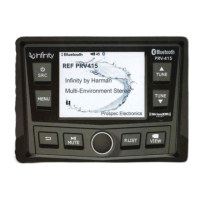

 To Next Page