MA310 | MA510 | MA710 Owner's Manual | rev1.3 20240612
Pg 5 of 42
©2024 Harman International | Features, Specifications, and Appearance subject to change without notice.
Product Overview
FRONT PANEL
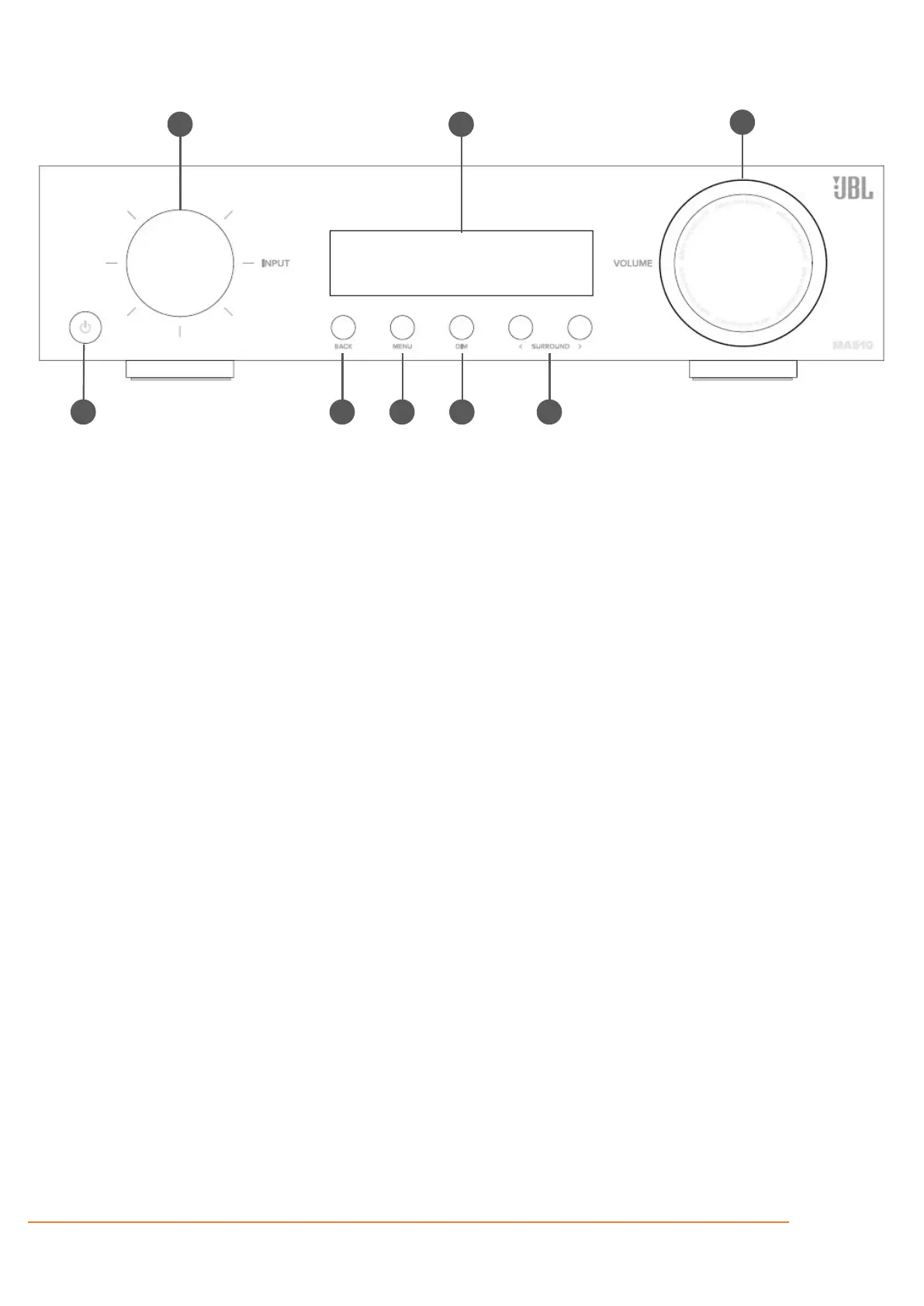
Activates and deactivates standby mode
when the Receiver is connected to AC
power.
When in standby mode, the display is blank
and the front panel LED glows orange.
While switched on, the front panel LED will
INPUT DIAL/MENU NAVIGATION/PRESS
SELECT
Rotate to select an input source until that
source is shown on the front panel. Press to
select.
Use to navigate and steer the cursor in
Setup menus or on-screen menus.
The display window shows the currently
selected source and current volume setting.
The front panel display is also used for unit
setup after pressing the MENU key on the
front panel or remote.
Use the Back button to go navigate to
previous page(s) in Setup menus or on-
screen menus.
The Menu button displays the unit’s setup
menu on the On-Screen Display and front
panel of the device.
This switches the display brightness
between bright/dim/off.
Selects between stereo and the available
surround modes for the current source.
Rotate to adjust the volume of the Receiver.
Press to mute all audio outputs.



 To Next Page