| www.harmar.com | 800-833-0478 © 2016 Harmar All Rights Reserved
12
INSTALLER
If you want to run the harness under the vehicle,
you will most likely need to drill a hole to get
the wire into the rear cargo area/trunk. Use the
supplied 3/8 grommet in the hole to protect the
wire.
If the harness is too long for the vehicle, coil the
excess wire and secure it to the vehicle frame
with the supplied cable ties.
DO NOT cut or shorten the harness.
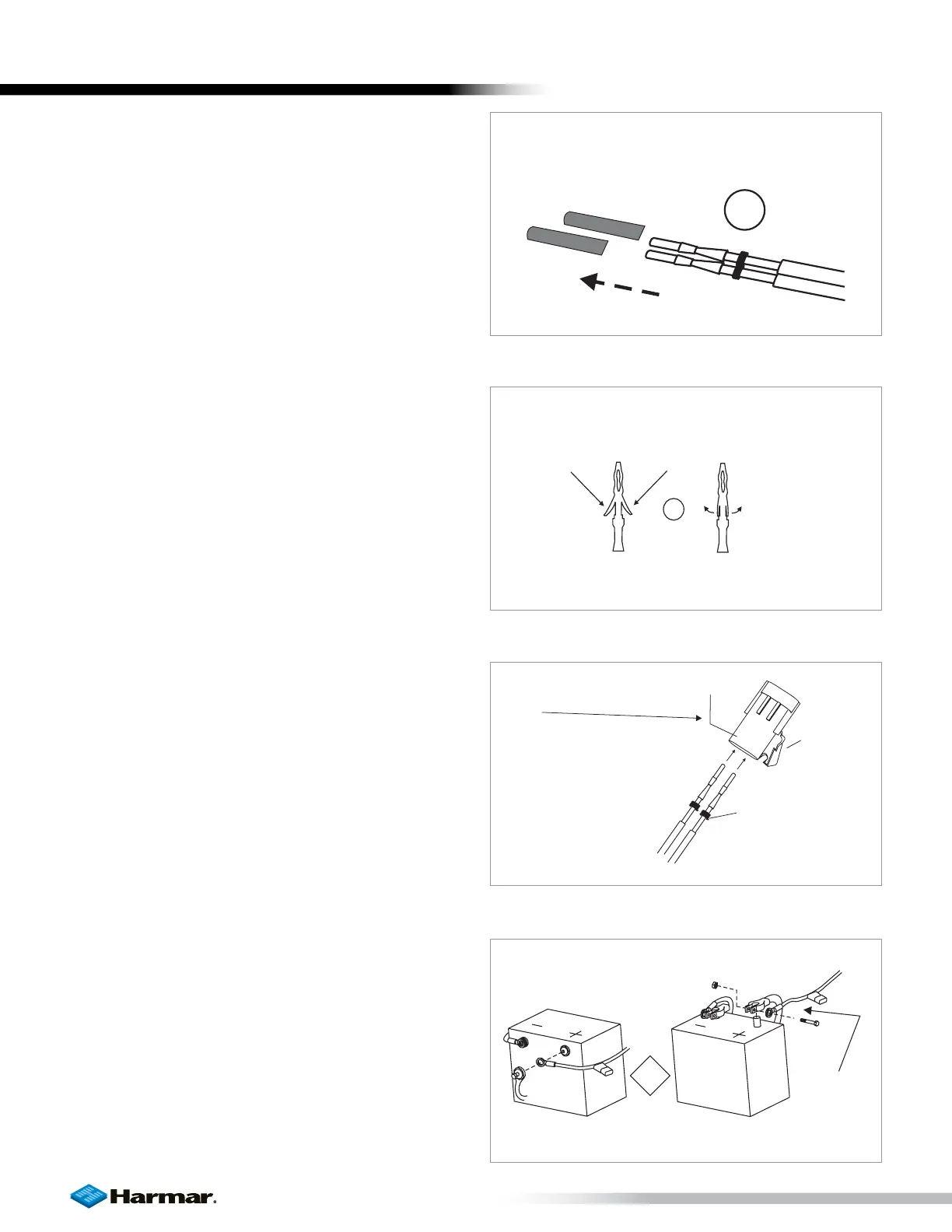
4. When the harness is through the vehicle,
remove the pin’s protective tubing. [Figure
12-1]
5. Inspect the pin’s retaining flanges. The flanges
may have been deformed while being run
through the vehicle. These are critical to secure
the pins inside the connector. Adjust as needed.
[Figure 12-2]
6. Flip open end connector’s hinged retainer.
• Insert pins as shown. [Figure 12-3]
• Verify the wires cannot be pulled out by
moderately pulling on the wires.
• Be sure rubber seals are inside the back of
the connector.
• Close the hinged retainer.
• Plug connector into lift.
7. Attach red wire to the positive terminal on
the battery. [Figure 12-4]
Protective
tubing
3
CORRECT
ADJUST BY
PRYING OU
Figure 12-1
Figure 12-2
B
=B
L
A
C
K
,
A
=R
E
D
LETTERSARE
MOLDED INTO
PLASTIC
HINGED
RETAINER
A
B
BLACK WIRE
ERIWDER
SEALS
ERIWDER
RED WIRE
OR
LAS
SIDE MOUNT
TOPMOUNT
Figure 12-3
Figure 12-4
INSTALLATION









 To Next Page