USE ONLY HAYWARD GENUINE REPLACEMENT PARTS
12
Heat Mode - Heat Mode is enabled if the Heating on/off switch is ON and the Cooling on/
off switch is OFF. In Heat Mode, the equipment will ONLY turn on to heat the pool/spa water.
Equipment will NOT turn on the cool the pool/spa water if the pool/spa water temperature
is too high.
Cool Mode - Cool Mode is enabled if the Cooling on/off switch is ON and the Heating on/
off switch is OFF. In Cool Mode, the equipment will ONLY turn on to cool the pool/spa water.
Equipment will NOT turn on the heat the pool/spa water if the pool/spa water temperature
is too low.
Auto Mode - Auto Mode is enabled if the Heating on/off switch and the Cooling on/off
switch are both ON. In Auto Mode, the equipment will turn on to heat the pool/spa water
when the pool/spa water temperature is too low, AND to cool the pool/spa water when the
pool/spa water temperature is too high. Auto Mode will turn on the heater/chiller according
to the set initial temperature differential. The default initial temperature differential is set
to 2°F.
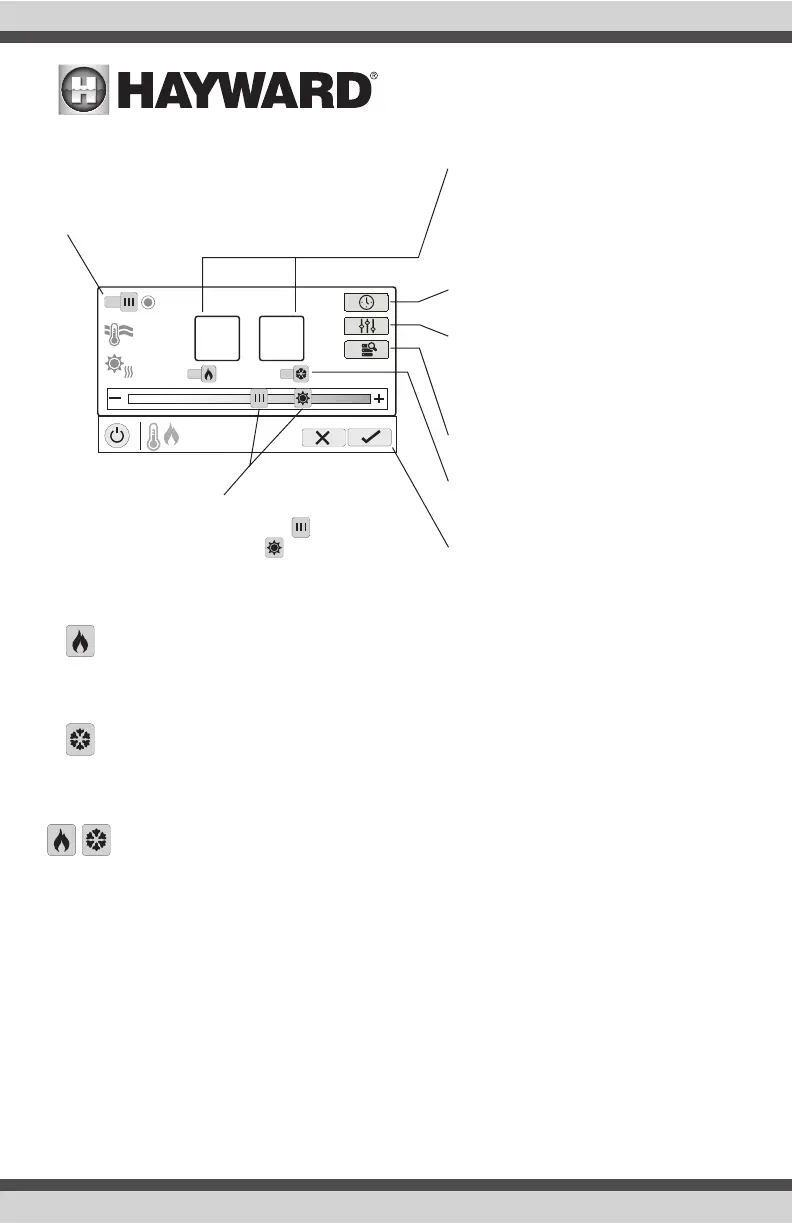
Enable / Disable - Slide this switch to enable and
disable heating/cooling. When the circle icon is grayed
out and stationary, equipment is currently idle. When in
motion, the heater/chiller is actively heating/cooling.
Setpoint Temperature - The Main heater/
chiller and Solar setpoint temperatures are
shown in these boxes. The setpoints can be
changed using the sliders at the bottom or by
pressing the box and inputting the tempera-
ture manually.
Set Schedule - Touch this button to set a
schedule for the heater/chiller.
Priority & Settings - If more than one
heater/chiller is configured for the pool
or spa, use this button to set priority,
change differential and enable/disable
physical heaters/chillers.
Heater Diagnostics - Press this button to
view heater diagnostics.
Heater/Cooling Mode - Press these buttons
to change the heating/cooling mode. Turn
both ON to enable “Auto Mode”.
Save Changes - Settings are not saved until
this button is pushed.
Change Setpoint - This slider will raise and lower
the heater/chiller setpoint setting. The slider will
change the Main setpoint and the slider will change
the Solar setpoint.
ON
set temperature
80°
POOL
heat/cool
86°F
water
120°F
roof
90°
Main Solar
ON
ON
Auto Mode















 To Next Page