USE ONLY HAYWARD GENUINE REPLACEMENT PARTS
24
Creating Favorites
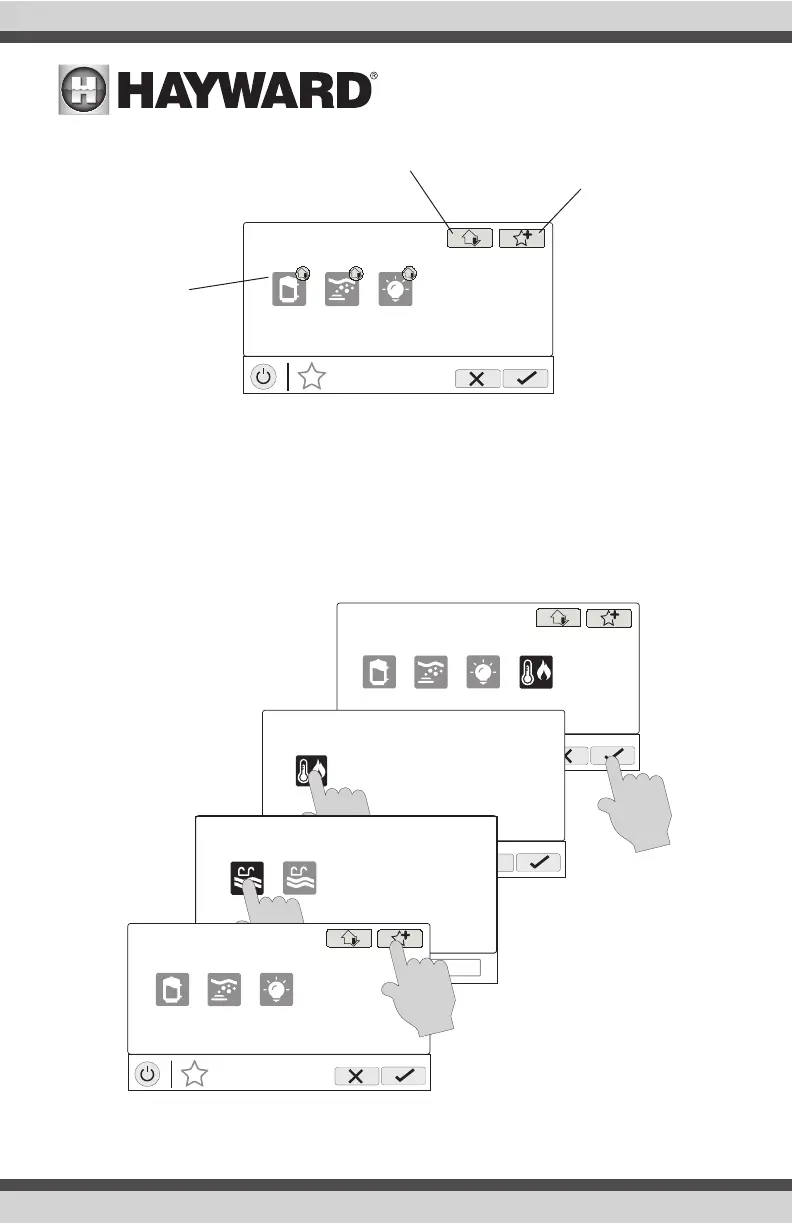
Follow the procedure below for adding Favorites. This example shows how to create a Favorite for
a heater. To find “heater” in our Add Favorites screen, we have to select “Pool” when prompted.
The next screen will show all equipment configured for the Pool; in this case, just heater. Selecting
heater and saving will add the heater to the Favorites screen. We can now move the heater button
if desired.
Add to Simple Mode - Touch this
button to add a favorite to Simple
Mode.
MANAGE
favorites
deck lights
vsp jets
S
S
SS
Add Favorite -
Touch this button to
add a favorite. NOTE:
If a Spa Side remote
control is configured,
you’ll have the option
to assign the Favorite
to one of its buttons.
Current Favorites -
These are favorites
that have already
been added. You can
change the location of
where they appear on
the Home Screen.
MANAGE
favorites
deck lights
vsp jets
S
heat/cool
MANAGE
favorites
heat/cool
MANAGE
favorites
pool backyard
MANAGE
favorites
deck lights
vsp jets
S















 To Next Page