INSTALLING OPTIONAL RF PANELS
26
Under ideal conditions, the Hayward RF Spa Remote Kit allows a user to position the spa remote controller
anywhere within 100 ft. of the Main Control Center without a hard-wired connection. The range for an
improperly installed unit can be as low as 25 ft.
Certain physical or architectural structures may interfere with the performance of the unit, so
care must be given to the installation (See instructions on page 27). While a hard-wired
Master Panel can be installed outdoors, the RF Master Panel is not suitable for outdoor
installation and should be stored indoors when not in use.
WARNING: ALL POWER MUST BE SHUT OFF
BEFORE INSTALLATION. DO NOT ATTEMPT TO
WORK INSIDE THE HAYWARD POOL SYSTEM
CONTROL WITH ANY LIVE ELECTRICAL PARTS.
Begin the installation by turning off the main
power (50 Amp Max) to the Hayward Pool
System Control at the house breaker box.
If there is an expander board installed
(Aux 5 and/or spa blower), turn off the
power to the two individual circuits
(20 Amp Max each) that may be
installed to the expander board.
INST
ALL HAYWARD RF MASTER
RECEIVER AND CONNECT IT T
O THE
MAIN CONTROL CENTER:
Once all power has been shut off to the
control, open the door on the Control
System enclosure. If there is a wired
connection for a Master Panel installed on
the circuit board, disconnect it from the board and coil it near the bottom of the low voltage raceway through which
it enters the central area of the enclosure (probably the left side). If the control supports a spa, do not disconnect
the spa control panel cable at this time.
NOTE: The Master Panel MUST be RF ready to be compatible with the RF Kit. You may, however, hard wire an
RF-ready panel if you choose. If you are not sure that you have an RF-ready panel, note the serial number on
the label located on the bottom of the panel and call your Hayward service center for verification.
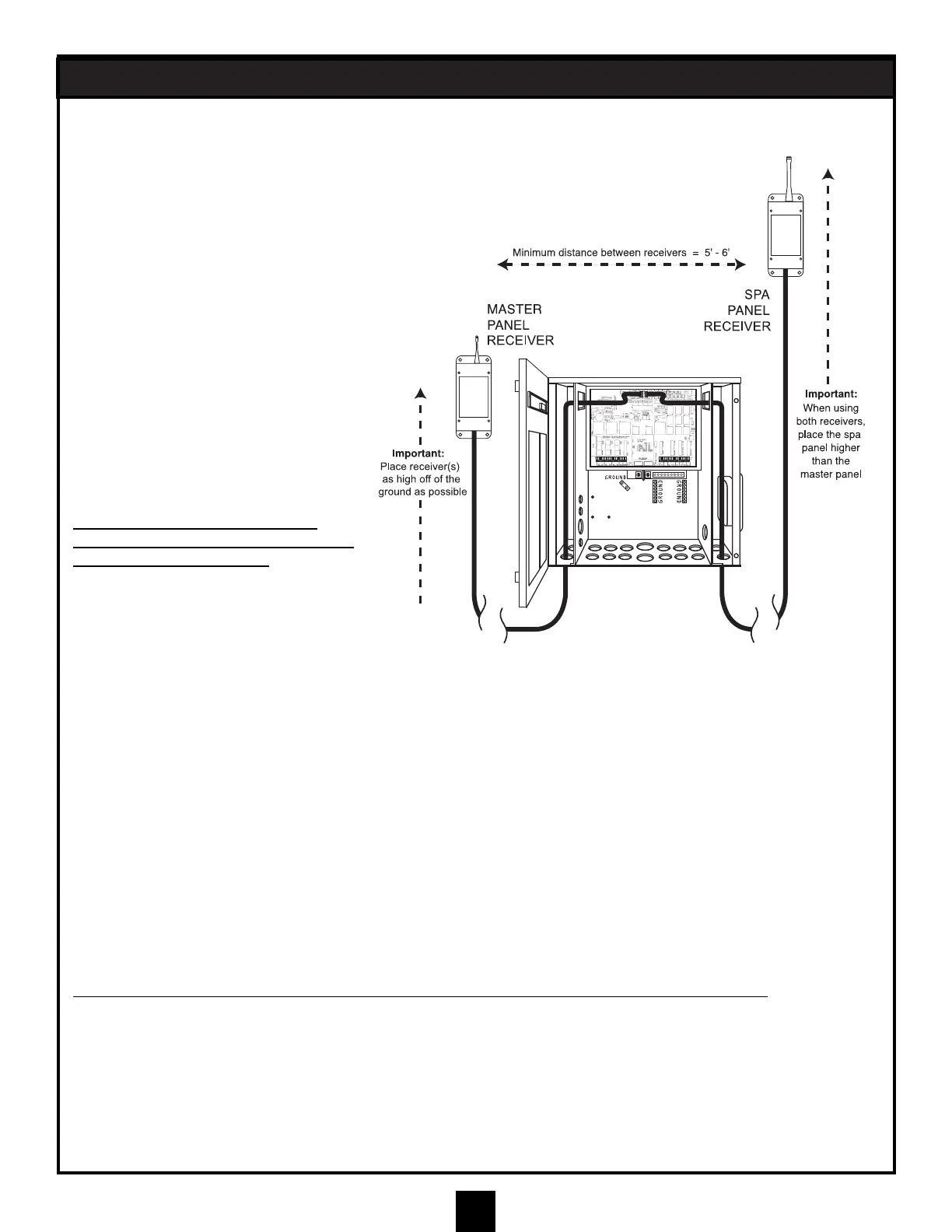
Next, feed the wire from the RF Master Panel receiver module through an appropriate knockout in the bottom of
the main control center. You should choose from the knockouts below the low voltage raceways for this purpose.
Continue to feed the cord that is attached to the RF Master Panel module through the hole in the raceway barrier
and over to the main circuit board. Plug it into an available phone-type socket on the top of the board. If there was
a hard-wired master panel installed, as mentioned above, use the same socket for the new RF connection.
If you would like to use a hard-wired panel and an RF panel, install an optional 2-1 cable connector inside the
system enclosure. This will allow connection of the hard-wired Master Panel cable and the RF Master Panel
receiver cable. This installation is similar to instruction 5 on page 23.
Mount the Receiver Module in a convenient location that maximizes the range of the RF Master Panel. (See
instructions on page 27.)
INST
ALL HAYWARD RF SPA RECEIVER AND CONNECT IT TO THE MAIN CONTROL CENTER:
Under ideal conditions, the Hayward RF Spa Remote Kit allows a user to position the spa remote controller
anywhere within 100 ft of the Main Control Center without a hard-wired connection.
Follow the same procedures to mount the RF Spa Control Receiver Module. (See instructions on page 27.) With
an optional extended cable, the effective range of the RF components can also be enhanced.
This completes the installation in the system box. Secure the Control System door and power up the System.
NOTE: Make sure RF Circuit Board connection is separate from the hard-wired connection;
use 2 to 1 connector as needed.


 To Next Page