TO PROGRAM TIME OF DAY:
1. Push Program button, display will blank out with the exception
of the “SET” icon.
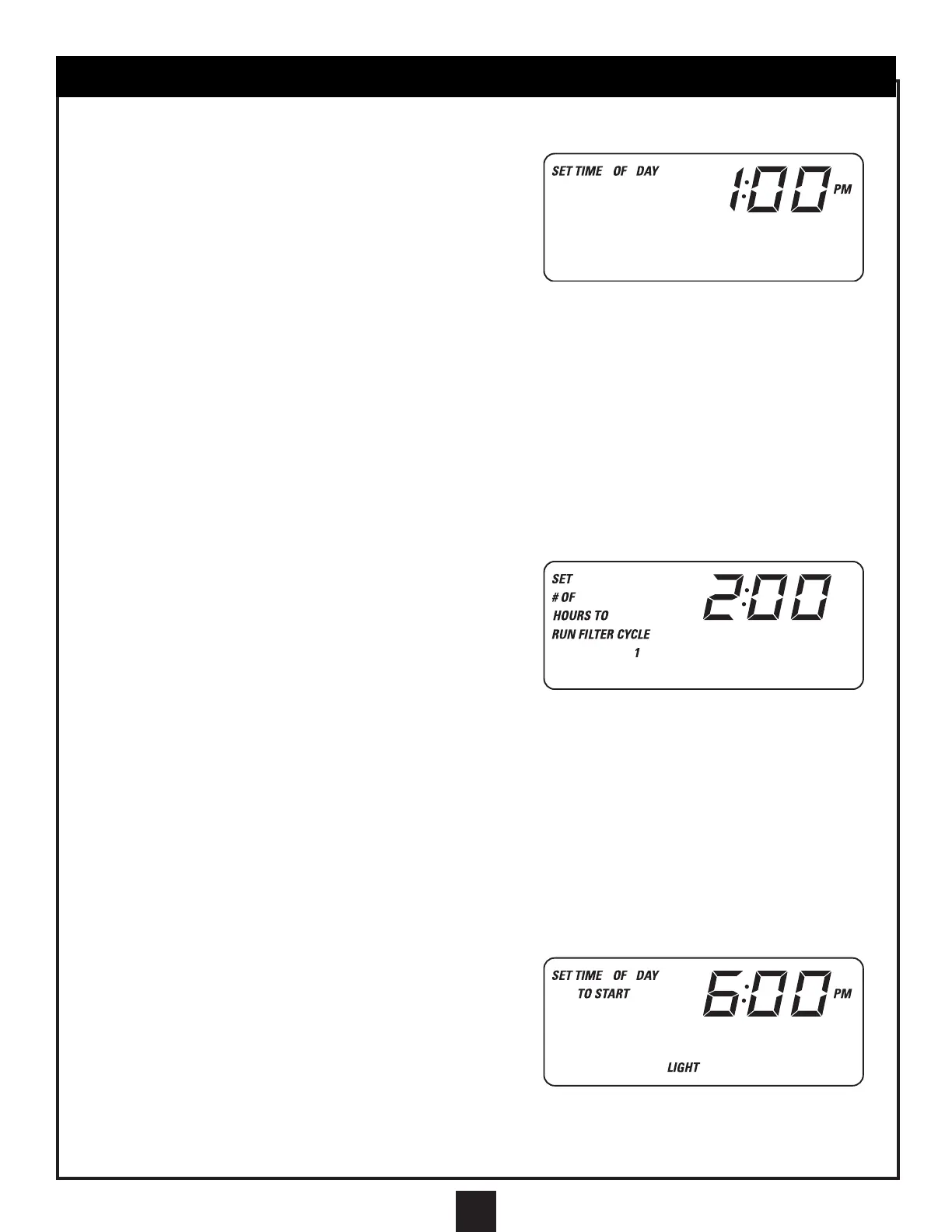
2. Push Program again and current time of day will display. At
this point, time of day may be adjusted by use of the Up and
Down buttons. You will see the words “SET TIME OF DAY” on
the display and the hours flashing. To set the hours and
AM/PM, press the Up or Down button.
3. After the hours have been set, press the Program button and the minutes will flash. Press Up or Down to adjust.
4. Press Program to enter your correct time into the system.
NOTE: In the “Time of Day Mode,” ºCelsius or ºFahrenheit can be chosen for the temperature display. After
pressing the Program button twice to enter the time of day mode, press the Heater button. “SET ºF OR ºC”
will appear on the display. Change the setting with the Up or Down buttons. Press Heater button again to
go back to “SET TIME OF DAY.”
NOTE: Air temperature and time is displayed when filter is not running. Air temperature and water
temperature is displayed when filter is running.
For users of Hayward Swim Pure Cartridges, please note the following: In the “Time of Day Mode,” a
“HAYWARD SWIM PURE” prompting message may be enabled. After pressing the Program button twice to
enter the “Time of Day Mode,” press the Filter button. “SET,” “HSP
”
or “OFF” will appear on the display.
Change the setting with the Up or Down buttons. Press the filter button again to go back to “SET TIME OF
DAY.” Once enabled, the message “HSP” will appear every 6 months. Push any button to reset message.
TO PROGRAM FILTER PUMP:
1. Push the Program button, display will blank out with the
exception of the “SET” icon.
2. Push the Filter button and display will show current filter
duration in hours along with the icons “SET # OF HOURS TO
RUN FILTER CYCLE 1.” Duration may be adjusted with the
use of the Up and Down buttons. Range is 0 to 24 hours.
3. Push Program again to program time of day and to start filter
cycle. Display will show “SET TIME OF DAY TO START
FILTER CYCLE 1.” Filter cycle start time may be adjusted by the Up and Down buttons in 30-minute increments.
4. Push Program again to enable heater during the filter cycle. Press Up or Down to select on or off.
NOTE: If a solar panel is being used for pool heating purposes, Hayward suggests: A) Leaving Heat Seek off (see page 39);
B) Enabling the heater during filter cycles; and C) Programming filter cycles for daytime periods which will provide the most
solar energy. This will allow solar heating only when it will work best and will prevent your solar panel from potentially cooling
your pool at night.
5. Push Program again to enable pool feature 1 during the filter cycle. Press Up or Down to select on or off.
6. Push Program again to set number of filter cycles. Display will show “SET # OF FILTER CYCLES.” Push Up or
Down to select between 1 or 2 filter cycles a day.
7. If two cycles are selected, they will start 12 hours apart from each other. Push Program to exit if one filter cycle is chosen.
8. If two filter cycles are chosen, push Program to begin entering settings for the second filter cycle as entered for the first.
TO PROGRAM LIGHTS:
1. Push the Program button, display will blank out with the
exception of the “SET” icon.
2. Push the light button and display will show current light
operation in hours along with the icons “SET # OF HOURS TO
RUN LIGHT.” Duration may be adjusted with the use of the Up
and Down buttons. Range is 0 to 12 hours.
3. Push Program again to program time of day and to start
automatic light cycle. Display will show “SET TIME OF DAY
TO START LIGHT.” Light cycle start time may be adjusted by the Up and Down buttons in 30-minute increments.
4. Push Program again to program light intensity. Push Up or Down to adjust between high, medium, and low
intensity. Display will show “SET LIGHT LEVEL” along with the current light level. Push Program to exit.
41
BASIC PROGRAMMING OF MASTER CONTROL PANEL
NOTE: BE SURE TO PROGRAM MASTER CONTROL PANEL USING THIS SEQUENCE.


 To Next Page