TO PROGRAM AUXILIARY 3
1. Push the Program button, display will blank out with the exception of
the “SET” icon.
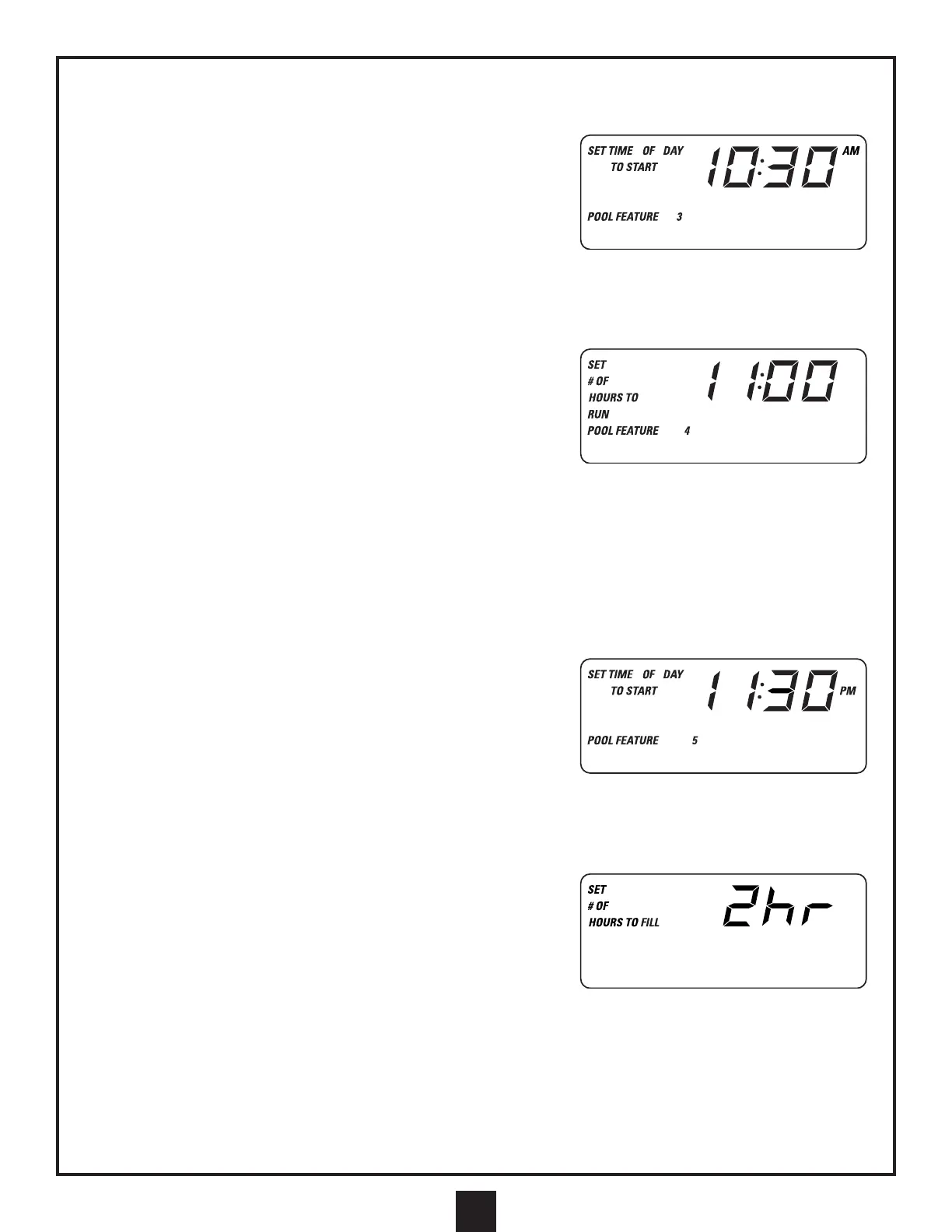
2. Push Aux 3 button and display will show current Aux 3 (POOL
FEATURE) operation in hours along with the icons “SET # OF
HOURS TO RUN POOL FEATURE 3.” Duration may be adjusted
with the use of the Up and Down buttons. Range is 0 to 12 hours.
3. Push Program again to program time of day and to start automatic Aux 3 cycle. Display will show “SET TIME OF
DAY TO START POOL FEATURE 3.” Aux 3 cycle start time may be adjusted by the Up and Down buttons in 30-
minute increments. Push Program to exit.
TO PROGRAM AUXILIARY 4
1. Push Program button, display will blank out with the exception of the
“SET” icon.
2. Push Aux 4 button and display will show current Aux 4 operation in
hours along with the icons “SET # OF HOURS TO RUN POOL
FEATURE 4.” Duration may be adjusted with the use of the Up and
Down buttons. Range is 0 to 12 hours. Push Program again to
program time of day and to start automatic Aux 4 cycle. Display will show “SET TIME OF DAY TO START POOL
FEATURE 4.” Aux 4 cycle start time may be adjusted by the Up and Down buttons in 30-minute increments. Push
Program to choose the F.O. Light or the On/Off Light option. Display will show either “Fo” or “Lt.” Choose mode by
pressing Up or Down. Push Program to exit. Aux 4 option will not operate during programmed times.
3. To choose between On/Off Light and the F.O. (fiber-optic) feature for Aux 4, push the program button once, followed
by Aux 4. Press program two more times after that. With the Up and Down arrows, you can toggle between “FO”
and “LT.” Press Program to set and exit. “FO” allows you to access: light, light option on, light option off, light off.
“Lt” allows you to turn the underwater light on and off.
TO PROGRAM AUXILIARY 5
1. Push Program button, display will blank out with the exception of the
“SET” icon.
2. Push Aux 5 button and display will show current Aux 5 (Aux 5 on
expander board) operation in hours along with the icons “SET # OF
HOURS TO RUN POOL FEATURE 5.” Duration may be adjusted
with the use of the Up and Down buttons. Range is 0 to 24 hours.
3. Push Program again to program time of day and to start automatic auxiliary 5 cycle. Display will show “SET TIME
OF DAY TO START POOL FEATURE 5.” Aux 5 cycle start time may be adjusted by the Up and Down buttons in
30-minute increments. Push Program to exit.
TO PROGRAM OPTIONAL FILL VALVE
1. Push the Program button and then the up button and display will show
“SET # OF HOURS TO FILL (1 OR 2 HRS).” Number of hours to fill
pool may be adjusted between 1 and 2 hours by pushing the Up button.
2. To start filling the pool, push the Down button. This will turn on the fill
valve. Display will show the “FILL” icon.
3. When the pool is filling, pushing the Up button will turn the fill valve off.
TO PROGRAM KEYPAD LOCK FEATURE
1. Push Program, then push Spa twice. The display will show ON or OFF, push Program to select. ON means all
keypads will function. OFF means all keypads on all panels and remotes will be locked except for the service panel.
2. Press Spa to exit.
3. To unlock, press Program.
43
BASIC PROGRAMMING OF MASTER CONTROL PANEL (continued)


 To Next Page