6 Using the heating system – Heating up the system
54
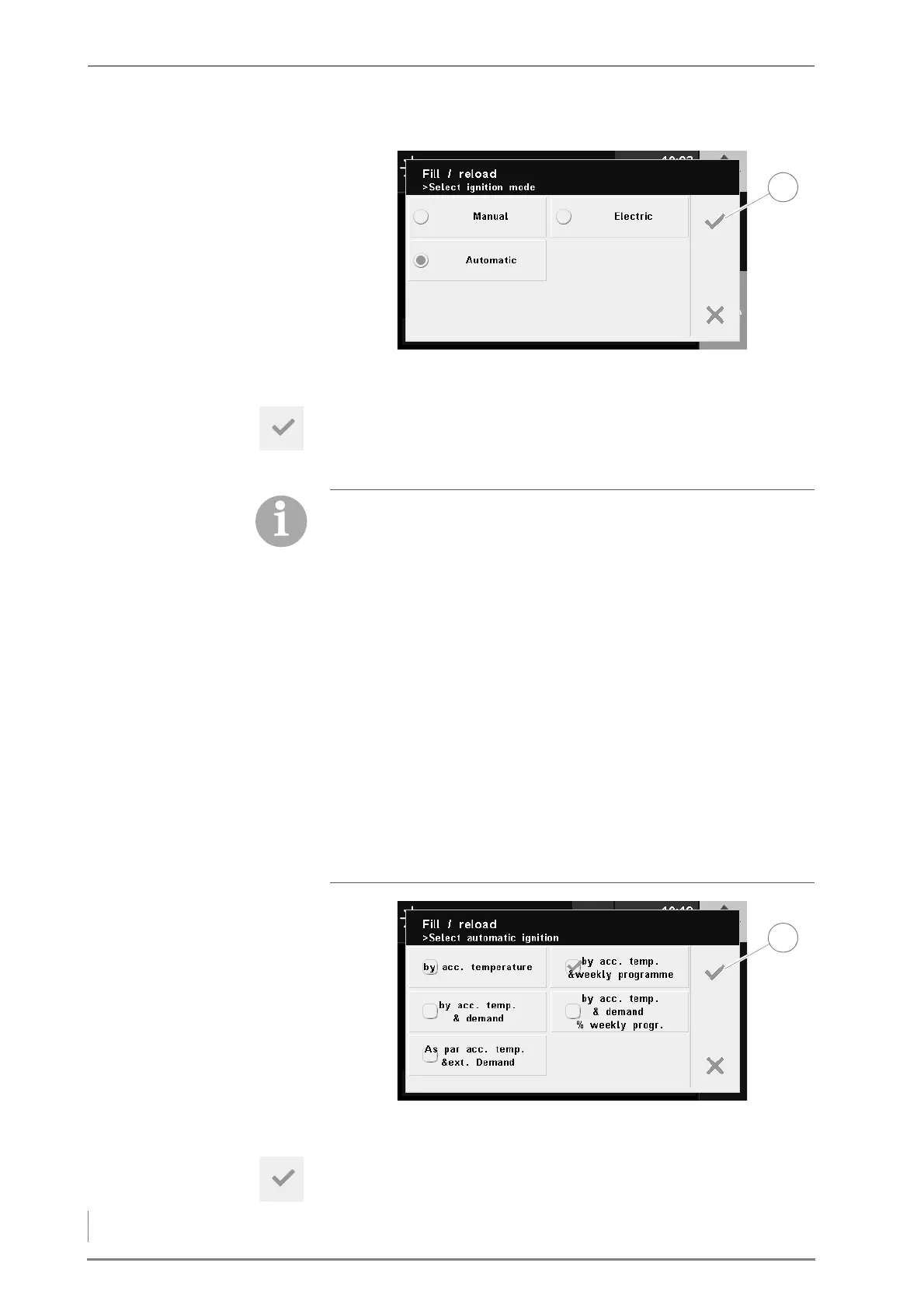
13.Select the desired ignition mode.
14.Confirm your input by pressing the Confirm button (1).
✓ The display shows - for prior selection of Automatic ignition mode
- the Automatic ignition selection window.
15.Select the type of automatic ignition.
16.Confirm your input by pressing the Confirm button (1).
✓ The Fill up / Reload window appears in the display again.
Figure 6/5 - Query ignition mode
Automatic ignition
• Accumulator temperature: The automatic ignition starts after
the set reloading temperature is undershot.
• Accumulator temperature and weekly programme: The
automatic ignition starts after the set accumulator temperature
is undershot and if the enable time is reached at the same time
in accordance with the set weekly programme.
• Accumulator temperature and requirement: The automatic
ignition starts after the set accumulator temperature is
undershot and if there is a requirement from a consumer
(heating circuits, domestic hot water) at the same time.
• Accumulator temperature, requirement and weekly
programme: The automatic ignition starts after the set
accumulator temperature is undershot and if there is a
requirement from a consumer (heating circuits, domestic hot
water) at the same time and the enable time is reached in
accordance with the set weekly programme.
Figure 6/6 - Query automatic ignition



 To Next Page