Hear Back PRO User Guide
5
STEREO
LINE MIC
AUX IN
15V PHANTOM
LINE OUT
(BAL)
LEFT/MONOR IGHT
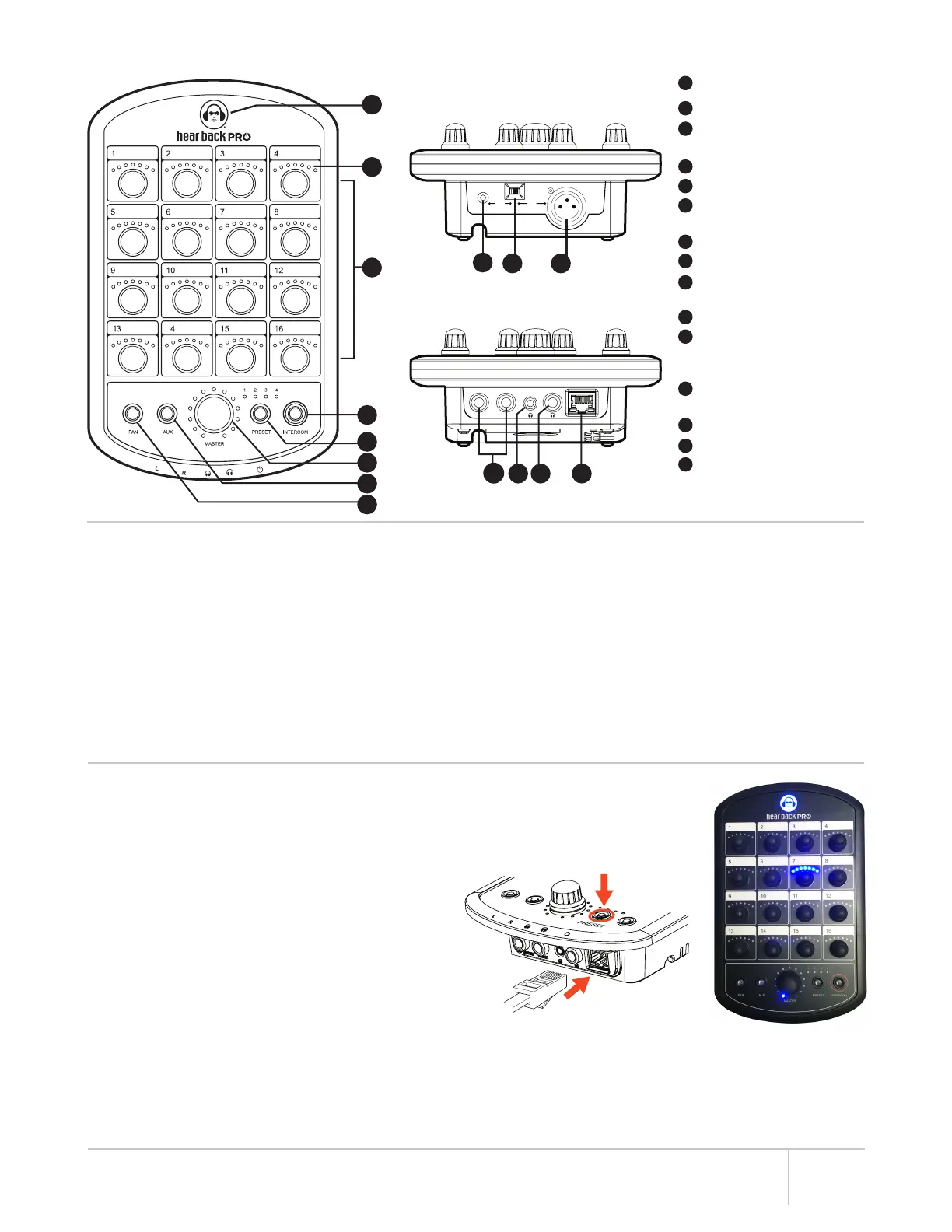
LED Status Indicator
LED Level Indicators
Volume/Pan Control Knob
for Each Audio Channel
“Intercom” Button
“Preset” Button
“Master” Control Knob
(Volume / Aux)
“Aux” Input Button
“Pan” Button
Auxiliary 1/8” Stereo
Unbalanced Audio Input
Auxiliary Input Switch
Auxiliary Balanced XLR
Microphone Input with
15V Phantom Power
1/4” Left/Mono and Right
Outputs
1/8” TRS Headphone Output
1/4” TRS Headphone Output
Gigabit Ethernet (GbE)
Connection with PoE+
(Power over Ethernet)
MIXER DETAIL DIAGRAM
1
2
3
4
5
6
7
8
9
10 11
12
13 14 15
1
2
3
4
5
6
7
8
9
10
11
12
13
14
15
TOP PANEL
BOTTOM PANEL
MIXER FEATURES
• Local control of all available audio channels
• Receive power and audio over one Ethernet cable, up to
500’ from Hub to each Mixer
• Side-mounted card slot for future expansion
• Large master knob controls overall main mix, AUX, and
intercom levels independently
• 24-bit D/A and A/D delta-sigma converters
• Error indicating logo glows “red” to indicate a problem,
and flashes “red” when headphone amplifier temperature
reaches 100° C (212° F)
• Volume / panning / stereo link control of all channels
of audio
• Balanced mono/stereo, line level outputs
• Store up to 4 recallable presets, while most recent
configuration is remembered after power-down
• Intercom feature allows communication to anyone with a
Hear Back PRO Mixer or Virtual Mixer Card
• Selectable 1/8 inch TRS stereo unbalanced and XLR mono
balanced (with 15V phantom power) AUX inputs:
– Microphone input for crowd/ambiance mic,
or for use with intercom
– Drum module/metronome or local mix input
• One 1/8 inch TRS headphone output
• One 1/4 inch TRS headphone output
CHECKING MIXER FIRMWARE (FW) VERSION
1. Starting with power “off”, press and hold PRESET button
while inserting network cable to apply power (until buttons
flash) (Figure 3).
2. The LED that is lit around the MASTER knob shows the
major firmware version. The channel knob lit with BLUE
LEDs indicates the minor firmware version 1-16. With
lit GREEN LEDs, the minor firmware version is channel
number + 16 = 17-32.
– Example: If the first LED is lit around the MASTER
knob and the LEDs above the channel 7 knob are lit
BLUE, the firmware version is 1.7 (Figure 4).
– To display the bootloader version number, press the
PAN button. The version number is display in the
same way.
3. To EXIT, disconnect then reconnect power.
Firmware updates for the Mixer are done using the iOS App.
Alternatively, they can be done using a Firmware Update Card
(see page 8).
Figure 4Figure 3
*Cable complying with the National authorities (cable with an outer jacket or sleeving rated VW-1 or better).


 To Next Page