Hear Back PRO User Guide
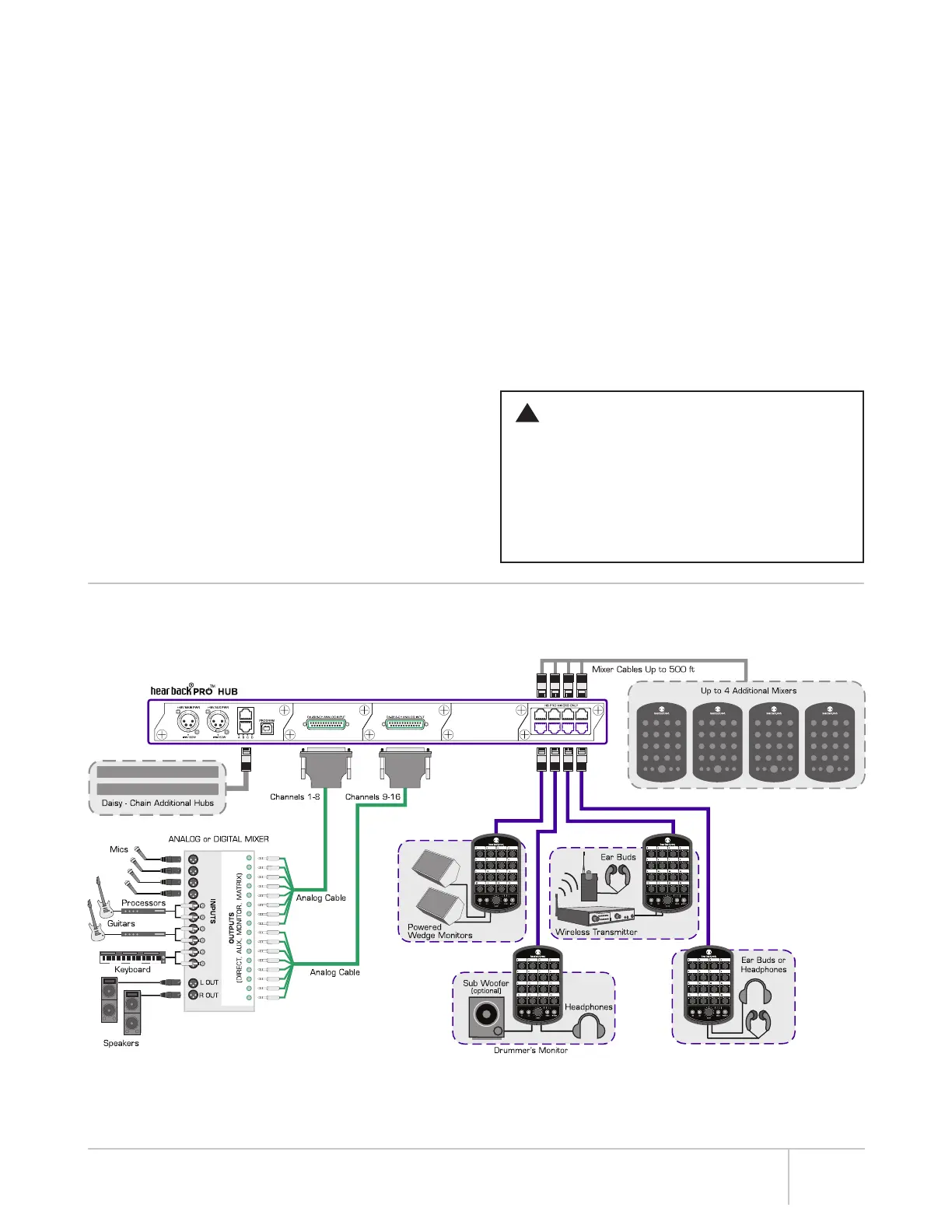
1. Connect the appropriate input(s), as shown in the
hook-up diagram below and select the desired input using
the front panel switch. Connect Hear Back PRO Mixers to
the network card outputs using CAT6* cables and set all
Mixer channel and master volume levels to 0%. Connect
the headphones, in-ear monitors, and/or line outputs for
connecting to wireless in-ear systems, powered monitors,
or other devices requiring line-level inputs.
2. Turn on Hub power.
3. Adjust the level at the input source (DAW, mixer, etc
until the RED clip LED’s on the Hub just come on and then
reduce the levels on the input source until you have a
GREEN LED. NOTE: Adjust the source for as much signal
into the Hub as possible without clipping. Higher input
levels improve signal-to-noise and dynamic range. If you
are unable to adjust your source without overdriving the
Hear Back PRO system, follow the “-10dB Pad” instructions
on page 2 to achieve and extra 10dB of headroom.
Remember, higher input levels improve signal-to-noise and
dynamic range.
4. Mixer Adjustment: Once you have the signals optimized,
turn the master volume up to about 10 o’clock and then
raise each channel’s volume up to a comfortable level.
Avoid adjusting the master volume too high and running
the inputs too low. If you wish to stereo-link any channels,
enter the stereo-link control interface and toggle them on.
If you wish to pan any mono channels within the stereo
field, press the PAN button to make adjustments.
5. AUX IN Adjustment: If using an auxiliary input, connect
it to the Mixer via the appropriate “LINE” or “MIC” input.
Select the appropriate input via the “AUX IN” selector
switch. If possible, adjust the input source for maximum
volume without clipping. Press the “AUX” button to turn
the “Master” knob LEDs RED and slowly turn the “Master”
knob to a comfortable level. Press the “AUX” button
again to exit auxiliary volume control.
Now enjoy personal monitoring at its best and have fun!
WARNING
• The Hear Back PRO is capable of driving most
headphones to extreme levels that can damage
your HEARING!
• ALWAYS turn down the Mixer “Master” volume
down before putting on in-ear headsets or
headphones.
!
HOOK-UP DIAGRAM | ANALOG (FW V1 AND V2)
CONNECTING AND CALIBRATION
*Cable complying with the National authorities (cable with an outer jacket or sleeving rated VW-1 or better).
9



 To Next Page