Hear Back PRO User Guide
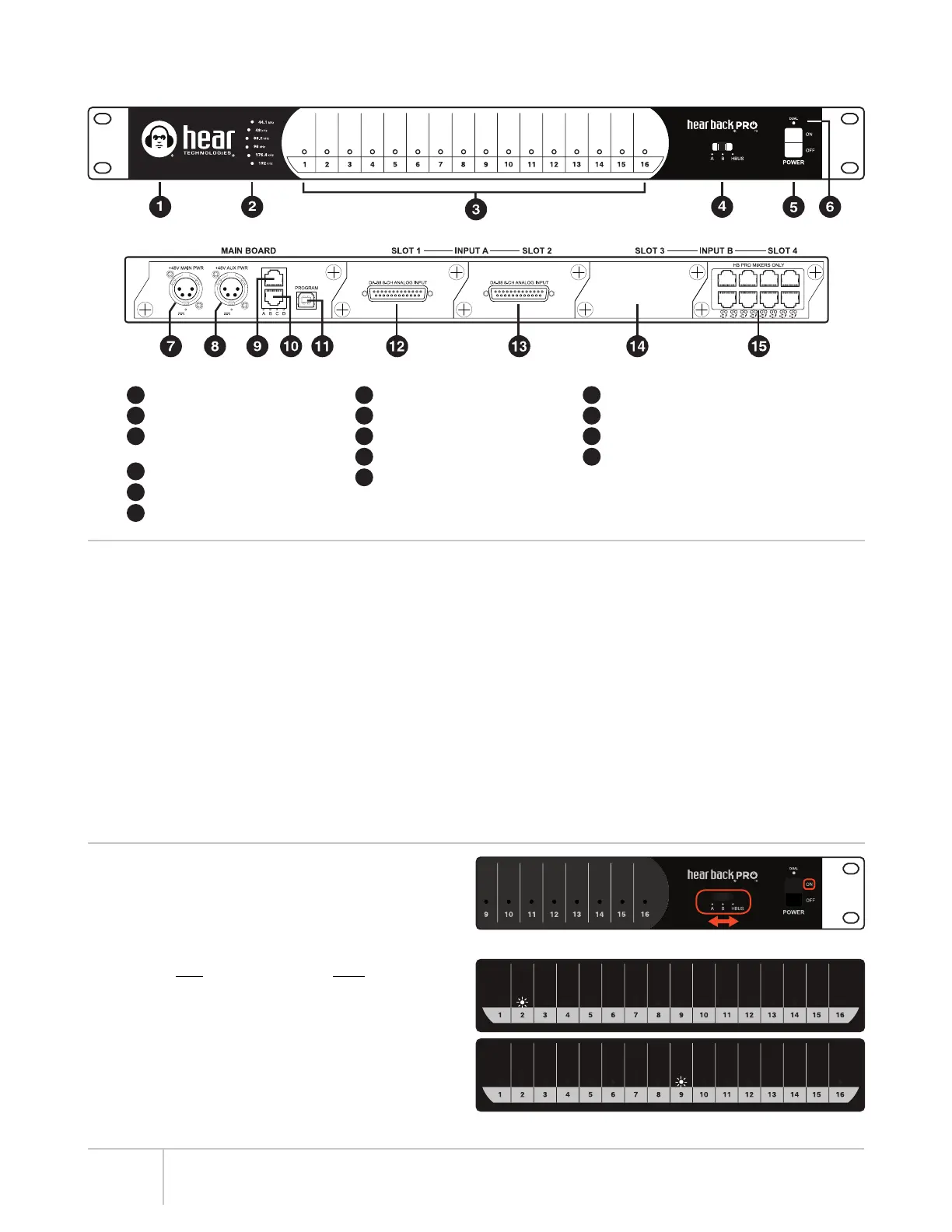
FRONT PANEL
REAR PANEL
LED Status Indicator
Sample Rate LED Indicators
Audio Input Channels 1-16
Level LED Metering
Input Selector Switch
Power Switch
“Dual” Power LED Indicator
Main 48V Power Input
Secondary 48V Power Input
HBUS Input
HBUS Output
USB Connection
Card Slot 1 (8-channel Analog Input shown)
Card Slot 2 (8-channel Analog Input shown)
Card Slot 3 (
shown unpopulated
)
Card Slot 4 (8-port Network Card shown)
HUB DETAIL DIAGRAM
1
2
3
4
5
6
7
8
9
10
11
12
13
14
150W 150W
15
HUB FEATURES
• Three switch selectable 16-channel input sources:
– Input A (Slots 1 & 2)
†
– Input B (Slots 3 & 4)
†
– HBUS
• 24-bit Delta-Sigma A/D converters
• Six user-selectable sample rates, indicated by LEDs:
44.1 kHz, 48 kHz, 88.2 kHz, 96 kHz, 176.4 kHz, and 192 kHz
• Less than .25 milliseconds total system delay (latency)
at 192 kHz
• 16 RGB LEDs intuitively display signal / peak levels
for channel metering
‡
• Standard CAT6* delivers power and signals to Mixers
• Daisy-chain via HBUS for very large systems
• Quiet, temperature-controlled fan (only runs when
internal temperature reaches 43° C or 110° F)
• 1 RU chassis
• Modular I/O card-slot configurable mainframe
• Gigabit Ethernet network fabric, with enough bandwidth
to support up to 96 channels of audio at 192/176.4 kHz,
128 channels at 96/88.2 kHz or 48/44.1 kHz.
• 48 volt Power Over Ethernet supply
• Port for redundant power supply (or to power more than
16 Mixers)
• USB port for firmware upgrades and future features
• Error indicating logo glows “red” should a fault arise
CHECKING HUB FIRMWARE (FW) VERSION
1. Apply Power.
2. Immediately after logo turns BLUE, slide the “Input
Selector Switch” through all “A,B,HBUS” options, then
return to the original selection (Figure 1).
3. Channel LEDs will flash WHITE to indicate firmware version
– once for main number, then once for minor number (e.g.
LED #2, then LED #9 = V2.9) (Figure 2).
NOTE: Firmware Updates are available for download at
www.hearback.com/support/
FW V1 and V2 are not compatible with FW V5.
To upgrade or downgrade, visit www.hearback.com/fwv5
Figure 1
Figure 2
2
†
For FW V5, both A and B inputs are used simultaneously. Switching between A and B only selects clock source.
‡
For FW V5, the 16 metering LEDs can be selected to display channels 1-16 or 17-32 using the iOS App.
*Cable complying with the National authorities (cable with an outer jacket or sleeving rated VW-1 or better).


 To Next Page