Quick Start Guide REX 30016
5.2.3 Synchronization of the portal confi guration
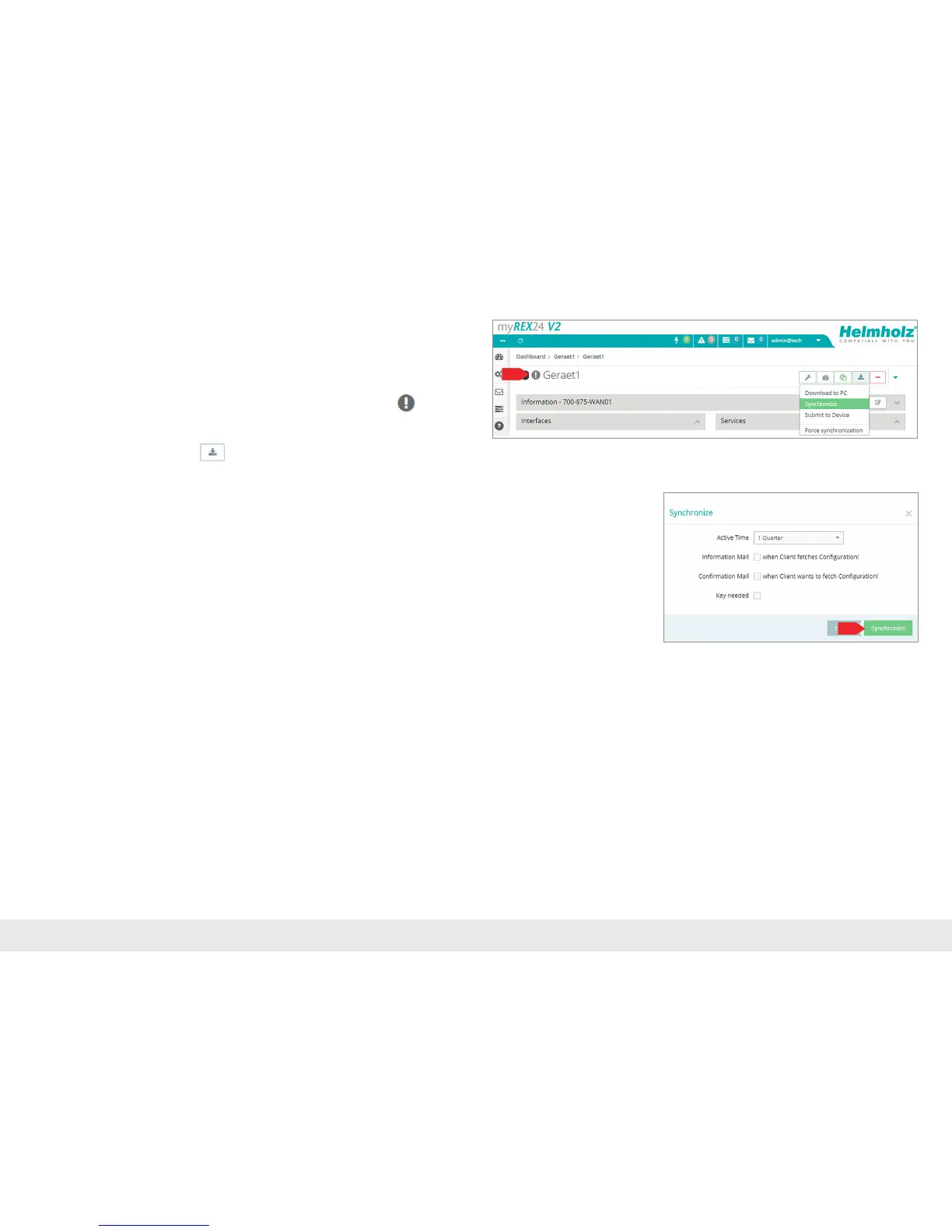
As soon as the REX 300 has logged into your account in the myREX24-V2 portal,
youcantransferretroactivechangestotheREX300atanytimewith"Synchronize".
Where there is an existing portal connection, the REX 300 checks cyclically whether
thereisanewcongurationavailableforitsserialnumberandthenloadsitauto-
matically.When,forexample,youhaveeditedtheLANIPaddress,the
"Device
congurationisnotuptodate"symbolappearsnexttotheOnlineLED.
Clickheretoinitiatethesynchronization.Alternatively,thecorrespondingmenucan
alsobeopenedviathesymbol
.
Thesynchronizationfunctionmustalwaysbeconrmedthroughthefollowing
dialog.Inthismenuyoucandeneadditionalsecurityaspectsasrequired.
Whenyougenerateauniquekeyforthedownloadhere,thismustbeenteredinthe
"FirstStartAssistant"attheREX300websiteforpurposesofverication(seepage11,
chapter 5.2.1).



 To Next Page