computer; the, the user can log in DVR on the binding computer after set the specific binding MAC
address.
② Authority:
a) Admin: Admin have full control of DVR. DVR could have only one admin account.
b) Advance: Besides ”firmware upgrade”, ”reset factory default”, ”shut down” and ”change other
user’s password”, advance account could control DVR like an admin account.
c) Normal: Normal account can only do “live view”, “playback”, “search”, “backup”, “log off”, “view
DVR information”, and “change his own password”.
3.8 P.T.Z configuration
P.T.Z configuration includes two submenus: serial port and advance
① Serial port
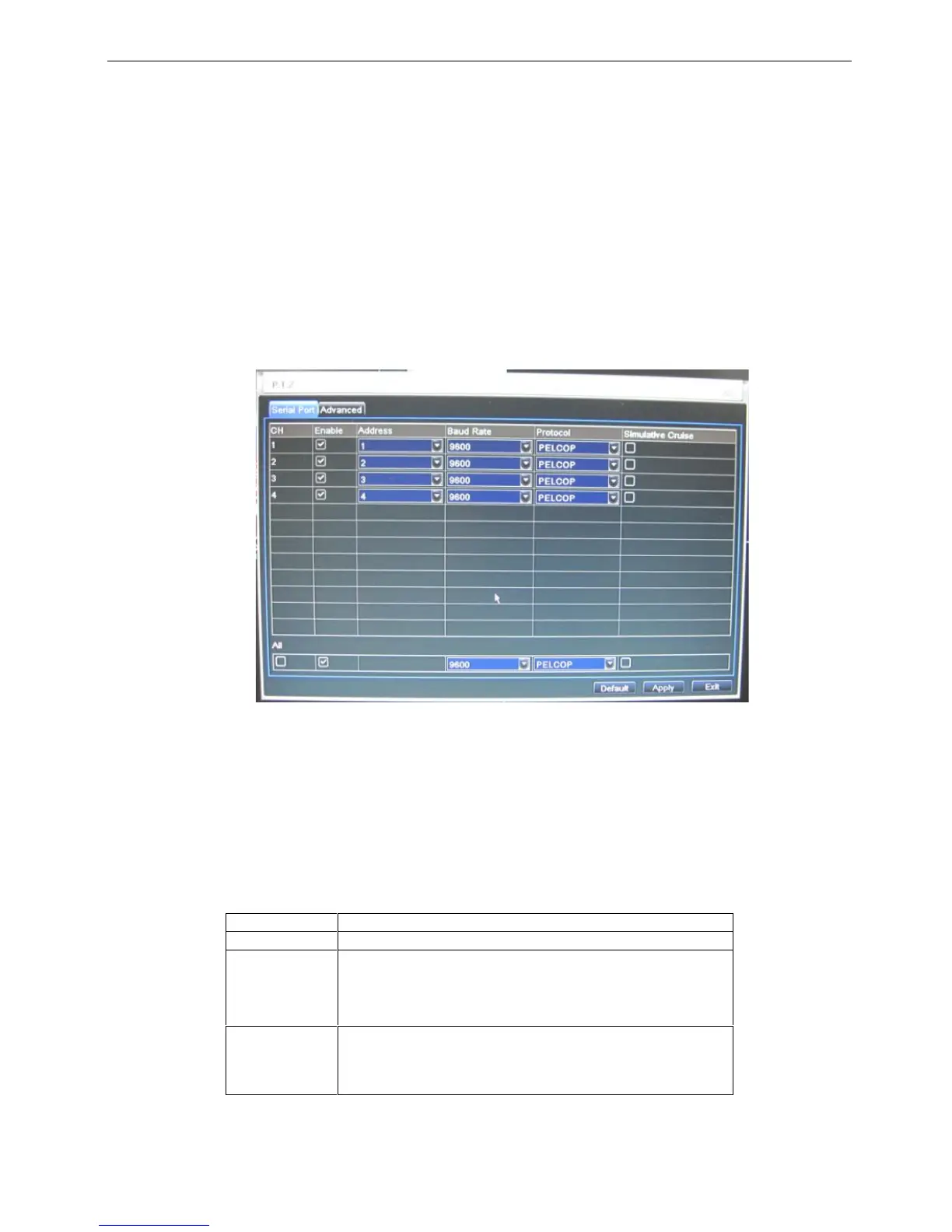
Step1: enter into system configurationP.T.Z configurationserial port; refer to Fig 4-36:
Fig 4-36 P.T.Z configuration-serial port
Step2: tick off Enable, setup the value of address, baud rate and protocol according to the settings of the
speed dome.
Step3: user can setup all channels with same parameters, tick off “all”, then to do relevant setup.
Step4: click “default” button to resort default setting; click “apply” button to save the setting; click “exit”
button to exit current interface.
Definitions and descriptions of network stream:
② Advance
Communication protocol of the PTZ device. Range from:
NULL、PELCOP、PELCOD 、LILIN、MINKING、NEON、
STAR、VIDO、DSCP、VISCA、SAMSUNG、RM110、HY



 To Next Page