SSD7000 NVMe RAID AIC BootRAID Installation Guide
HighPoint Technologies, Inc
2.3. Adjust System EFI Settings
Adjust the UEFI settings. Allow the option ROM settings for third-party devices to load. Different
motherboards will provide different UEFI-related BIOS settings. Please consult your motherboard’s
user manual for more information. This section provides examples of two different types of
motherboard BIOS menus.
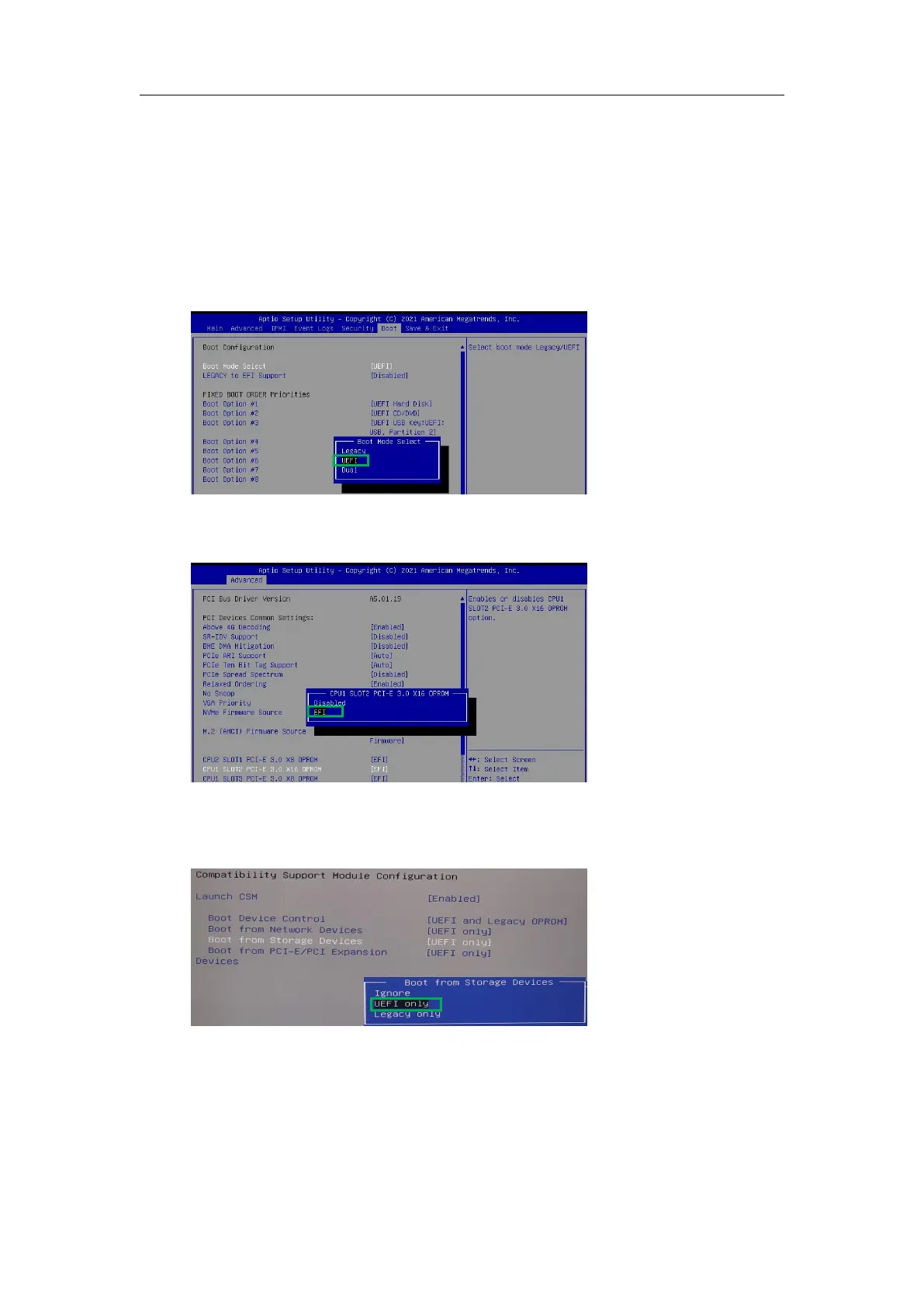
1. Set UEFI setting with SuperMicro X11DPi-NT motherboard as an example.
a. Boot the system and access the motherboard BIOS menu.
b. Select the Boot tab and set the Boot Mode Select to UEFI.
c. Select AdvancedPCIe/PCI/PnP ConfigurationCPUSlot PCI-E OPROM to EFI.
NVMe AIC is connected to motherboard CPU1 Slot 2 PCI-E X16; then you should set “CPU1
Slot 2 PCI-E X16 OPROM” to “EFI”.
Note: If the OPROM is not configured correctly, the UEFI driver will not load correctly!
2. Set UEFI setting with ASUS Pro WS WRX90E-SAGE SE motherboard as an example.
a. Set Boot from Storage Devices to UEFI only.















 To Next Page