SSD7000 NVMe RAID AIC BootRAID Installation Guide
HighPoint Technologies, Inc
2.5. Create a RAID Array
Note: RocketAIC series NVMe drives are already pre-configured with RAID0. You can skip those
steps. If you want to use another type of RAID for Boot-RAID, follow the steps.
There are two ways to create a RAID.
2.5.1.Method 1: UEFI Command Line (RAID Tool)
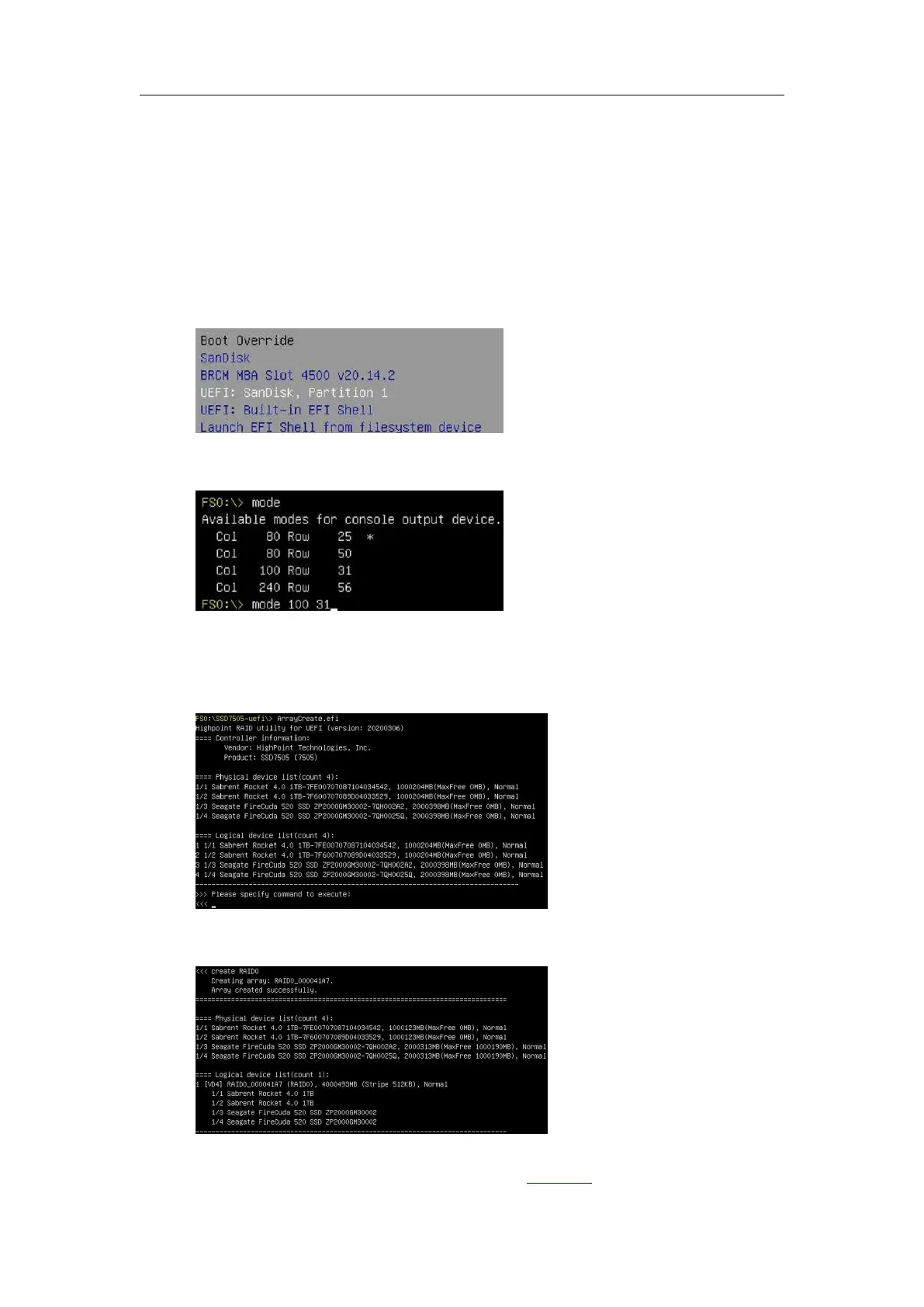
1. Insert the bootable USB flash drive into the motherboard.
2. Power on the motherboard
the BIOS Setting
Advanced, and select the “UEFI: flash
drive”.
3. At the prompt, enter the following command to change the resolution:
mode 100 31
Note: This command adjusts the screen resolution; please adjust it according to the actual
situation of your motherboard.
4. Enter the following command to enter the RAID creation utility:
ArrayCreate.efi
5. Enter the following command to create the RAID:
create RAID0
6. Enter the following command to exit the UEFI command line: exit
Note: For more additional commands, please refer to Appendix of this guide.















 To Next Page