SSD7000 NVMe RAID AIC BootRAID Installation Guide
HighPoint Technologies, Inc
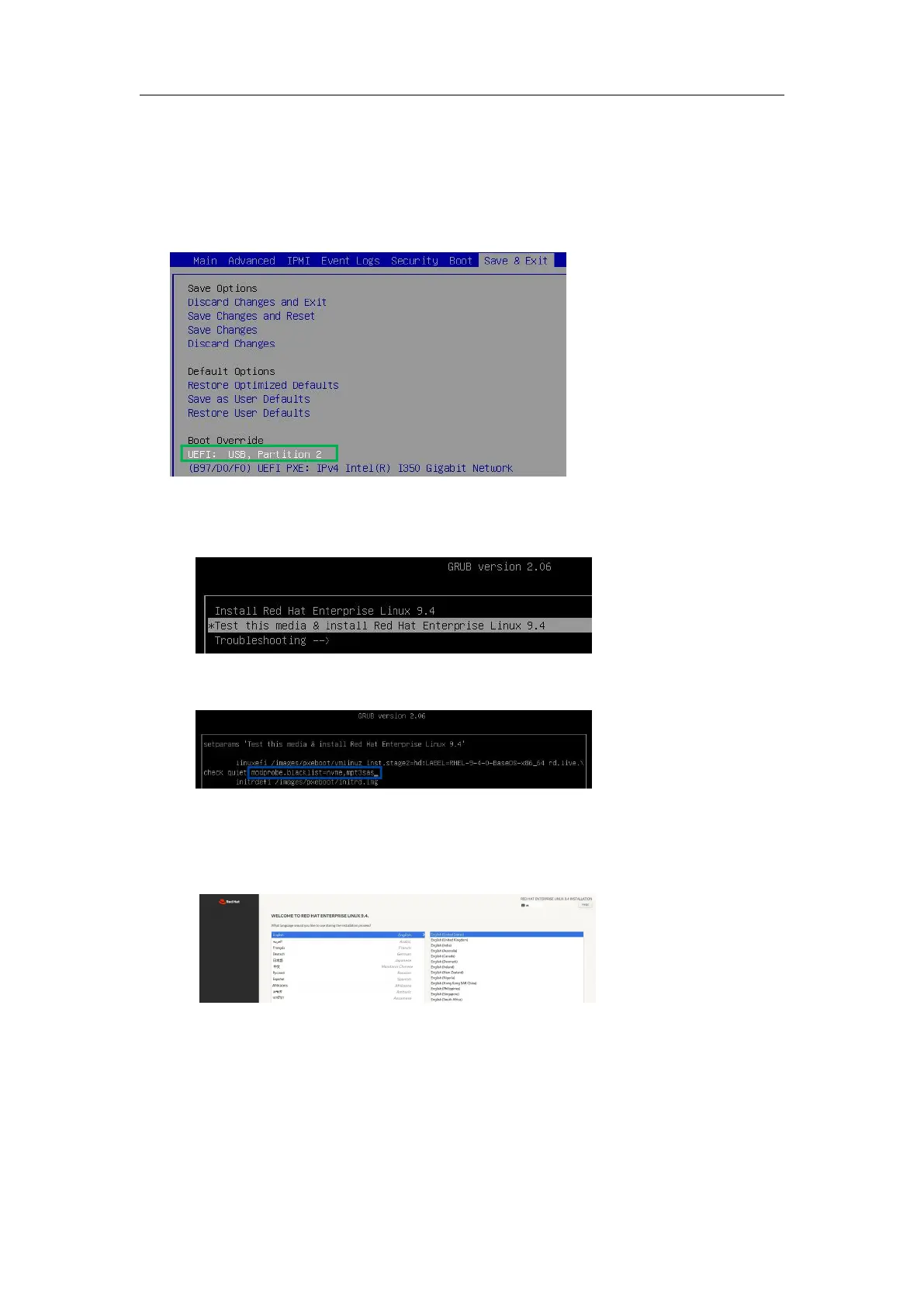
5. Install the RHEL OS in a RAID array
Please disconnect from the network and follow these steps to install the Red Hat Enterprise Linux
operating system in a RAID array.
1. Insert a bootable USB flash drive into the target system.
2. Boot the system using a bootable USB flash drive.
3. Block the system kernel module so that NVMe SSD is not occupied by the system driver.
Example: Red Hat Enterprise Linux 9.4
a. When the Installation screen appears, press the e key to edit the boot command line option.
b. On the edit command window, move the cursor to the end of the line “linux
efi/images/pxeboot/vmlinuz...”, and append “modprobe.blacklist=nvme,mpt3sas”.
c. Press CTRL+X or F10 to start the system.
4. Install the binary driver in a RAID array.
a. When the following window appears during installation. Press CTRL+ALT+F2 to switch to
the shell on console 2.
Note: The shortcut to switch to the shell may differ for different Red Hat Enterprise Linux
versions.
b. Execute the following command to create a mount point for the USB flash drive.
#mkdir /hptdd
c. Execute the following command to mount the USB flash drive to /hptdd.
#mount /dev/sda1 /hptdd/















 To Next Page