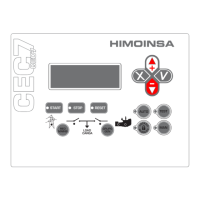
FRONT OF THE DISPLAY MODULE | PAGE 6
2.1.2 CONTROL UNIT COMMAND BUTTONS
Engine start button (only in manual mode).
Controls the start up with a single push.
Lit LED: Engine started.
Engine stop button (only in manual mode).
The rst press stops the engine following a cooling cycle. The
second press stops the engine immediately.
Lit LED: Engine stopping (with or without cooling).
Alarms reset button. Allows acoustic signals to be eliminated
and the user to report the alarms.
LED flashing: Pending notication alarms.
Lit LED: Alarms active.
Fuel transfer pump button.
In manual mode, this button activates the fuel transfer pump
if the fuel level is below the programmed limit.
Lit LED: Fuel transfer pump active.
2.1.3 DISPLAY BUTTONS
Confirm (V). Enter the menus and conrm the data
entered.
Cancel (X). Leave the menus and cancel the data entered.
Up (+). Advance through the selection on display screens,
the selection in maintenance menus and increase the
programming settings.
Down (-). Go back through the selection on display screens,
the selection in maintenance menus and decrease the
programming settings.
1. Backlit display 4 lines by 20 digits.
NOTE
The display goes into low power mode (backlight off) after 10 minutes have
passed without any keystroke.
2. Control unit buttons
• Buttons for control unit operating mode.
• Control unit command buttons.
• Display buttons.
• Genset contactor activation button (only CEM7P module).
3. Status LEDs
• ENGINE status LEDs.
• ALARMS LEDs.
• CONTACTORS status LEDs.
2.1 CONTROL UNIT BUTTONS
2.1.1 BUTTONS FOR CONTROL UNIT OPERATING MODES
Automatic mode: The control unit
monitors the status of the genset and
manages its operation and the
programmable inputs.
Manual mode: The control unit is
commanded by the user.
Lit LED: Automatic
mode active.
LED flashing:
Automatic mode
blocked.
LED off: Manual
mode active.



 To Next Page