12
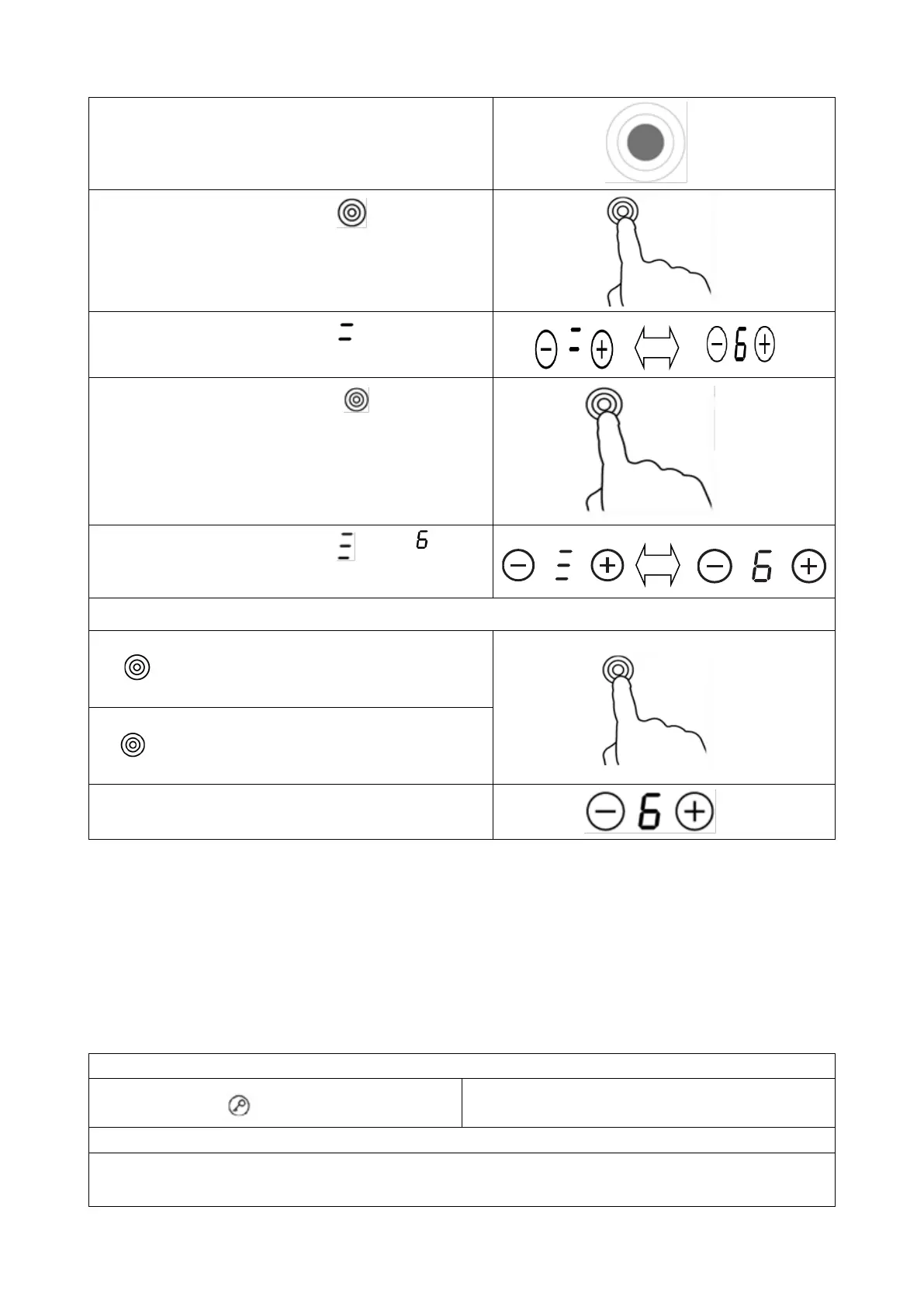
Central section of the treble cooking zone will switch on.
Touching the treble zone control once time,
the section (B) works.
The cooking zone indicator show “ “ and “6 ”
alternately.
Touching the treble zone control second time,
the section (C) works.
The cooking zone indicator show “ ” and “ ”
alternately.
Deactivate the Treble zone
If the 3# cooking zone works in section(B),touching
the two times, it will return to section (A) and
the treble zone is deactivated.
If the 3# cooking zone works in section(C),touching
the one time, it will return to section (A) and
the treble zone is deactivated.
After the treble zone is deactivated, the cooking zone
indicator show.
Note:
1、 The double loop is available only in 3# cooking zone.
2、 You can select the function from level 1 to level 9.
3、 You can active the Dual or Treble zone only when the 3# cooking zone is selected
3.3.4 Locking the Controls
• You can lock the controls to prevent unintended use (for example children accidentally turning the
cooking zones on).
• When the controls are locked, all the controls except the ON/OFF control are disabled.
To lock the controls
Touch the lock control
The timer indicator will show “ Lo “
To unlock the controls
Make sure the ceramic hob is turned on



 To Next Page