EasyManua.ls Logo

Hitachi IJ RX2-SD160 - 4.13.2 Use count multiplication printing; (1) Function

Hitachi IJ RX2-SD160
224 pages
Print Icon
To Next Page IconTo Next Page
To Previous Page IconTo Previous Page
Loading...
4-61 ●Use the count function
Edit message
2015.07.0712:45
Com=0
[Stop     ]
Message name[           ]
Column1
Item2
Char.count
3/1000
A B C D E F G H I J
Backspace
K L M N O P Q R S T
Dupli-
cate
Paste
U V W X Y Z
Space
etc.
▽
Calendar
/count
←
123‥
Sign
★◎ ‥
Logo
《 》
Delete
110 20
→
Prev.item
abcde
fghij
klmno
Nextitem
abcde
fghij
klmno
Change Change
Insert
・
Over-
write
ABC…
− +
Print
spec.
Print
format
M
Manual
Startup
HOME
Back
Cal.
cond.
Count
cond.
Edit message
2015.07.0712:45
Com=0
[Stop     ]
Message name[           ]
←
《 》
110 20
→
Prev.item
abcde
fghij
klmno
Nextitem
abcde
fghij
klmno
・
Column1
Item2
Char.count
3/1000
Year
Month
Day Hour
Minu-
te
Seco-
nd
Total
days
Week
num-
ber
Day
of
week
Shift
code
Time
count
Count
Backspace
etc.
▽
123‥
Sign
★◎ ‥
Logo
ABC…
Delete
Insert
+ − × /
( ) . : ,
Over-
write
Calendar
/ count
− +
←
→
Cancel
OK
・
Print
spec.
Print
format
M
Manual
Startup
HOME
Back
Space
(3) Operation
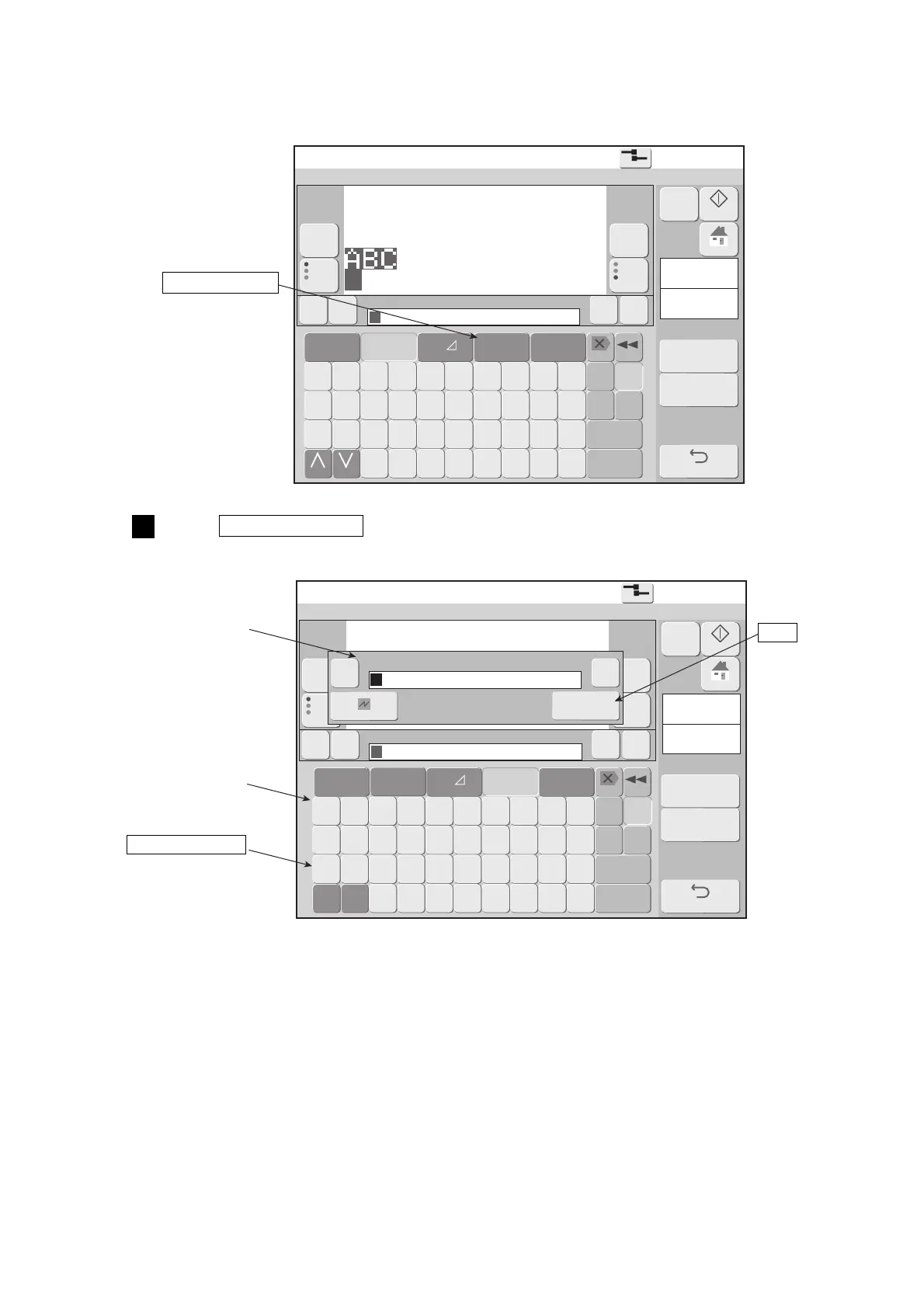
The Edit message screen is displayed.
Press Calendar/count .
The display changes to the calendar/count keyboard and the calendar/count edit window are displayed.
1
Calendar/count
Calendar/count
edit window
Calendar/count
keyboard
Count character
OK

Table of Contents