3 Control functions
Timers function
SMGB0135 rev.0 - 06/2020
26
3.10 Timers function
The LCD controller must be set to the correct date and time before using the timer function.
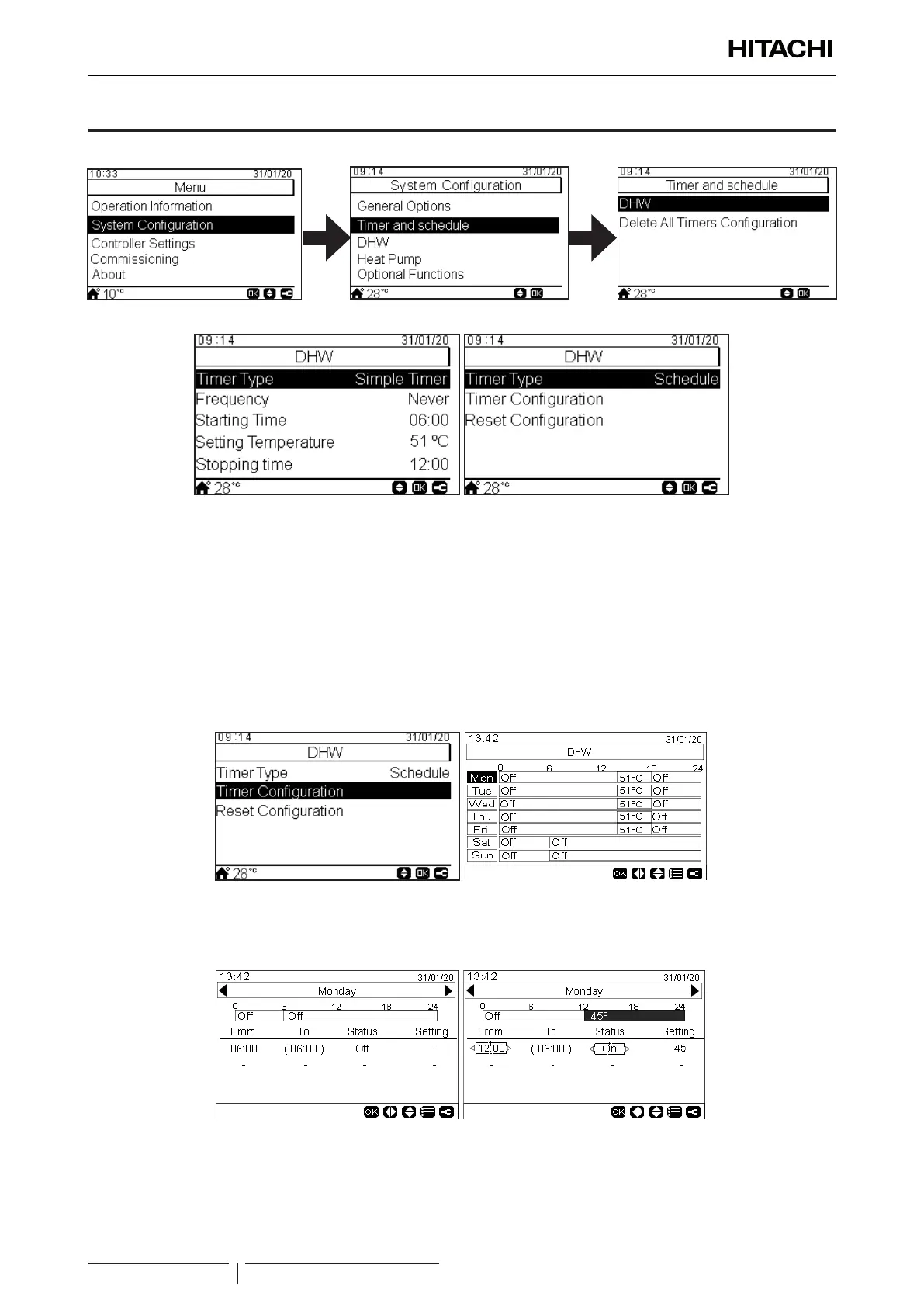
The timer function allows the selection of simple and scheduledtimers,asshownintheguresbelow:
3.10.1 Setting of Simple timer
The following parameters can be adjusted:
• Frequency (Never / Once / Everyday / Weekend / Work day)
• Starting Time: From 00:00 to 24:00
• Setting Temperature: From 30 ºC to 75 ºC
• Stopping time: From 00:00 to 24:00
3.10.2 Setting of Schedule timer
PressingtheOKkeywith“TimerConguration”beingselecteddisplaysthedetailedschedulescreen.Theactive
schedule timers are shown in a weekly calendar.
Uptovetimereventscanbedenedforeachweekday,andthesecanbeusedforturningtheDHWheatingoperation
onoro,ortochangethesettingtemperaturefortheDHWtank.PressingtheOKkeywithoneoftheweekdaysbeing
selected in the weekly calendar screen displays the detailed schedule for the weekday. The following parameters can be
adjusted for each program within the day:
• From: Starting time (the selected Status remains valid until the time shown between brackets in the “To” column)
• Status:(On/O)
• Setting: Setting temperature for the DHW tank (From 30 ºC to 75 ºC)
Pressing the “Menu” button during the edition of the timer events for a given weekday displays a menu to copy the daily
pattern to other weekdays or to suppress the selected timer event.



 To Next Page