POWER SOURCES
16
POWER SOURCES
WHEN USING WITH THE BATTERY (Provided)
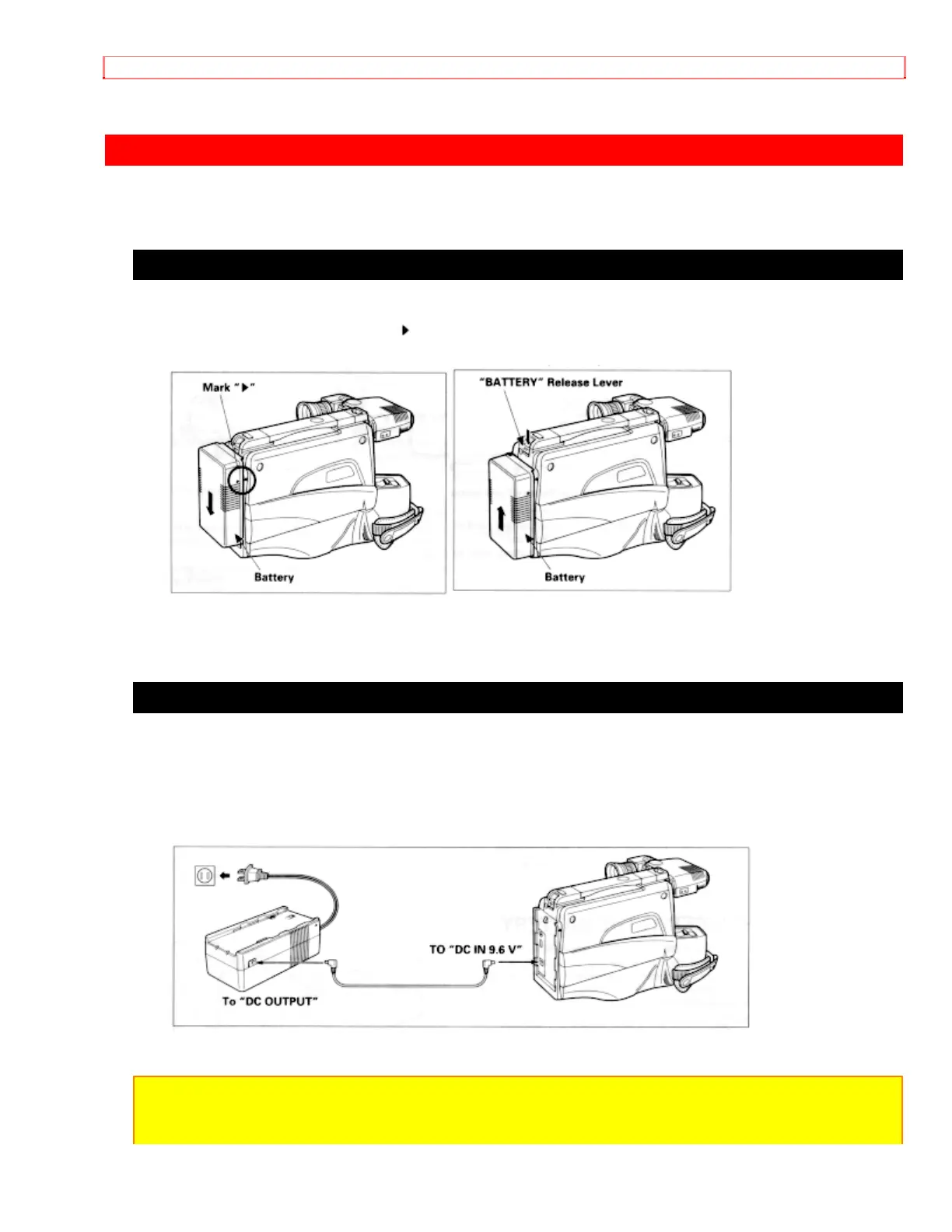
• To attach, align the mark " " of the battery with that of the camera/recorder so that the
battery fits into the groves, and slide the battery downward, as illustrated.
• To remove the battery:
Push and hold "Battery" release lever, then slide the battery to the upside and remove.
WHEN USING WITH THE AC ADAPTER/CHARGER (Provided)
1. Plug the AC adaptor/charger power cord into AC electrical outlet.
2. Connect one end of the DC cord (provided) to the "DC IN 9.6V" of the
camera/recorder.
Connect the other end of the DC cord to the "DC OUTPUT" of the AC adaptor/charger.
NOTES:
• The AC adaptor/charger cannot charge the battery and operate the camera/recorder at
the same time.


 To Next Page