VIEWING THE PICTURE PLAYED BACK ON YOUR TV
60
VIEWING THE PICTURE PLAYED BACK ON YOUR TV
To play back a tape recorded on your camera/recorder and view it on your TV receiver,
you must connect the camera/recorder to the TV receiver using either audio/video cord
(not provided) or RF converter unit (optional).
You also may play back the tape recorded by your camera/recorder on any other VHS
video cassette recorder. The camera/recorder records and plays back in VHS standard
speed (SP). A tape recorded in long play (LP) or extra long play (EP) cannot be played
back on this camcorder.
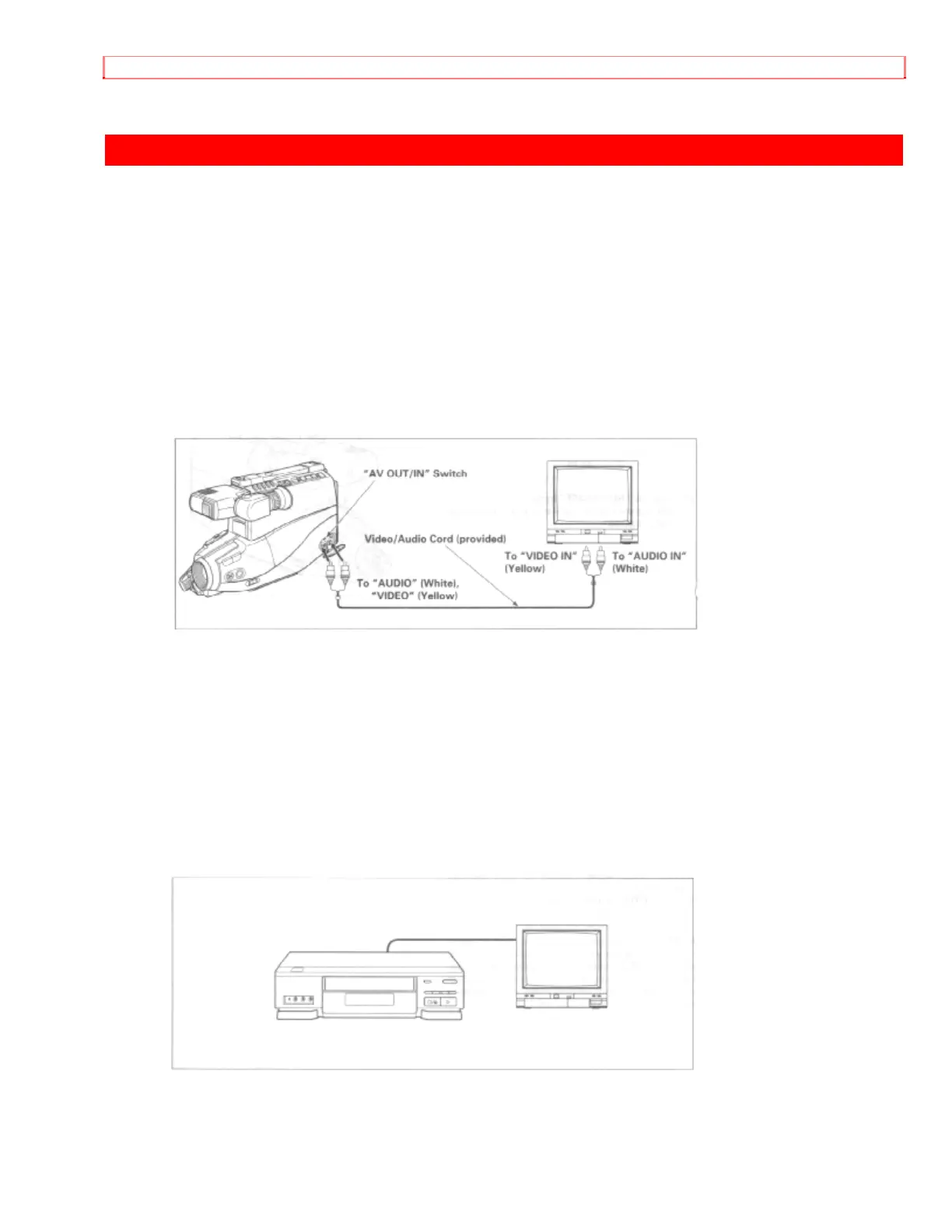
Example 1: If your TV has "VIDEO IN" and "AUDIO IN " jacks,
1. Connect the video/audio cord (provided) to "AUDIO IN" and "VIDEO IN" of your TV.
2. Connect the other end of the video/audio cord to "AUDIO" and "VIDEO" of your
camera/recorder.
3. Turn on TV.
4. Set "AV OUT/IN" switch to "OUT" position.
5. Press "STOP/EJECT" button on the camera/recorder and then insert the cassette.
6. Place "POWER" switch in "VIDEO" position.
7. Press "PLAY" button.
8. After playing press "STOP/EJECT" button.
Example 2: If you have a VHS VCR,
1. Insert the recorded tape into your VCR.
2. Press "PLAY" button of your VCR.


 To Next Page