EasyManua.ls Logo

Hitachi VM-E535LE - Digital Effects Recording; Digital Effects Overview; 16 x9 Mode Recording

Hitachi VM-E535LE
46 pages
Print Icon
To Next Page IconTo Next Page
To Previous Page IconTo Previous Page
Loading...
ENGLISH
DIGITAL
EFFECTS
RECORDING
The
digital
processor
in
this
camera/recorder
allows
you
to
record
picture
and
add
special
effects;
16x9
recording
mode,
a
negative
image
(negative/positive
recording),
130
times
digital
zoom
feature,
a
symmetric
image,
obtained
by
placing
a
mirror
at
the
center
of
the
screen
(half¬
mirror
recording),
and
an
image
in
mosaic
(mosaic
recording).
NOTE:
The
half-mirror
recording
and
mosaic
recording
functions
cannot
be
used
with
digital
zoom,
instant
zoom,
image
stabilizer
or
zoom
fade
function.
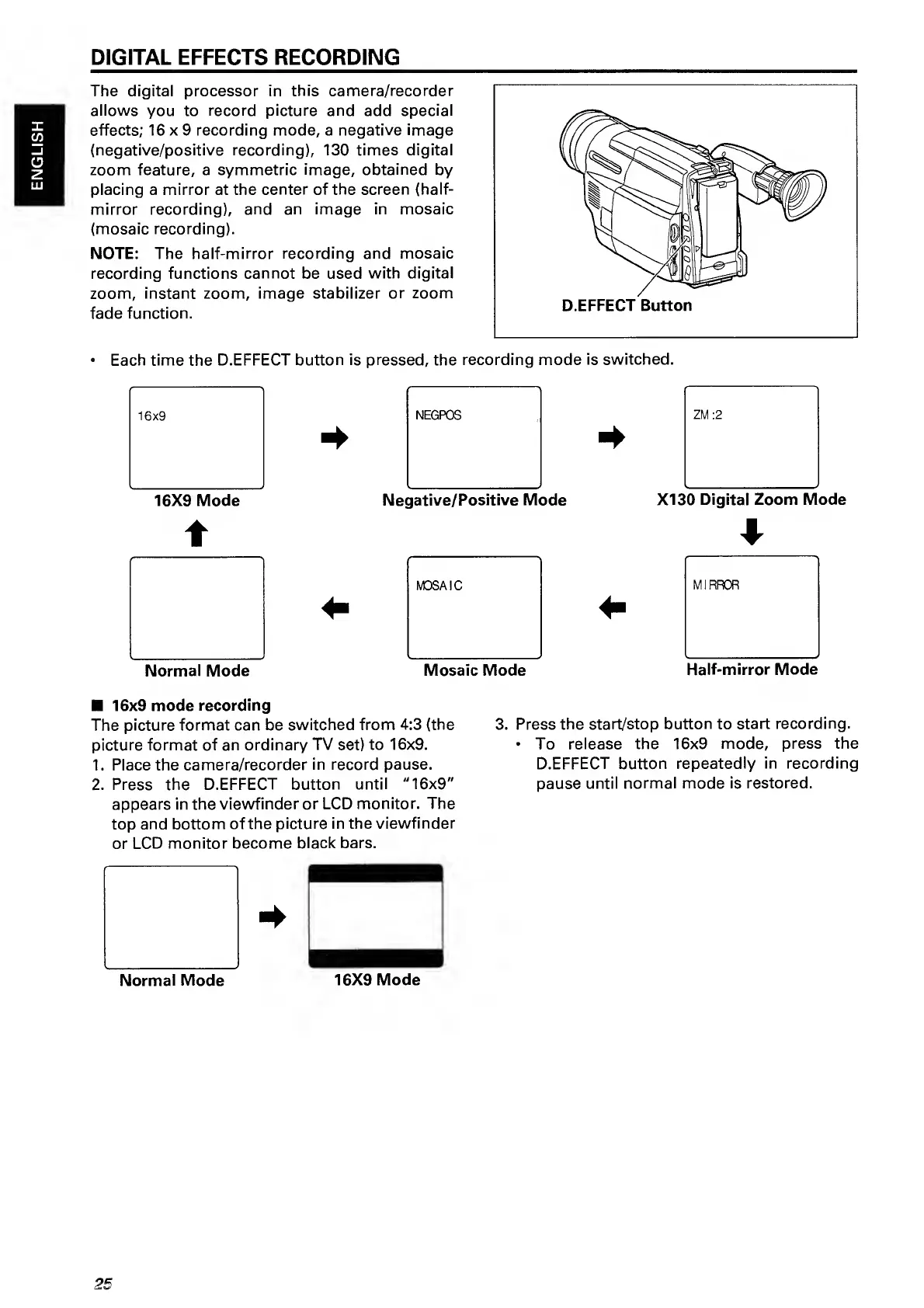
Each
time
the
D.EFFECT
button
is
pressed,
the
recording
mode
is
switched.
16x9
NEGPOS
ZM
:2
*
16X9
Mode
Negative/Positive
Mode
XI30
Digital
Zoom
Mode
t
*
MOSAIC
MIRROR
4
-
Normal
Mode
Mosaic
Mode
Half-mirror
Mode
16x9
mode
recording
The
picture
format
can
be
switched
from
4:3
(the
picture
format
of
an
ordinary
TV
set)
to
16x9.
1.
Place
the
camera/recorder
in
record
pause.
2.
Press
the
D.EFFECT
button
until
"16x9"
appears
in
the
viewfinder
or
LCD
monitor.
The
top
and
bottom
of
the
picture
in
the
viewfinder
or
LCD
monitor
become
black
bars.
3.
P
ress
the
start/stop
button
to
start
recording.
To
release
the
16x9
mode,
press
the
D.EFFECT
button
repeatedly
in
recording
pause
until
normal
mode
is
restored.
25

Related product manuals