INTRODUCTION
Version 1.0, 05/2015. Copyright 2012 Hitron Technologies
18
Version 1.0, 05/2015. Copyright 2015 Hitron Technologies
18
CDA3-35 User’s Guide
1
Open a browser window.
2 Enter the CDA3-35’s IP address (default 192.168.100.1) in the URL bar.
3 The System Information screen displays (see The System Information Screen
on page 27).
4 Select the Language, if required. By default, the CDA3-35’s interface displays in
English.
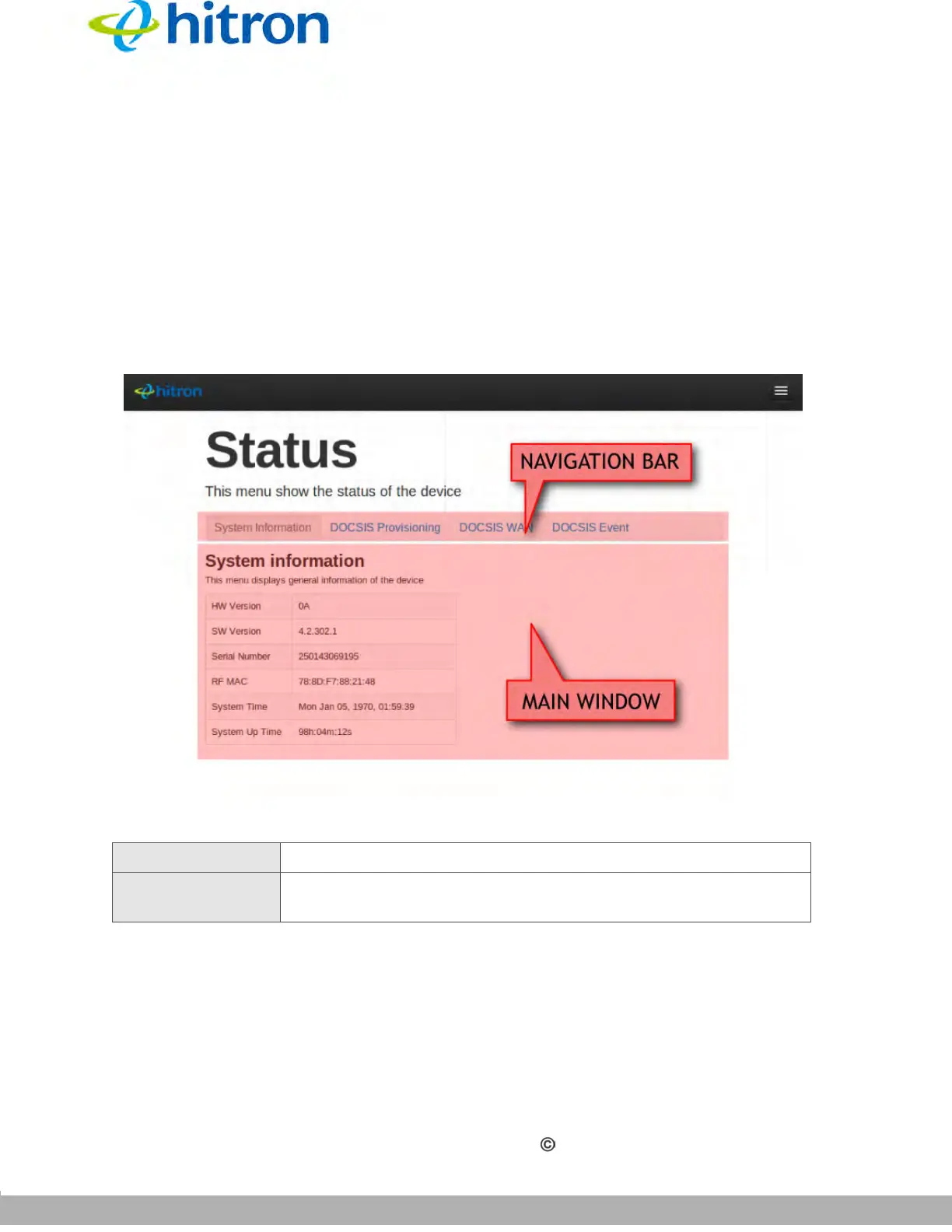
Figure 5: GUI Overview
1.6 Resetting the CDA3-35
When you reset the CDA3-35 to its factory defaults, all user-configured settings are
lost, and the CDA3-35 is returned to its initial configuration state.
Table 3: GUI Overview
Navigation Bar Use this section to move from one related screen to another.
Main Window Use this section to read information about your CDA3-35’s
configuration, and make configuration changes.



 To Next Page