Built-in devices
10-2
If the system's power supply is interrupted, the time must
be reset.
• Only operate the device if it is in perfect technical
condition.
• Always have malfunctions repaired immediately. Only
repair malfunctions yourself if such malfunctions are
described in the troubleshooting instructions in this
manual.
• Do not carry out any repairs on or make any changes to
the device.
• Only have a defect device repaired by the manufacturer
or their service department.
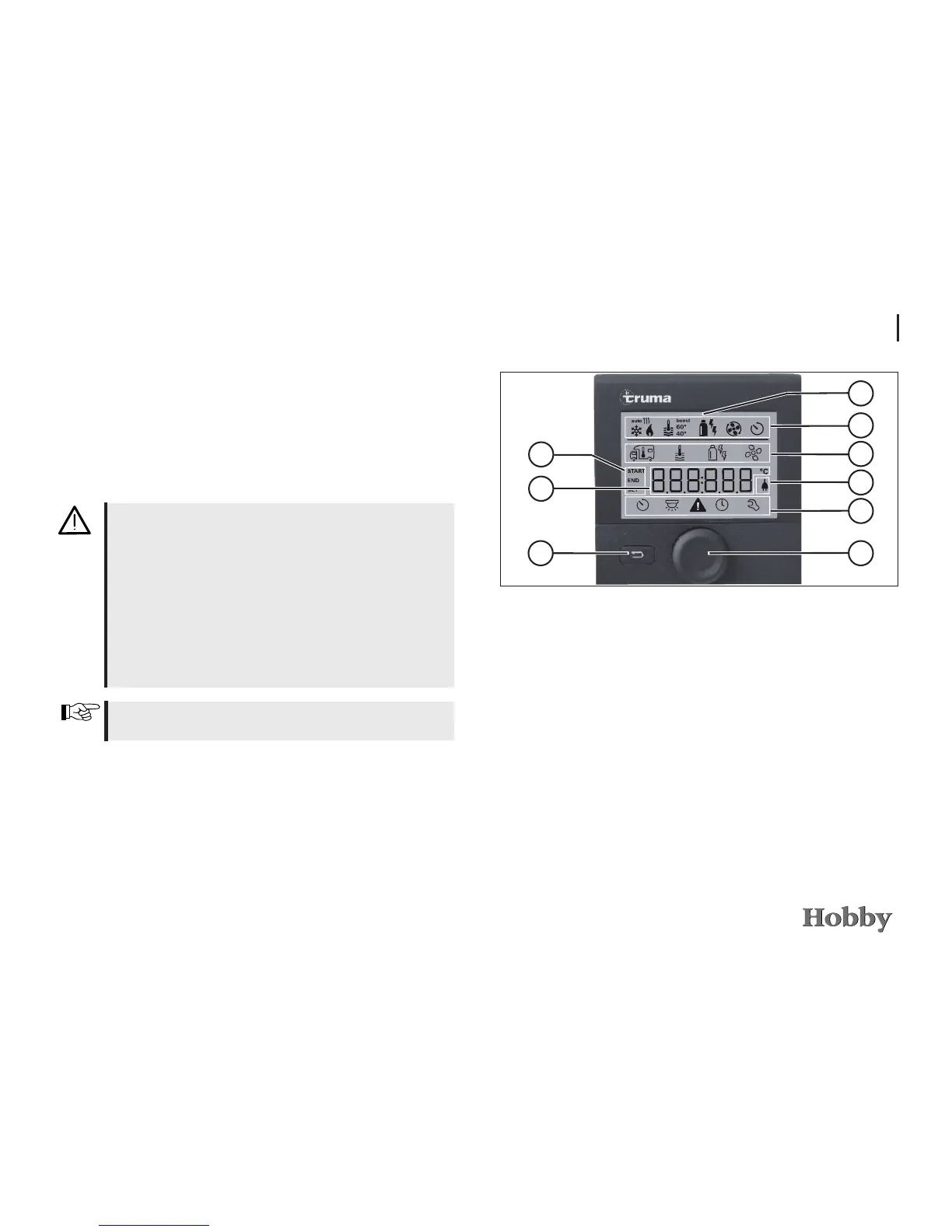
Operating and display controls
j
Display
k
Status line
l
Menu line (top)
m
Menu line (bottom)
n
Display: 230V mains voltage (charging current)
o
Display: timer
p
Settings / values
q
Adjusting knob / pushbutton
r
Reset button
6
1
7
9
2
3
8
The adjusting knob / pushbutton
q
is used to select the menus in
lines
l
and
m
and change the settings. The data is shown on
the display
j
; the background is illuminated. Use the reset button
r
to return to the previous menu.
5
4
Initial operation
• Set the air vents in the motor home so that the warm air
is blown out where required.
• Check that the chimney is clear. Remove any covers.
• Open the gas bottle and gas shuto valve on the gas pipe.





 To Next Page