Built-in devices
10-5
Icon Type of operation Type of energy
a Gas Gas
b EL 1 Electricity
c EL 2 Electricity
d MIX 1
1)
Electricity + Gas
e MIX 2
1)
Electricity + Gas
Use the adjusting knob / pushbutton to select the icon in the
menu line
l
- Press to switch to the setting mode.
- Use the adjusting knob / pushbutton to select the desired type of energy
- Press the adjusting knob / pushbutton to conrm the temperature.
1)
Mixed operation (electric and mixed operation are optional
extras)
a
b c
d
3
e
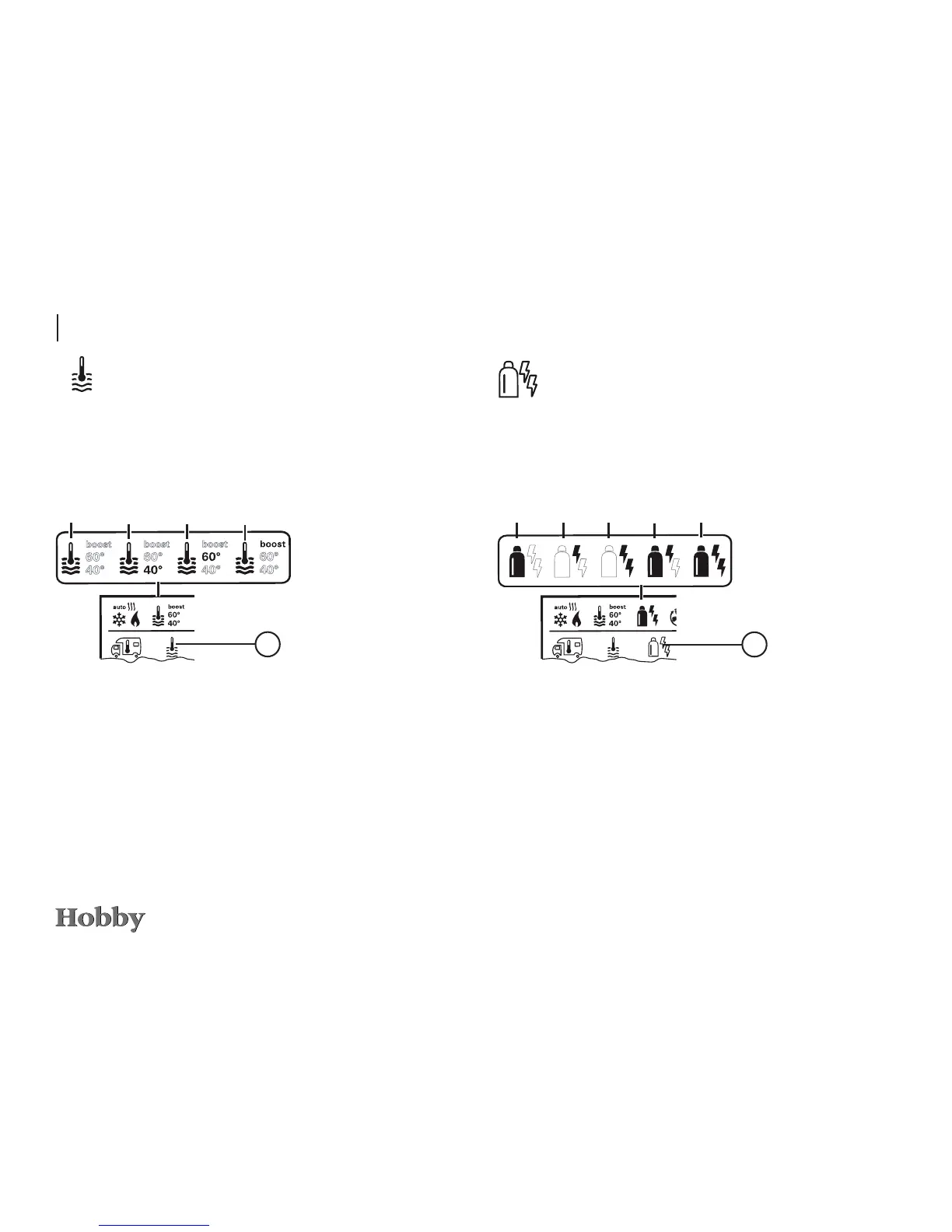
Selecting the type of energy *
a = boiler
1)
is switched on
b = 40°
** hot water temperature of 40°C
c = 60° hot water temperature of 60°C
d = BOOST
1)
specically heats up the contents of the boiler
(boiler operation) fast for a max. period of 40 min.
Use the adjusting knob / pushbutton to select the icon in the
menu line
l
- Press to switch to the setting mode.
- Use the adjusting knob / pushbutton to select the desired temperature.
- Press the adjusting knob / pushbutton to conrm the temperature.
Changing the hot water temperature
1)
The icon will blink until the desired water temperature is
reached.
1)
Hot water temperature of 40°C can only be maintained at
40° C for a limited period of time if both the room and the
water are being heated.
a
b c
d
3





 To Next Page