72 Operating the Device
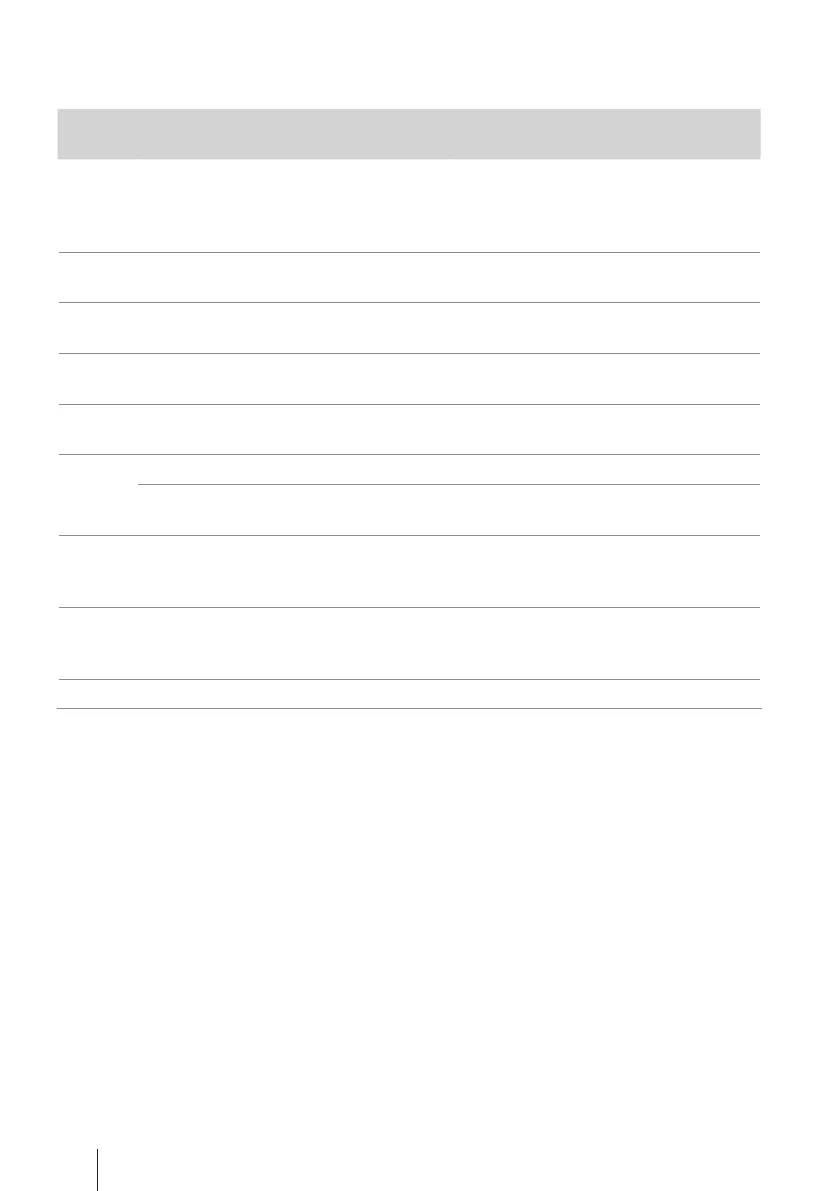
The following table shows all error codes that can occur in connection with the use
of the SD card.
Error
code
Meaning Remedy
E00
Writing data has failed. Possible causes
are power failure, removal of card during
writing or a faulty SD card.
The SD card is probably faulty. Remove
the SD card and then insert it into the
device again. If the error continues to
occur, send the card back to the physician.
E01 The SD card is faulty.
Obtain a new SD card from your physi-
cian or specialist dealer.
E02 File system or folder structure is faulty or
cannot be read.
The SD card must be formatted by the
physician using TRENDset.
E03
New files cannot be created or the SD
card is full.
The SD card must be formatted by the
physician using TRENDset.
E04
The device cannot adopt the therapy data.
The SD card must be returned to the phy-
sician to check the therapy.
E05 The SD card was removed. Insert the SD card again.
The SD card has fallen out of the card slot.
If this occurs frequently, the device should
be examined by a service technician.
E06 The SD card or the device is faulty.
Change SD card. If this occurs frequently,
the device should be examined by a ser-
vice technician.
W00
The device is attempting to repair the SD
card. But you have inserted a new SD
card into the device.
Confirm with key. The old SD card is defec-
tive. Continue to use the new SD card.
W05/06 see error code E05/E06 see error code E05/E06


 To Next Page