CTC-CEN Service Manual 07-13 Rev.E
27
At the end of the installation a icon
will be on the desktop.
Programmer connection
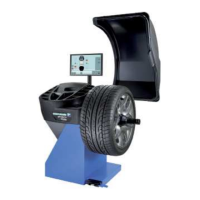
a) Connect the programmer to the USB port,
and the programming cable as shown below.
WARNING: the blue connection must be
inserted in the programmer connection
marked with a small triangle.
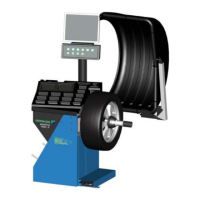
b) Connect the programming cable to the
inverter programming port.
WARNING: The inverter must be OFF.
Update firmware wit PICkit 2
a) Start programming software with
icon.
b) With Device Family -> PIC18F the programmer auto-detect the device to program.
In this case PIC18F2331 (The board must be powered).




 To Next Page