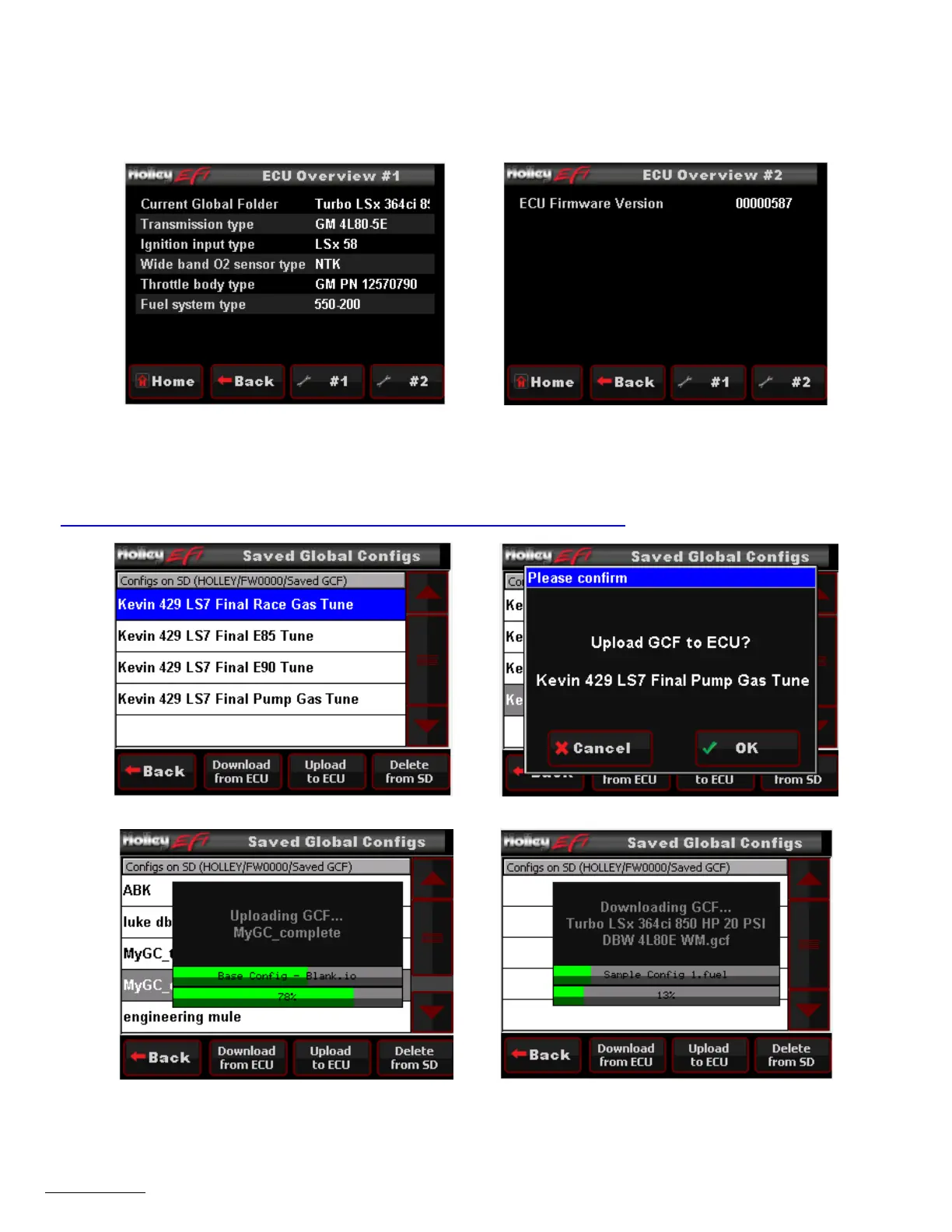
29.1.1 ECU Overview
Information specific to the engine and ECU configuration is shown here, these include the name of the current global folder, transmission
type, ignition input type, WBO2 type, throttle body type, fuel system type, and ECU firmware version. Note that this menu is view only – no
information can be changed. Any changes to engine or transmission setup must be done through the TUNING or WIZARDS menu.
Figure 46 Figure 47
29.1.2 ECU Globals
This menu will list any global folders that have been saved to the SD card. It will also allow you to download a global folder from the ECU
to the SD card so that it may be opened on any Windows based PC with free Holley EFI software installed. Software may be downloaded
at http://www.holley.com/data/TechService/Technical/Holley%20EFI%202.2.0.3%20Setup.zip
Figure 48 - Global Folders List Figure 49 - Global Folder Upload to ECU from SD Card
Figure 50 - Upload Status Screen Figure 51 - Global Folder Download to SD Card Status Screen




 To Next Page