8.0 CHARGING
Of
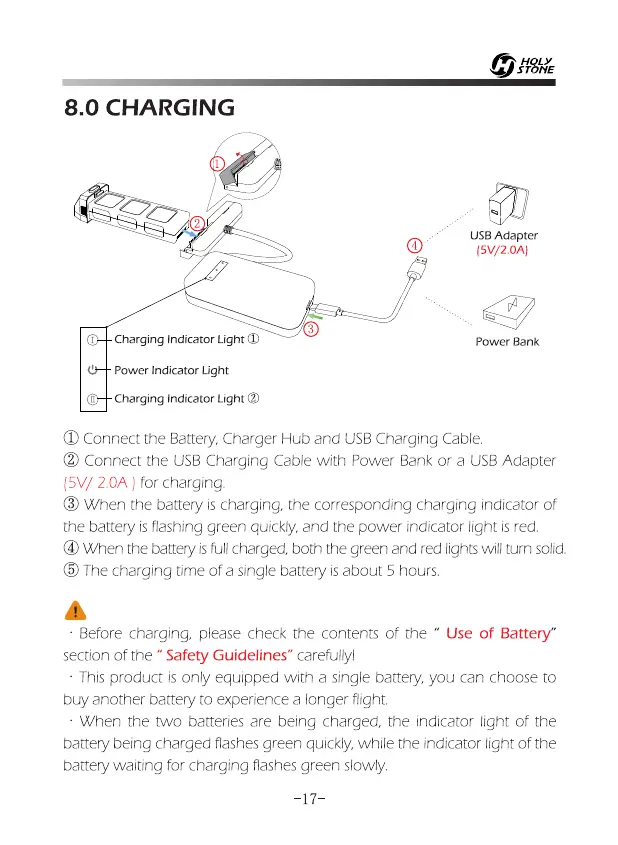
USB Adapter
(5V/2.0A)
Power Bank
Charging Indicator Light 0
Power Indicator Light
Charging Indicator Light
e
0 Connect the Battery, Charger Hub and USB Charging Cable.
Connect the USB Charging Cable with Power Bank or a USB Adapter
(5V/ 2.0A ) for charging.
1
0 When the battery is charging, the corresponding charging indicator of
the battery is flashing green quickly, and the power indicator light is red.
® When the battery is full charged, both the green and red lights will turn solid.
® The charging time of a single battery is about 5 hours.
•
•
Before charging, please check the contents of the " Use of Battery"
section of the " Safety Guidelines" carefully)
This product is only equipped with a single battery, you can choose to
buy another battery to experience a longer flight.
When the two batteries are being charged, the indicator light of the
battery being charged flashes green quickly, while the indicator light of the
battery waiting for charging flashes green slowly.
-17-














 To Next Page