11.4 Headless Mode
C) Click the
"LI"
icon first, then select the "
" icon, and follow the
prompt box to enter the Headless Mode.
© Exit the Headless Mode by clicking the"
" icon again.
HEAD
TAIL
HEA
,
w
,
HEAD
TAIL
A
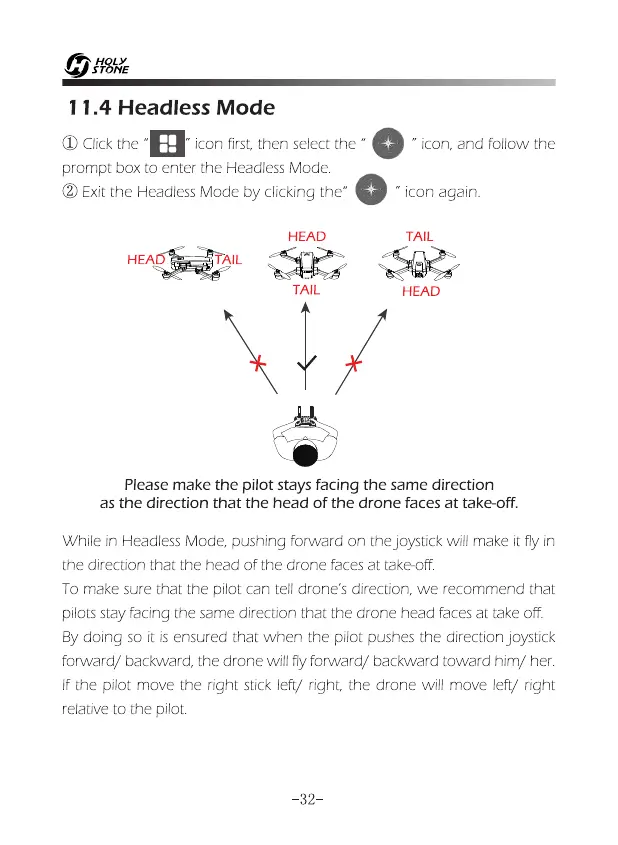
Please make the pilot stays facing the same direction
as the direction that the head of the drone faces at take-off.
While in Headless Mode, pushing forward on the joystick will make it fly in
the direction that the head of the drone faces at take-off.
To make sure that the pilot can tell drone's direction, we recommend that
pilots stay facing the same direction that the drone head faces at take off.
By doing so it is ensured that when the pilot pushes the direction joystick
forward/ backward, the drone will fly forward/ backward toward him/ her.
If the pilot move the right stick left/ right, the drone will move left/ right
relative to the pilot
-32-














 To Next Page