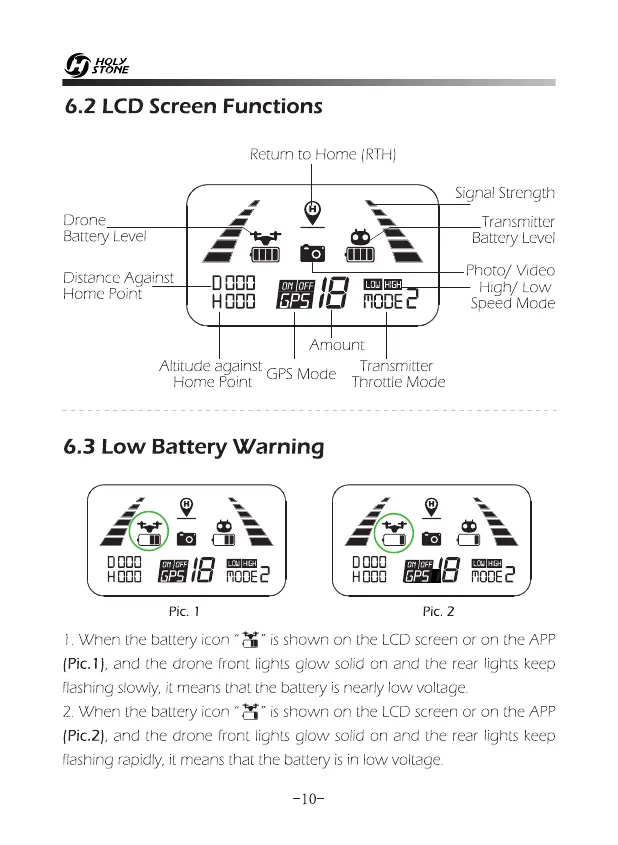
6.2 LCD Screen Functions
Return to Home (RTH)
Drone
9
=
Transmitter
Battery Level
—
11
Battery Level
1U1
Photo/ Video
Distance Against
D000
High/ Low
,
H 000
18
EDE2
Speed Mode
Home Point
Amount
Altitude against
GPS Mode
Transmitter
Home Point
Throttle Mode
6.3 Low Battery Warning
41N
■
ED
RE
OS
ga2
0000
HDOD
in
DI
EMU
MODE
C
GP5 I
Pic. 1
Pic. 2
I. When the battery icon "N
-
is shown on the LCD screen or on the APP
(Pic. 1), and the drone front lights glow solid on and the rear lights keep
flashing slowly, it means that the battery is nearly low voltage.
2. When the battery icon "M" is shown on the LCD screen or on the APP
(Pic.2), and the drone front lights glow solid on and the rear lights keep
flashing rapidly, it means that the battery is in low voltage.
Signal Strength
-10-














 To Next Page