storageoptions.com/support 13
2.3 Adjusting the time and date
It is important to adjust the time and date on your system, to ensure the recorded files are properly labelled.
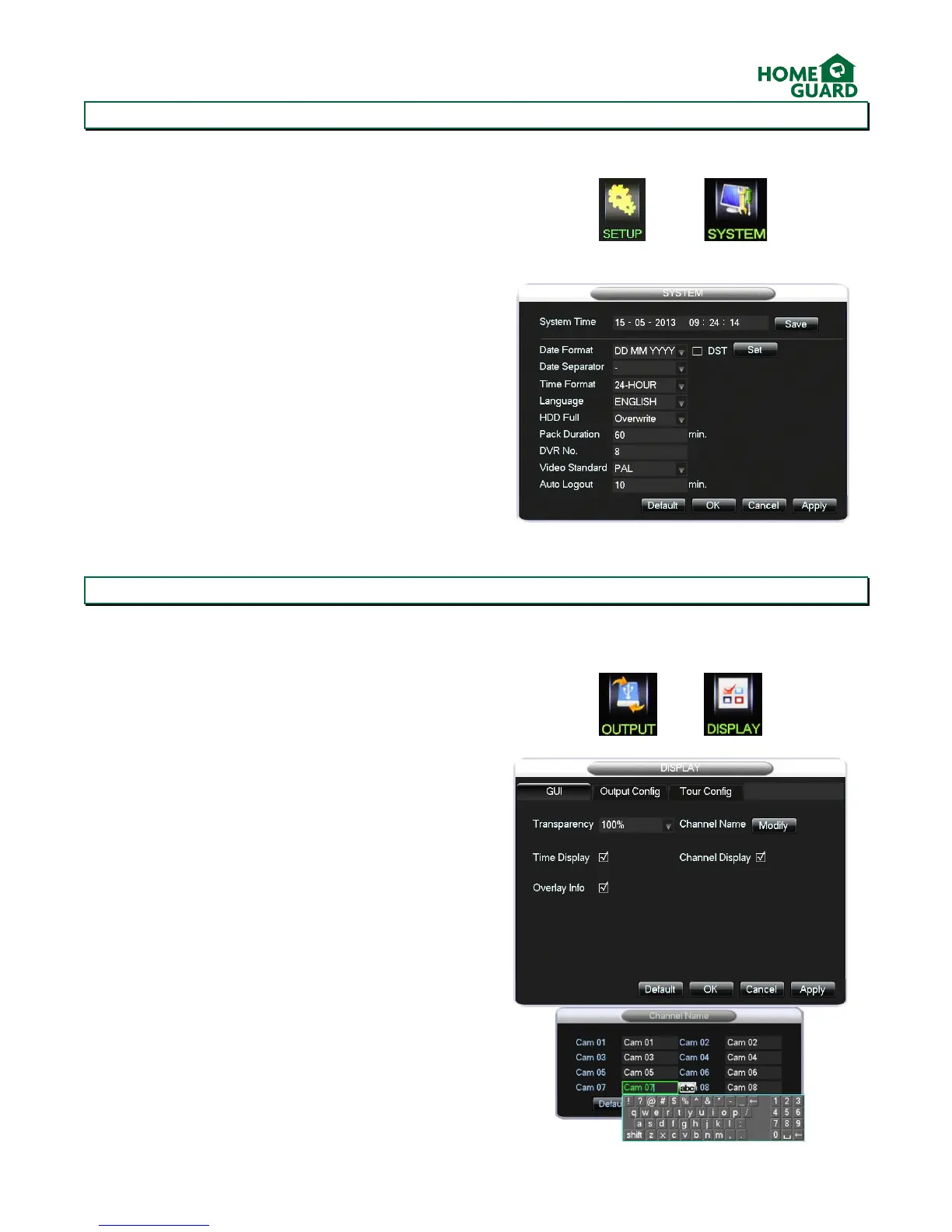
In the main menu, select CONFIGURATION then
SYSTEM
The System screen allows you to adjust the system
time and date, and which format they are displayed
in.
Once the time has been adjusted, click Save.
You can then amend other settings as required, click
OK when done.
Other settings include how the DVR handles a full
hard drive, the length of each recorded file, and the
time after which the user will be logged out if
inactive. These are explained in more detail in
chapter 4.5.
2.4 Adjusting the channel names
It is a good idea to adjust the channel names, so you can easily tell which one you are reviewing, particularly if your
cameras are looking at similar areas.
In the main menu, select OUTPUT, then
DISPLAY
The display menu allows you to set display options.
Next to Channel Name, click Modify
Click in the name field to edit it using the virtual
keyboard, open this by clicking on the characters box
twice.
When done, click anywhere on the screen to close the
virtual keyboard, click OK, then OK again to exit the
display menu. The new channel name is displayed in
the bottom corner of the viewing screen.


 To Next Page