storageoptions.com/support 7
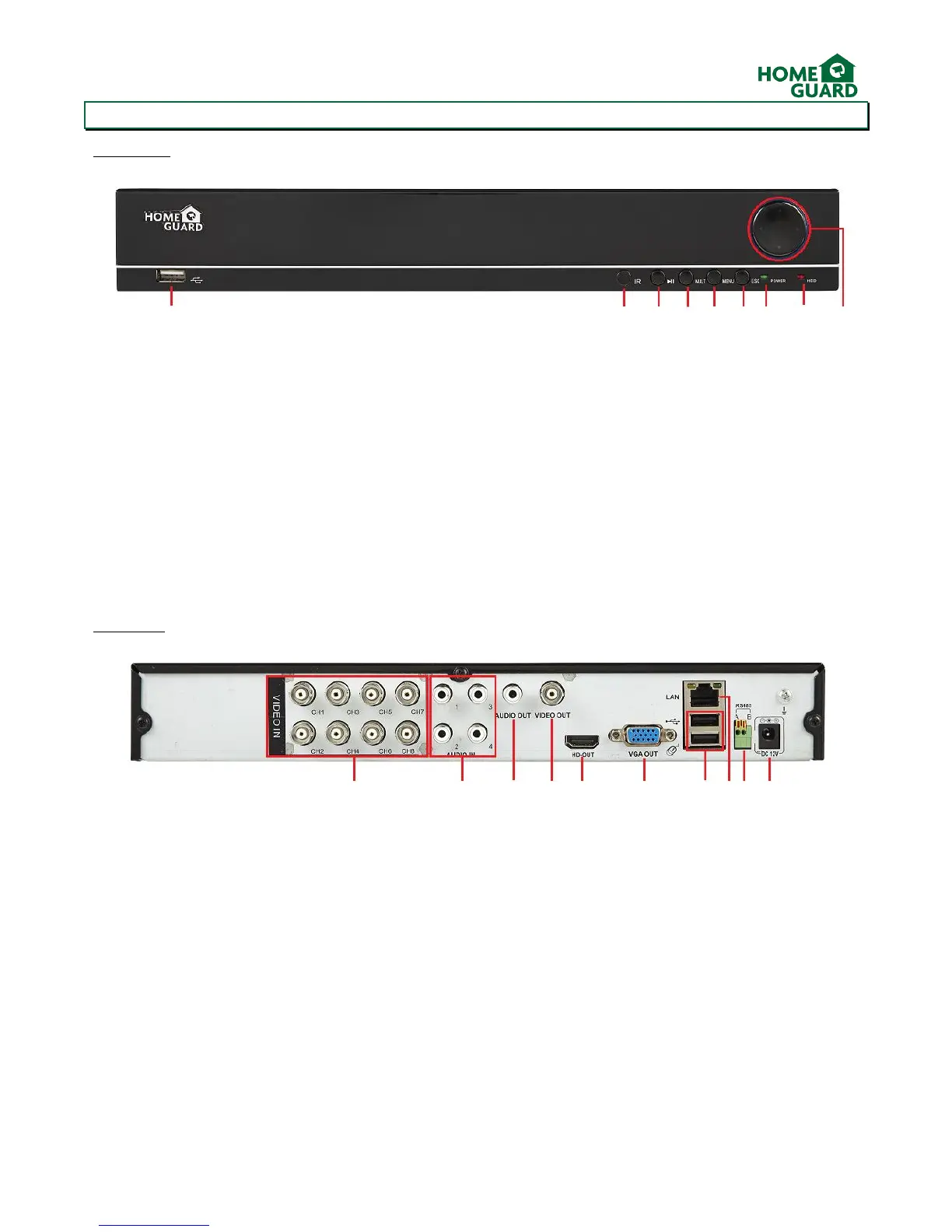
1.1 DVR Layout
Front Panel
Rear Panel
*Requires audio capable camera or self-powered microphone, not supplied
**Requires PTZ Camera
1. USB 2.0 Slot: For connecting external storage and upgrading the firmware
2. IR Receiver: Receives the signal from the remote control
3. Play/Pause: Opens the Search/Playback menu
4. MULT: Alternates the display between 1 and 4 cameras
5. MENU: Opens the DVR’s main menu
6. ESC: Returns back one menu page
7. Power LED: Indicates the DVR is turned ON when lit
8. HDD LED: Flashes when the HDD is in use
9. D-Pad: For navigating through the menus and switching between the displayed channels
1. 4x/8x BNC Video Connectors: For each camera input
2. 4x RCA Audio Connectors: For each audio input*
3. RCA Audio Output: For speakers
4. BNC Video Output: For older TV sets (the cable supplied must be connected to a
composite input on your TV!)
5. HDMI Output: For most modern TVs
6. VGA Output: For most monitors
7. 2 x USB 2.0 Ports: For USB mouse and external storage
8. LAN Port: To connect your DVR to the network
9. RS485 Connector: For PTZ Camera**
10. Power Connector: To power the DVR


 To Next Page