storageoptions.com/support 35
4.2 Maintain
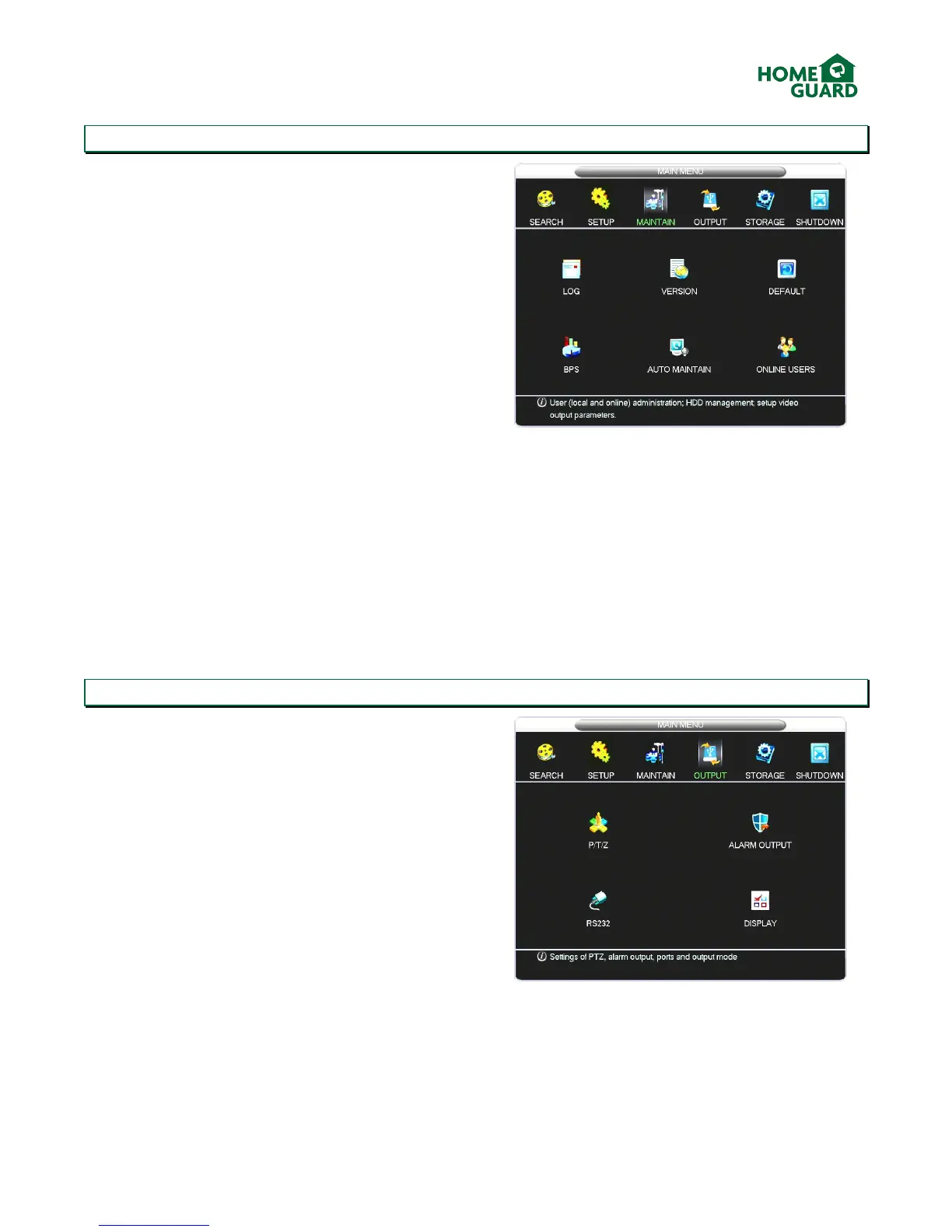
The MAINTAIN menu has six options:
LOG: displays a log of all activity on the DVR. You can
search for a particular event, or clear the list.
VERSION: displays information about the DVR’s
software. You can also upgrade the software via a USB
flash drive if an update is released.
DEFAULT: Select which settings you want to reset to
their default values.
BPS: shows the space used on the hard drive by each
channel, in real time. Use this to get an understanding
of how different recording settings affect the space
required.
AUTO MAINTAIN: offers the option to automatically
reboot the system at a chosen time during the week,
doing this allows the system to check itself for
potential faults.
ONLINE USERS: displays devices connected to the DVR
remotely, and allows you to block or disconnect those
users.
4.3 Output
The Output menu controls all signals being sent from
the DVR:
P/T/Z: Amend the settings relevant to the control of
Pan Tilt Zoom cameras. Refer to the camera’s manual
to confirm which values are required.
RS232: Amend the settings relevant to devices
controlled via the RS232 port (for advanced users
only)
ALARM OUTPUT: Confirm the active period for an
external alarm system.
DISPLAY: Amend the TV or Monitor display settings
(see below)


 To Next Page