storageoptions.com/support 17
3 Basic Use
This chapter covers the main functions DVRs are used for, i.e. recording, alarm, and remote viewing (from a PC or
mobile). Playback options are described in chapter 2.8.
3.1 Menu layout
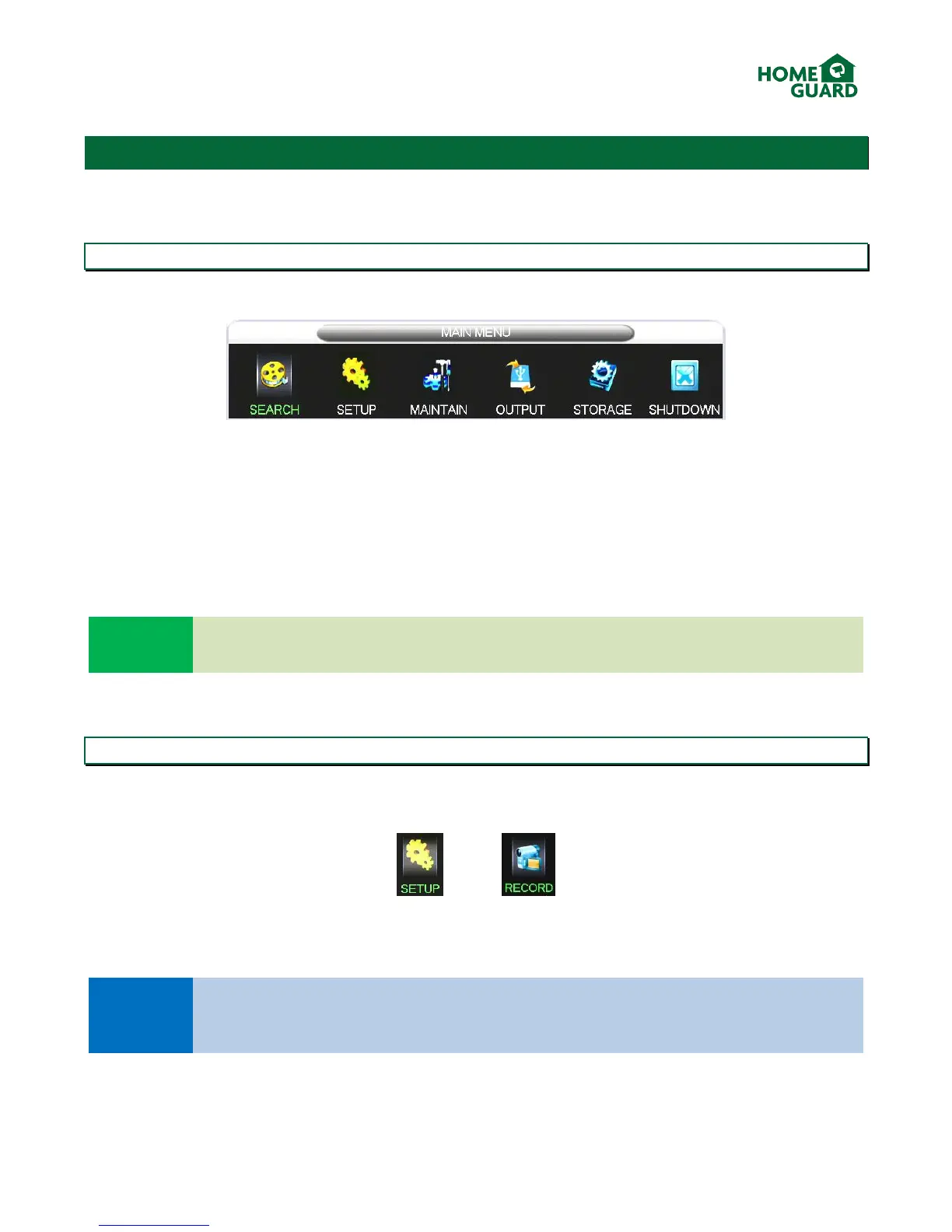
The main menu has 6 options:
SEARCH: takes you to the playback screen
SETUP: to adjust system, recording, network, alarm and account settings, as well as how the system deals with
errors.
MAINTAIN: shows information about the DVR and its usage, such as how much space each recording is using up, a
log of all activity on the DVR, and options to default most settings and automatically update the system.
OUTPUT: to adjust output settings, from the display to any accessories you may use.
STORAGE: to manage the installed HDD(s) and backup USB drive(s)
SHUTDOWN: to shut down or restart the DVR, or to log out of the menu.
Look out for handy help texts displayed in the bottom field of the menu window, for a quick
explanation of the selected function.
3.2 Recording
This DVR offers a range of recording options to suit any user’s needs. These range from recording resolution and
quality, to recording schedule and conditions. To access these, select SETUP in the main menu, then RECORD.
All options mentioned in this chapter cover one channel only, however the settings applied to that
channel are easily copied by selecting Copy and choosing which channel to copy the settings to. The
copy option is available on each screen.


 To Next Page