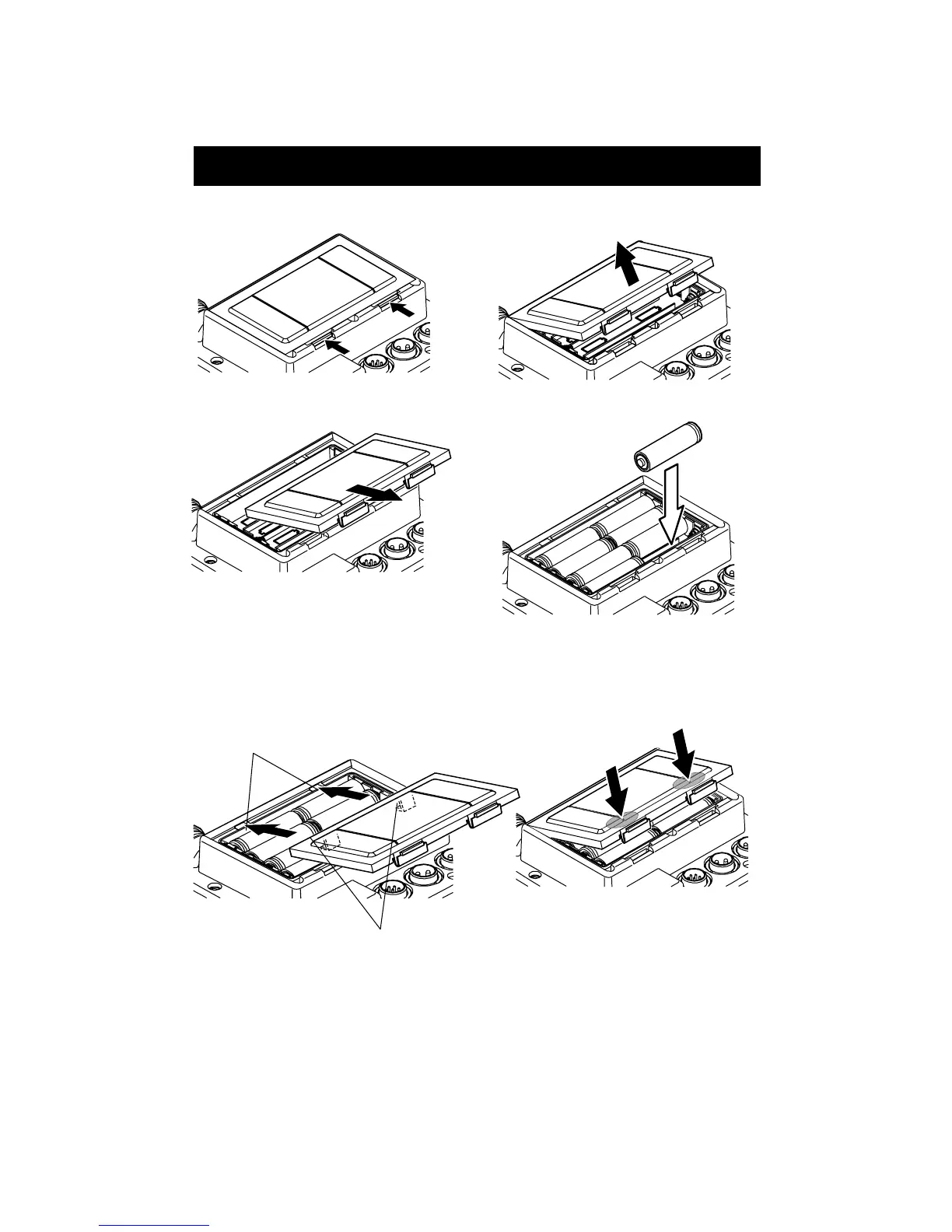
5. Putting the batteries
1) Open the battery cover on the rear side of unit and put the batteries.
12
Release two locks pushing them.
Raise the battery cover.
Pull the battery cover toward you and
remove it.
Put 8 pcs. size AA batteries with correc
polarity.
2) After putting batteries, hook picks of battery cover with square holes of unit and fit the
cover. Please confirm if two locks fit correctly.
Press two locks firmly until small sound to
lock comes out and close the cover. Press
positions indicated by arrows with fingers.
Put picks on cover onto
holes of unit.
Hole
Pic
Note 1) Unless two locks fit correctly, water enters in.
Note 2) In case the unit is wet, wipe out water well and then put batteries .Especially when
the cover is opened while around the cover gets wet, it causes to trouble that water
enters in.


 To Next Page