EasyManua.ls Logo

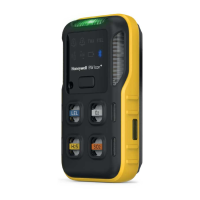
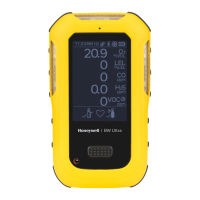
Honeywell BW Flex Series - User Manual

Honeywell BW Flex Series
61 pages
Print Icon
To Next Page IconTo Next Page
Loading...
USER
MANUAL
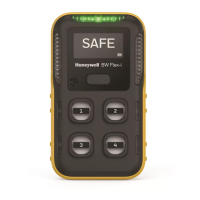
Honeywell BW ™ Flex Series
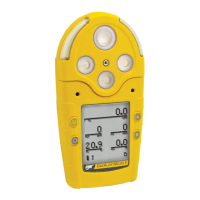
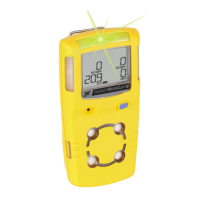
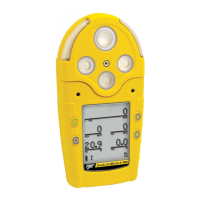
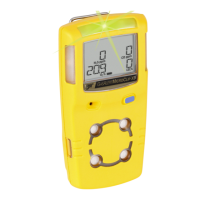
Portable Multiple Gas Detector
M05-4002-003 EN-Rev. A

Questions and Answers

  • G
    Gina PhamAug 19, 2025
    What does 'Need Force Calibration' mean on Honeywell BW Flex Gas Detectors?
    • C
      chad38Aug 20, 2025
      If your Honeywell Gas Detector displays a 'Need Force Calibration' message, it means that calibration is overdue and must be performed before use. Hold the button for 3 seconds, connect to DC/SSDC, or insert it into IntelliDoX to start the calibration. Otherwise, the detector will automatically power off after 60 seconds.
  • P
    Philip JonesAug 21, 2025
    What does error 4006 mean on Honeywell BW Flex?
    • S
      Shannon OlsonAug 21, 2025
      If your Honeywell Gas Detector shows Error 4006, it indicates that sensors have failed or there is no communication. The suggested solution is to replace the sensor or the PCBA.
  • G
    Gregory JonesAug 25, 2025
    What does error 4004 mean on Honeywell BW Flex?
    • A
      arnoldbrianAug 25, 2025
      If your Honeywell Gas Detector displays Error 4004, it means the sensor is in the wrong slot. To resolve this, correct the sensor position.
  • A
    Audrey WellsAug 26, 2025
    What does error 1008 mean on Honeywell Gas Detectors?
    • S
      swilsonAug 26, 2025
      If your Honeywell Gas Detector displays Error 1008, it means BLE fail. The suggested solution is to replace PCBA.
  • N
    Nathaniel RamirezAug 28, 2025
    What does error 3001 mean on Honeywell BW Flex Gas Detectors?
    • D
      Diana DouglasAug 28, 2025
      If your Honeywell Gas Detector displays Error 3001, it means RTC fail. The suggested solution is to replace PCBA.
  • K
    Kimberly BakerAug 29, 2025
    What does error 1007 mean on Honeywell BW Flex Gas Detectors?
    • N
      Natalie HarrisAug 29, 2025
      If your Honeywell Gas Detector displays Error 1007, it means Data flash fail. The suggested solution is to replace PCBA.
  • M
    Michael PalmerSep 1, 2025
    What does error 1006 mean on Honeywell BW Flex Gas Detectors?
    • A
      Anna ZimmermanSep 1, 2025
      If your Honeywell Gas Detector displays Error 1006, it means Temperature sensor fail. The suggested solution is to replace PCBA.
  • M
    Michael JohnsonSep 2, 2025
    How to fix 'Battery 0%' message on Honeywell BW Flex Gas Detectors?
    • G
      glenn54Sep 2, 2025
      If the Honeywell Gas Detector displays a 'Battery 0%' message, it means the battery is depleted. To resolve this, charge the rechargeable battery pack.
  • C
    Crystal BanksSep 5, 2025
    Why my Honeywell BW Flex doesn’t accurately measure gas?
    • F
      Faith GeorgeSep 5, 2025
      If your Honeywell Gas Detector doesn't accurately measure gas, the following reasons may cause this issue: * The sensors require calibration. In this case, you should carry out calibration. * The detector is colder or hotter than the gas temperature. Allow the detector to reach ambient temperature before use. * The sensor filter is blocked. Replace the sensor filter.
  • R
    Rodney CantrellSep 6, 2025
    Why does my Honeywell Gas Detectors alarm for no reason?
    • L
      Latoya AllenSep 6, 2025
      If the Honeywell Gas Detector alarms without reason, consider the following: * The sensor may have been exposed to the target gas. If so, the detector is operating normally; use caution in suspected areas and check the peak gas exposure reading. * Alarm setpoints might be set incorrectly. Define the alarm setpoint in Detector Configurator. * Sensors may require calibration. Carry out calibration. * There may be missing or faulty sensors. Replace the sensors. * The battery temperature may be out of acceptable range. Move to a lower temperature environment to charge the battery.

Summary

Safety Precautions

Safety Warnings and Cautions

Essential safety guidelines and hazard warnings for detector usage.

Product Introduction and Setup

Product Description and Standards

Overview of the detector's function and compliance with industry standards.

Device Overview and Display Elements

Identifies physical components and explains display icons and indicators.

Initial Setup and Configuration

Steps for initial setup, including language, time, and date configuration.

Detector Operations and Testing

Basic Operation and Controls

Procedures for turning the detector on/off, self-test, and button functions.

Bluetooth Connectivity and Pairing

Steps to connect the detector to a mobile device via Bluetooth.

Calibration Procedures

Step-by-step guide for calibrating the detector's sensors.

Bump Testing Procedures

Process for performing a bump test to verify sensor response.

Zero Calibration

Steps to perform a zero calibration in fresh air for optimal performance.

Maintenance and Troubleshooting

Detector Cleaning, Charging, and Firmware Updates

Instructions for cleaning, charging, and updating firmware.

Replacing Detector Components

Guidance on replacing the belt clip, sensor filter, and sensors.

Troubleshooting Common Issues

Solutions for common problems and error messages encountered with the detector.

Additional Information and Specifications

Sensor Specifications and Gas Response

Detailed sensor specs and response to various gases.

General Specifications and User Preferences

Detector's physical characteristics and configurable settings.

Security and Contact Information

Guidelines for system security and how to contact Honeywell.

Honeywell BW Flex Series Specifications

General IconGeneral
Humidity Range10% to 95% RH (non-condensing)
AlarmAudible and visual alarms
IP RatingIP66
Detection GasesCombustible gases, O2, H2S, CO, SO2, NH3, Cl2, HCN, HF, NO2, PH3, O3
Sensor TypeElectrochemical, Catalytic Bead, Infrared
DisplayLCD
CommunicationBluetooth
Operating Temperature-20°C to 50°C (-4°F to 122°F)
CertificationsUL, ATEX, IECEx, CSA

Related product manuals