MAN0964-14-EN_XL4_XL4P_UM
N o v e m b e r 1 0 , 2 0 2 1 P a g e 28 | 194
5.3 System Menu – Details
The following sections describe each of the Sub-Menus in detail.
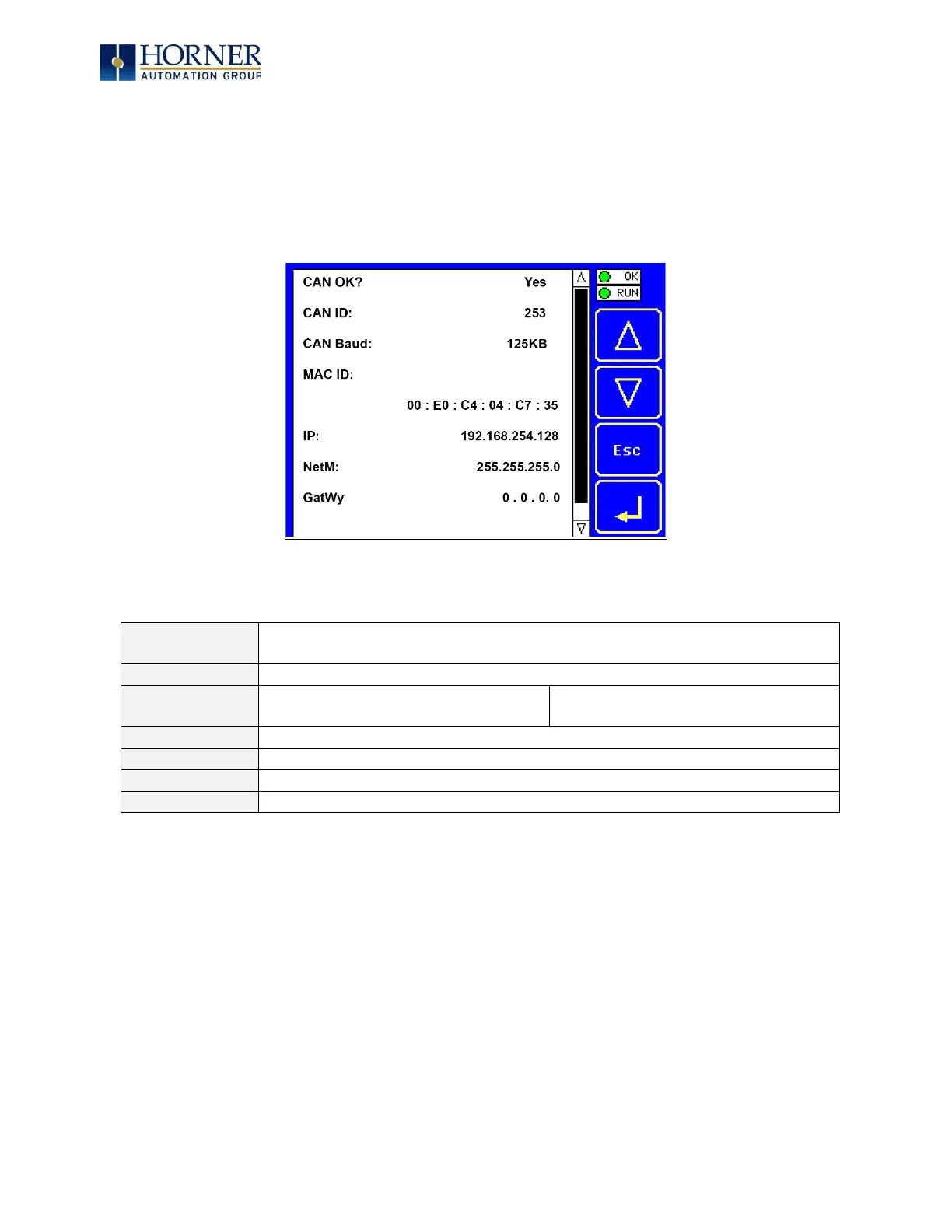
Set Networks
This sub menu allows setting for the CAN and Ethernet network to be viewed or changed.
Yes= CAN1 connected to a CAN network and functioning properly
No= Not ready to communicate on CAN network
1 to 253 = This node’s CsCAN Network ID; must be unique on network
125kB = 125kBd CAN network
250kB = 250kBd CAN network
500kB = 500kBd CAN network
1MB = 1MBd CAN network
Displays the Ethernet MAC ID of the unit
Displays the Ethernet IP address of the unit
Displays the Ethernet net mask of the unit
Displays the Ethernet gateway of the unit
NOTE: The IP address, Net Mask, and Gateway can be changed from the System Menu. This is
designed for commissioning or temporary field changes. The actual parameters are defined in
Cscape under the Ethernet configuration.


 To Next Page