EasyManua.ls Logo

HORNER XL4 - System Menu: Screen Settings Configuration

HORNER XL4
194 pages
Print Icon
To Next Page IconTo Next Page
To Previous Page IconTo Previous Page
Loading...
MAN0964-14-EN_XL4_XL4P_UM
N o v e m b e r 1 0 , 2 0 2 1 P a g e 39 | 194
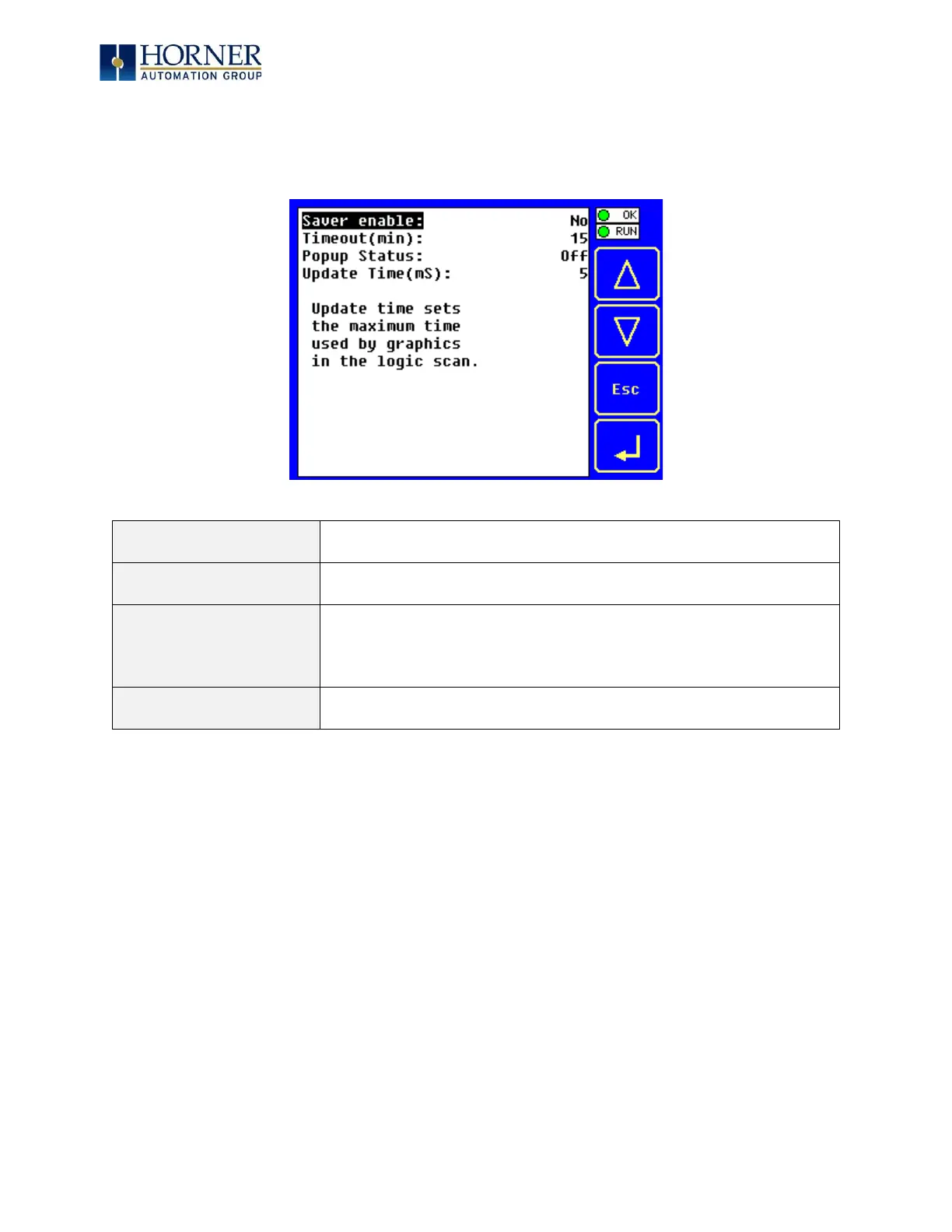
5.13 Set Screen
The Set Screen Sub-Menu displays four System Settings, all of which are editable.
Saver enable
Yes = Enable screen saver
No
(default)
= Disable screen saver
Timeout (min)
5 - 1200 = Amount of time in minutes to expire with NO touch
activity before activating screen saver (black screen)
Popup Status
Off
(default)
= Disable popup status
Warning = Display popup status only if controller status changes
to NOT Ok or NOT Run mode.
On = Display popup status on any controller status change.
Update Time (mS)
2 - 50 = Maximum amount of time to allow for graphics update
per scan

Table of Contents