MAN0964-14-EN_XL4_XL4P_UM
N o v e m b e r 1 0 , 2 0 2 1 P a g e 78 | 194
CHAPTER 8: GENERAL I/O
NOTE: The datasheet is the first document you need to refer to for model-specific information
related to XL4/XL4 Prime OCS models such as pin-outs, jumper settings, and other key
installation information. Visit our website to obtain datasheets, user documentation, and
updates.
8.1 Overview
The XL4/XL4 Prime OCS is a compact unit that contains high density, very versatile I/O. Using
the I/O properly requires wiring to the proper terminals, configuring jumpers inside the
XL4/XL4 Prime OCS unit on some models and configuring Cscape properly. This section will
offer some tips and suggestions to configure the I/O properly. For the register mapping of the
I/O, refer to the Index at the end of this manual for the pages referencing register mapping.
8.2 Removing the XL4/XL4 Prime OCS I/O Cover
Some I/O configurations require jumper settings to be changed inside the XL4/XL4 Prime OCS
unit. Examples of these settings are setting positive or negative logic on digital inputs or setting
current or voltage on analog inputs.
Each XL4/XL4 Prime OCS I/O jumper is set to a factory default. Refer to the data sheet for your
XL4/XL4 Prime OCS model to find the default setting to determine if a jumper change is
necessary for your application.
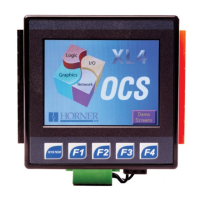
To remove the I/O cover of the XL4/XL4 Prime OCS, remove the four (4) Phillips screws from
the I/O back. It may help to place the XL4/XL4 Prime OCS unit face down on a clean work
surface. Once the four screws are removed the I/O cover can be lifted straight off.
Figure 8.1 – Removing the I/O Cover


 To Next Page