Table 2-6 Button, speakers, and ngerprint reader and their descriptions (continued)
Component Description
▲ Right-click the Power icon , and then select Power
Options.
(3) Fingerprint reader (select products only) Allows a ngerprint logon to Windows, instead of a password
logon.
▲ Swipe down across the ngerprint reader.
IMPORTANT: To prevent ngerprint logon issues, be sure
when you register your ngerprint that all sides of your
nger are registered by the ngerprint reader.
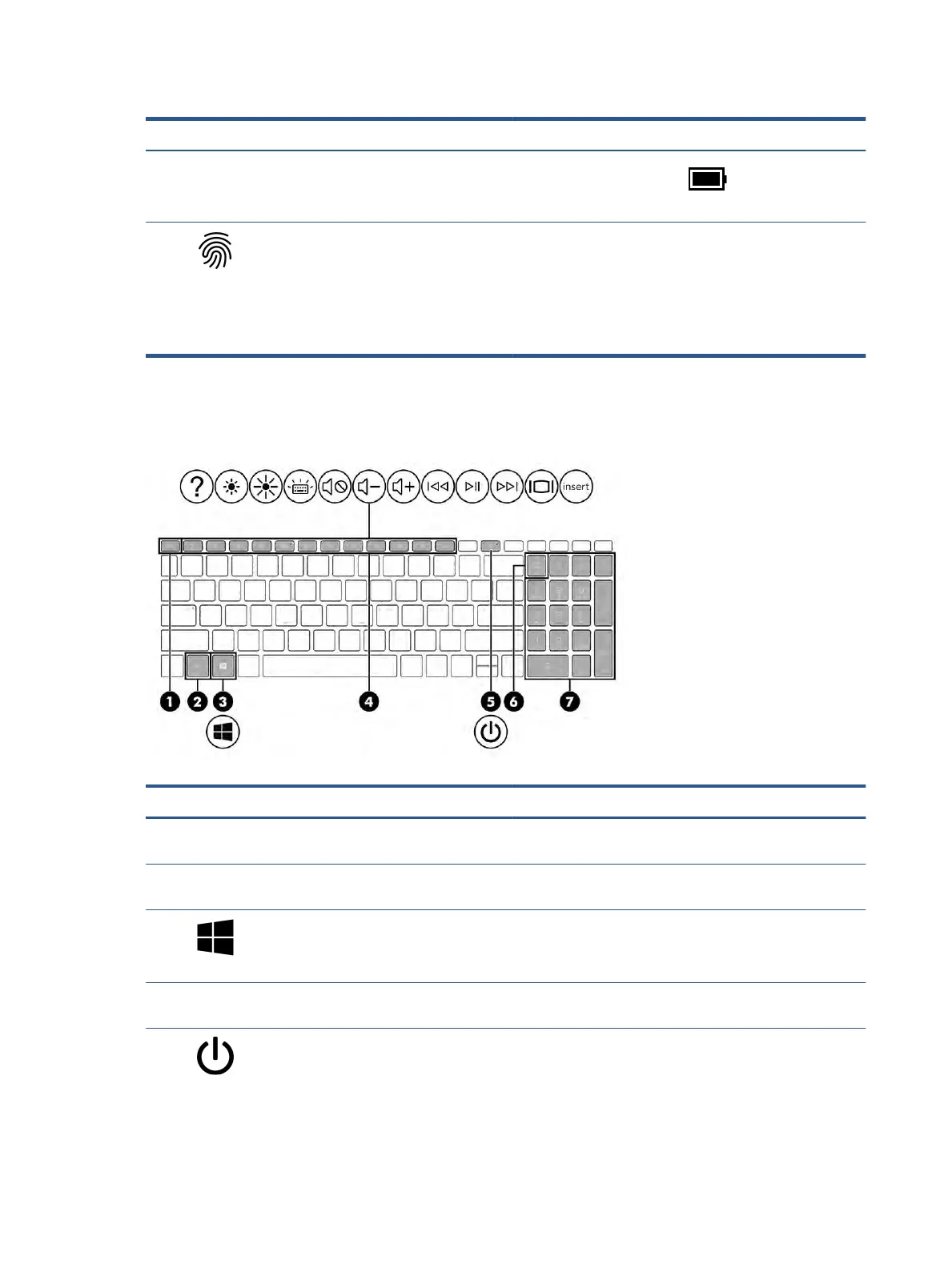
Special keys
Identify the special keys.
Table 2-7 Special keys and their descriptions
Component Description
(1) esc key Displays system information when pressed in combination with
the fn key.
(2) fn key Executes specic functions when pressed in combination with
another key.
(3) Windows key Opens the Start menu.
NOTE: Pressing the Windows key again will close the Start
menu.
(4) Action keys Execute frequently used system functions as dened by the icon
symbols on f1 through f12 function keys.
(5) Power button ● When the computer is o, press the button briey to turn
on the computer.
● When the computer is on, press the button briey to
initiate Sleep.
12 Chapter 2 Getting to know your computer


 To Next Page
 Loading...