EasyManua.ls Logo

HP 3465B - Page 53

HP 3465B
58 pages
Print Icon
To Next Page IconTo Next Page
To Previous Page IconTo Previous Page
Loading...
Section
VII
Model
3465B
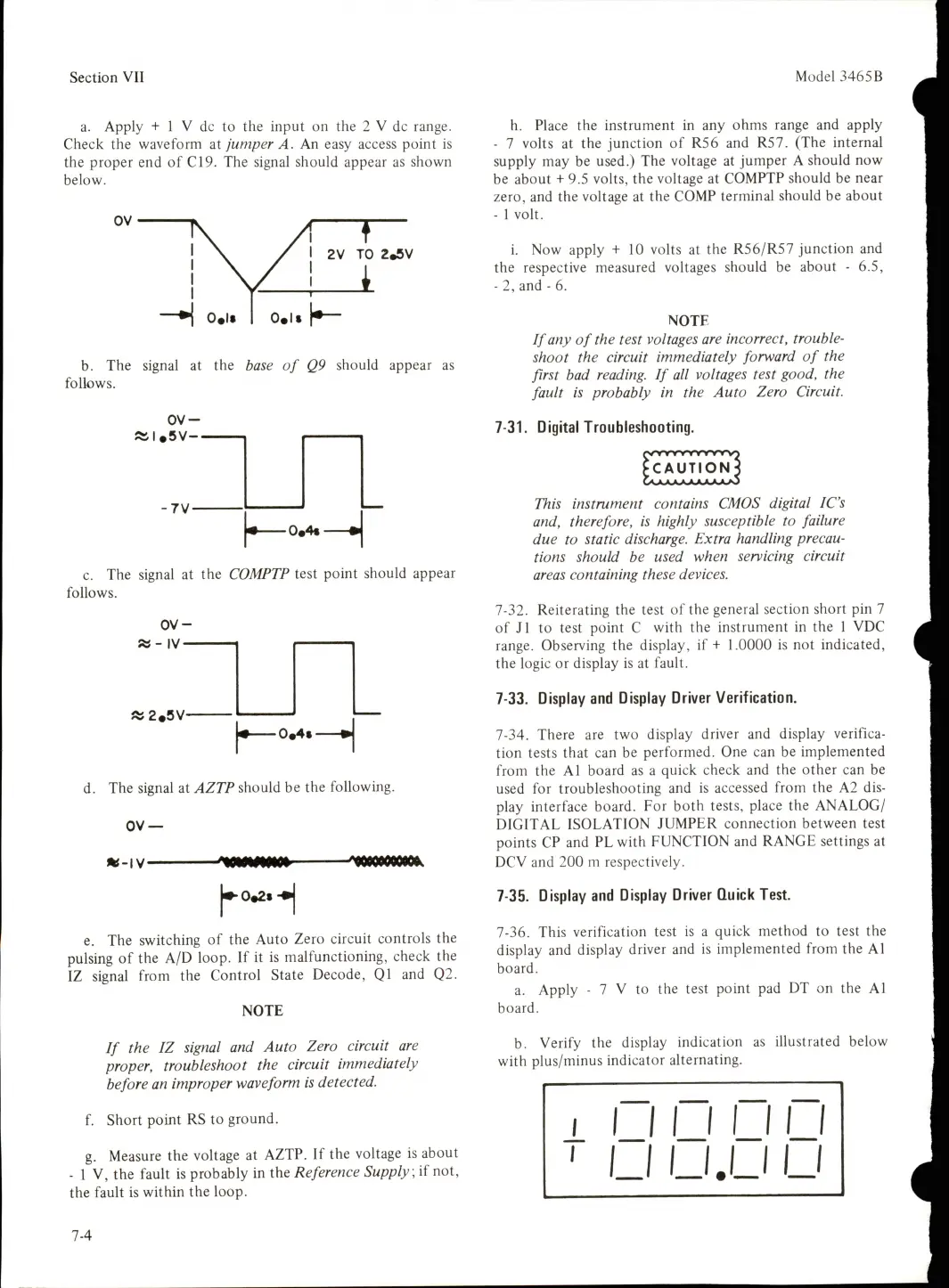
a.
Apply
+
1
V
dc
to
the
input
on
the
2
V
dc
range.
Check
the
waveform
at
jumper
A.
An
easy
access
point
is
the
proper
end
of
€19.
The
signal
should
appear
as
shown
below.
I
2V
TO
2,5V
b.
The
signal
at
the
base
of
Q9
should
appear
as
follows.
OV-
0,4«
»
■7V-
c.
The
signal
at
the
COMPTP
test
point
should
appear
follows.
OV-
»
-
IV-
«
0,4i
»
«5
2,5V-
d.
The
signal
at
AZTP
should
be
the
following.
OV
*-IV-
1^0,21-^
e.
The
switching
of
the
Auto
Zero
circuit
controls
the
pulsing
of
the
A/D
loop.
If
it
is
malfunctioning,
check
the
IZ
signal
from
the
Control
State
Decode,
Q1
and
Q2.
NOTE
If
the
IZ
signal
and
Auto
Zero
circuit
are
proper,
troubleshoot
the
circuit
immediately
before
an
improper
waveform
is
detected.
f.
Short
point
RS
to
ground.
g.
Measure
the
voltage
at
AZTP.
If
the
voltage
is
about
-
1
V,
the
fault
is
probably
in
the
Reference
Supply,
if
not,
the
fault
is
within
the
loop.
h.
Place
the
instrument
in
any
ohms
range
and
apply
-
7
volts
at
the
junction
of
R56
and
R57.
(The
internal
supply
may
be
used.)
The
voltage
at
jumper
A
should
now
be
about
+
9.5
volts,
the
voltage
at
COMPTP
should
be
near
zero,
and
the
voltage
at
the
COMP
terminal
should
be
about
-
1
volt.
1.
Now
apply
+10
volts
at
the
R56/R57
junction
and
the
respective
measured
voltages
should
be
about
-
6.5,
-
2,
and
-
6.
NOTE
If
any
of
the
test
voltages
are
incorrect,
trouble-
shoot
the
circuit
immediately
forward
of
the
first
bad
reading.
If
all
voltages
test
good,
the
fault
is
probably
in
the
Auto
Zero
Circuit.
7-31.
Digital
Troubleshooting.
r/VTWWwwj
KAUTION4
This
instrument
contains
CMOS
digital
IC's
and,
therefore,
is
highly
susceptible
to
failure
due
to
static
discharge.
Extra
handling
precau
tions
should
be
used
when
servicing
circuit
areas
containing
these
devices.
7-32.
Reiterating
the
test
of
the
general
section
short
pin
7
of
J1
to
test
point
C
with
the
instrument
in
the
1
VDC
range.
Observing
the
display,
if
+
1.0000
is
not
indicated,
the
logic
or
display
is
at
fault.
7-33.
Display
and
Display
Driver
Verification.
7-34.
There
are
two
display
driver
and
display
verifica
tion
tests
that
can
be
performed.
One
can
be
implemented
from
the
A1
board
as
a
quick
check
and
the
other
can
be
used
for
troubleshooting
and
is
accessed
from
the
A2
dis
play
interface
board.
For
both
tests,
place
the
ANALOG/
DIGITAL
ISOLATION
JUMPER
connection
between
test
points
CP
and
PL
with
FUNCTION
and
RANGE
settings
at
DCV
and
200
m
respectively.
7-35.
Display
and
Display
Driver
Quick
Test.
7-36.
This
verification
test
is
a
quick
method
to
test
the
display
and
display
driver
and
is
implemented
from
the
A1
board.
a.
Apply
-
7
V
to
the
test
point
pad
DT
on
the
A1
board.
b.
Verify
the
display
indication
as
illustrated
below
with
plus/minus
indicator
alternating.
i
LI
U
U
U
U.LI
U
7-4

Table of Contents

Related product manuals