Configuring the IP Address Manually
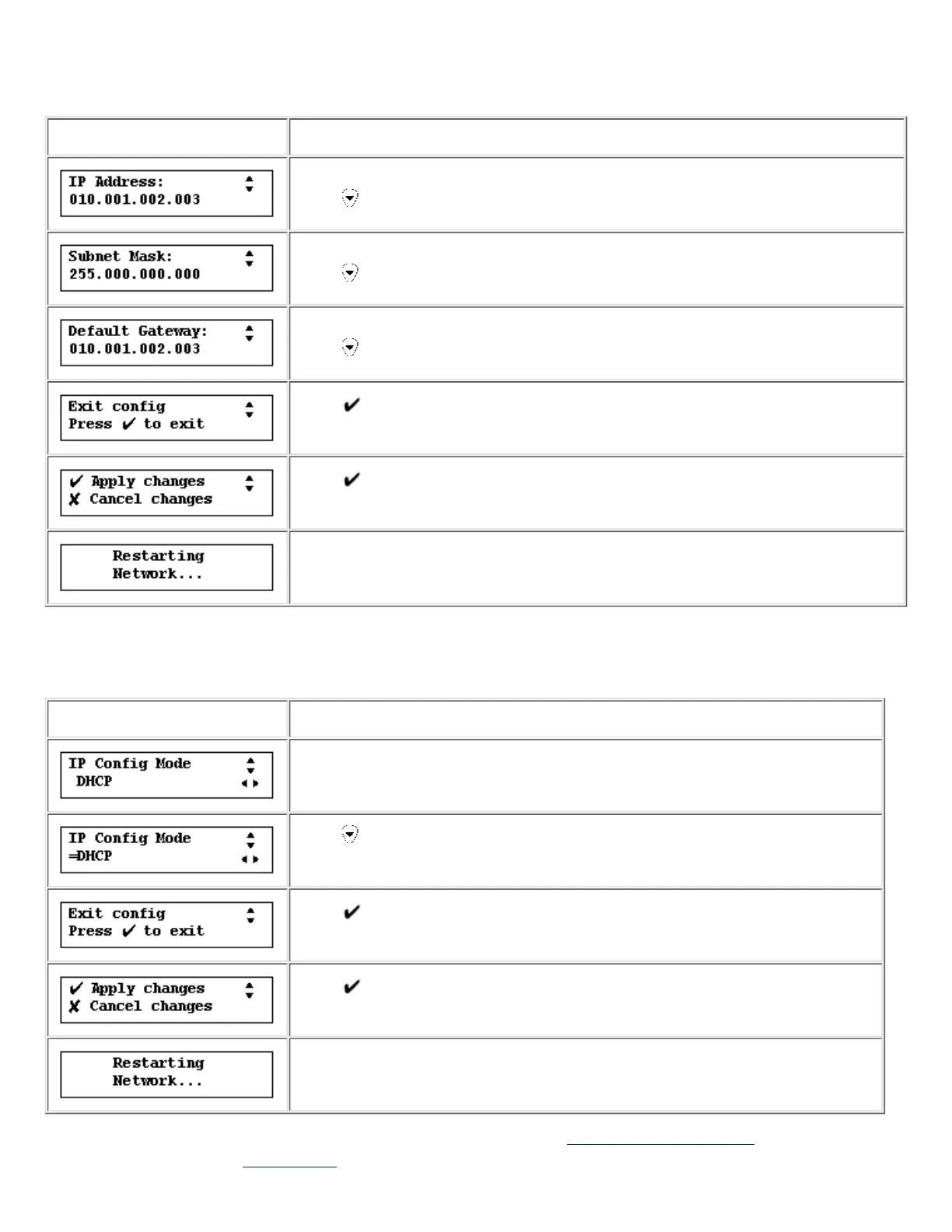
In Manual mode, the following is displayed:
Display Action
Use the number buttons on the front panel of the appliance to enter the IP address.
Press
.
Use the number buttons on the front panel of the appliance to enter the subnet mask.
Press
.
Use the numbers on the front panel of the appliance to enter the default gateway.
Press
.
Press .
Press .
After a moment, the appliance will resume displaying normal operating messages if
the IP address entered is valid.
Configuring the IP Address Using DHCP
In DHCP mode, the following is displayed:
Display Action
The "=" will appear in the display.
Press twice to display this message.
Press .
Press .
After a moment, the appliance will resume displaying normal operating messages.
Use the web interface to further configure the appliance. Refer back to the Getting Started procedures, or refer directly to
information about using the web interface to further configure the device.











 To Next Page