EasyManua.ls Logo

HP 4934A - Making Measurements; Preliminary Setup

HP 4934A
136 pages
Print Icon
To Next Page IconTo Next Page
To Previous Page IconTo Previous Page
Loading...
2
Making
Measurements
Preliminary
Setup
Connecting
the
HP
4934A
to
the
Test
Circuit
CAUTION
Ensure
no
more
than
200
V
dc
or
10
V
rms
at
60
Hz
is
connected
between
tip
and
ring
of
the
TRMT
or
RCV
jacks.
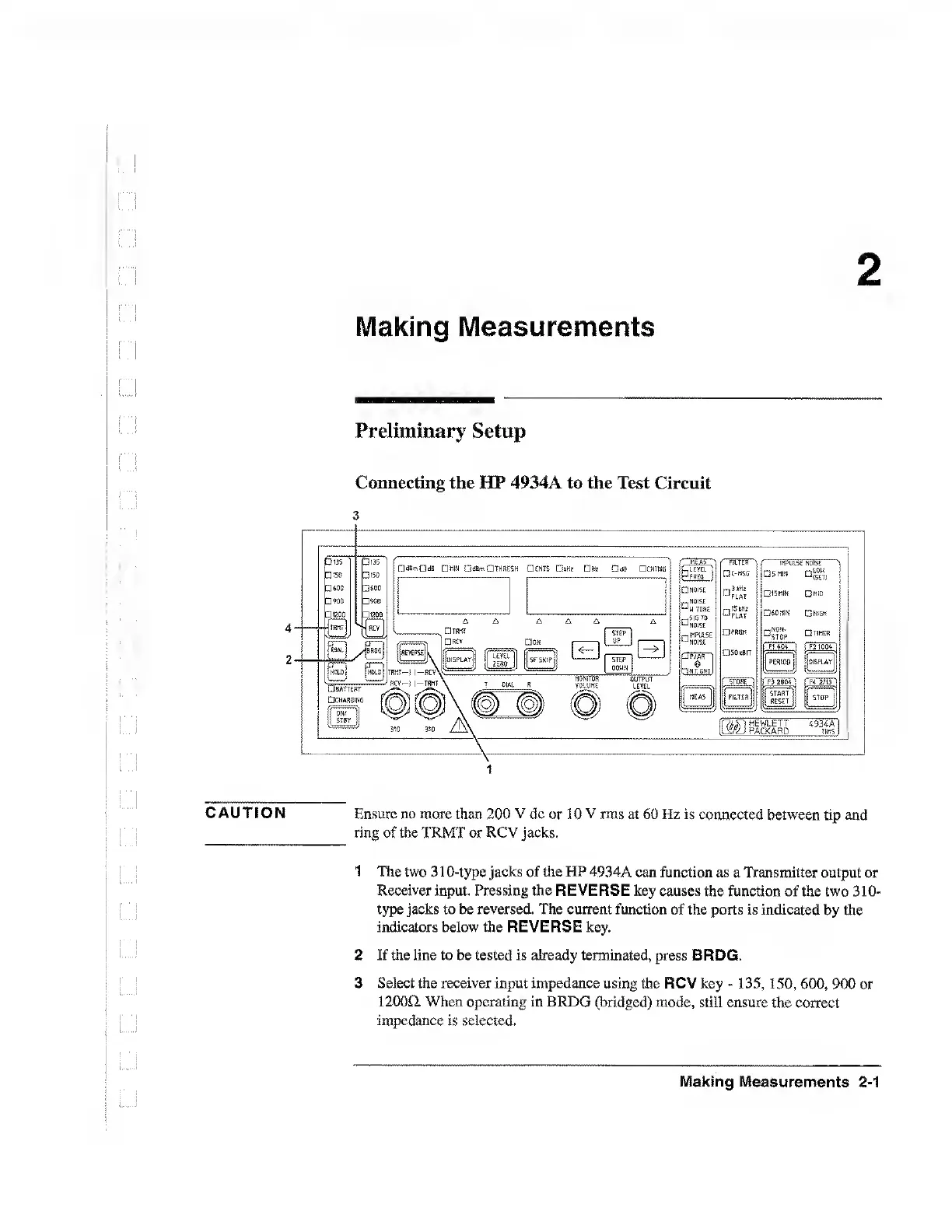
1
The
two
310-type
jacks
of
the
HP
4934A
can
function
as
a
Transmitter
output
or
Receiver
input.
Pressing
the
REVERSE
key
causes
the
function
of
the
two
310-
type
jacks
to
be
reversed.
The
current
function
of
the
ports
is
indicated
by
the
indicators
below
the
REVERSE
key.
2
If
the
line
to
be
tested
is
already
terminated,
press
BRDG.
3
Select
the
receiver
input
impedance
using
the
RCV
key
-
135,150,600,
900
or
12000.
When
operating
in
BRDG
(bridged)
mode,
still
ensure
the
correct
impedance
is
selected.
Making
Measurements
2-1

Table of Contents

Related product manuals