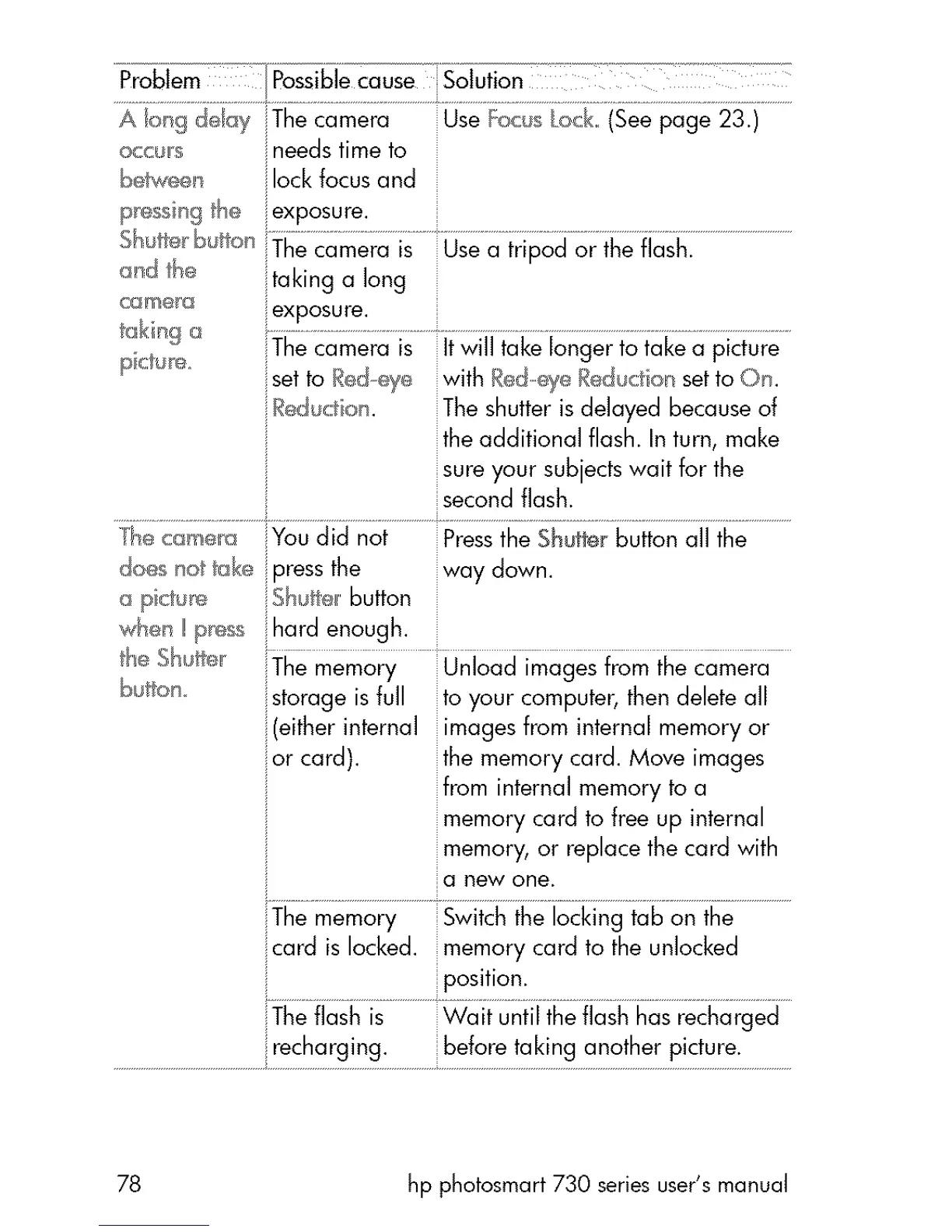
Problem PossiblecauseSolution
occ_us ineedstimeto
beh,_,eeuilockfocusand
p_ssir_ghe iexposure.
arid he
cGme_
taking a long
pete e_ The camera is itwill take longer to take a picture
iset to I_edeye with RedeyeRed_ciot setto On.
Reducta . The shutter isdelayed becauseof
the additional flash. In turn, make
sure your subjectswait for the
secondflash.
/he c_smera You did not Pressthe Shutterbutton all the
do_s not take÷pressthe way down.
o pictu_ Sh_te, button
who,/I! pg_;s_;::hard enough.
the Sh;fie, The memory Unload imagesfrom the camera
b_ton storage isfull to your computer,then deleteall
if(eitherinternal imagesfrom internal memory or
jor card), the memory card. Move images
from internal memory to a
memory card to free up internal
memory, or replace the card with
a new one.
The memory Switch the locking tab on the
card islocked, memory card to the unlocked
position.
The flash is Wait until the flash hasrecharged
.............................................................rechc_[g!ng:.......................be!€_[e!ak!ng €_nc_!l_e[P!cture:....................
78 hp photosmart 730 series user's manual



 To Next Page