then touch again to enable the function (on).
5. Touch to return to record screen.
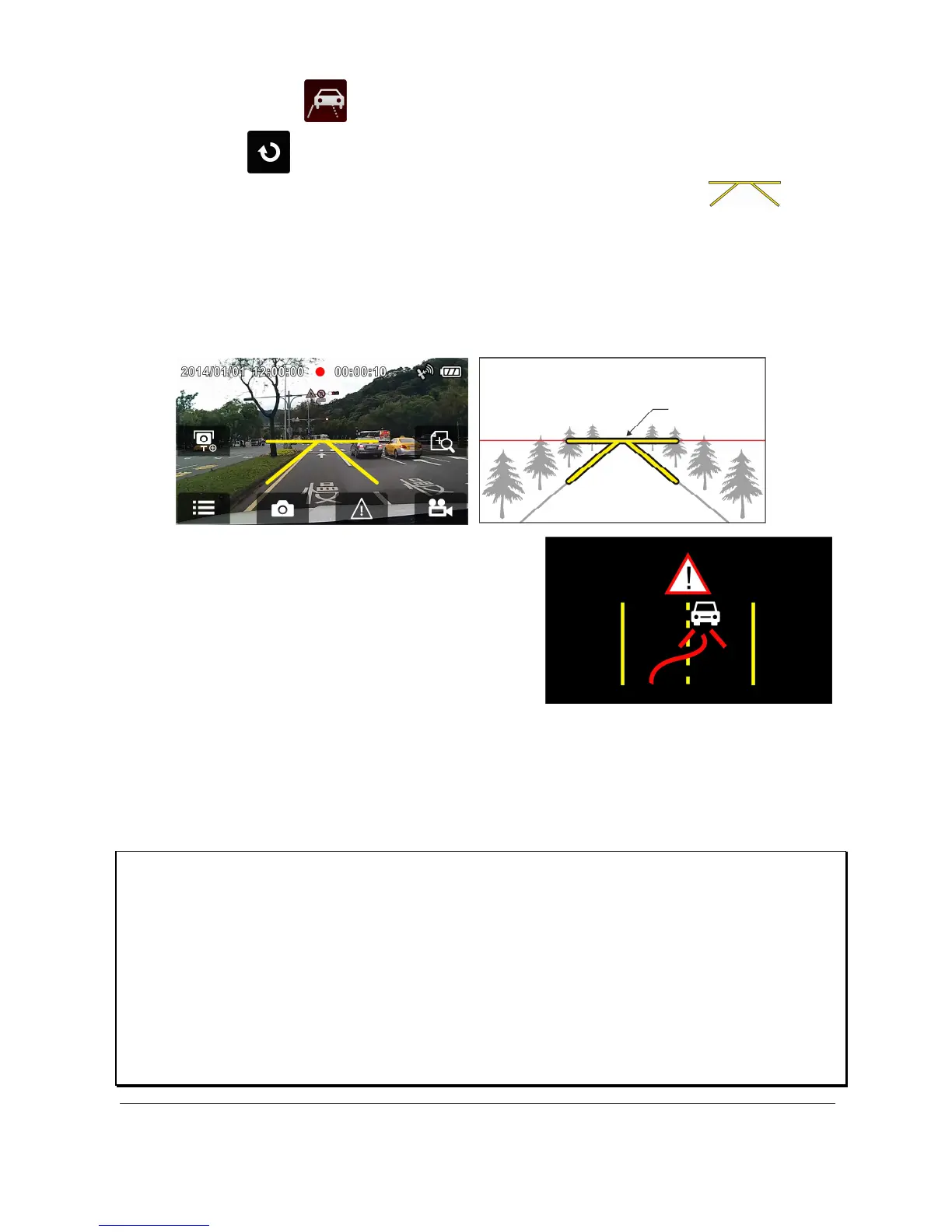
6. After enabling LDWS, the screen will display align icon ,
please adjust the camcorder so that the horizontal line and the eye
level are overlapped and the slash lines are centered in the driving
lane. Make sure that align icon will not be obscured (e.g. hood)
during installation, it may cause misjudgment if the endpoint is
obscured.
7. When satellite positioning is in
ready state, camcorder will give a
voice alert and an alarm screen if
vehicle speed reaches or exceeds
50 km/h (31 mile/h) and the
vehicle deviates from the original
lane.
Note:
1. LDWS is only applicable when satellite positioning is in ready state. Make sure
satellite positioning of your camcorder is ready if you want to activate this function.
Satellite positioning function is dependent on the model purchased.
2. When enable the LDWS, please follow this self-aligned approach in order to increase
the accuracy.
3. The all Driving Safety functions such as LDWS, Speed Cam Alert, Speed Limit Alert,
Driver Fatigue Alert and Collision Detection will be disabled, if the product doesn’t
connect with the external power supply.



 To Next Page